
1
Set the scene
Start with context
Fill the frame
2–3 ft for close-ups; keep ladders, cords and workers fully in view.
Tree service hazard detection means spotting the hazards on a tree job before the first cut: aerial lifts and climbers working near overhead power lines, drop zones under the cut, chippers and chainsaws, traffic around trucks parked on the street, fuel, noise, and the public walking past. With OSHA Scan, a tree care owner or crew leader photographs the work zone, and AI hazard detection acts as a second set of eyes, listing the visible hazards, the OSHA rule each may relate to, and a suggested fix. It cannot measure the distance to a power line, judge a tree's structure, or replace the crew's job briefing; the safety inspection checklist below covers what a photo cannot show.
Photo scan: no account needed (you may be asked for the free phone Access Pass) · Template downloads: free account required
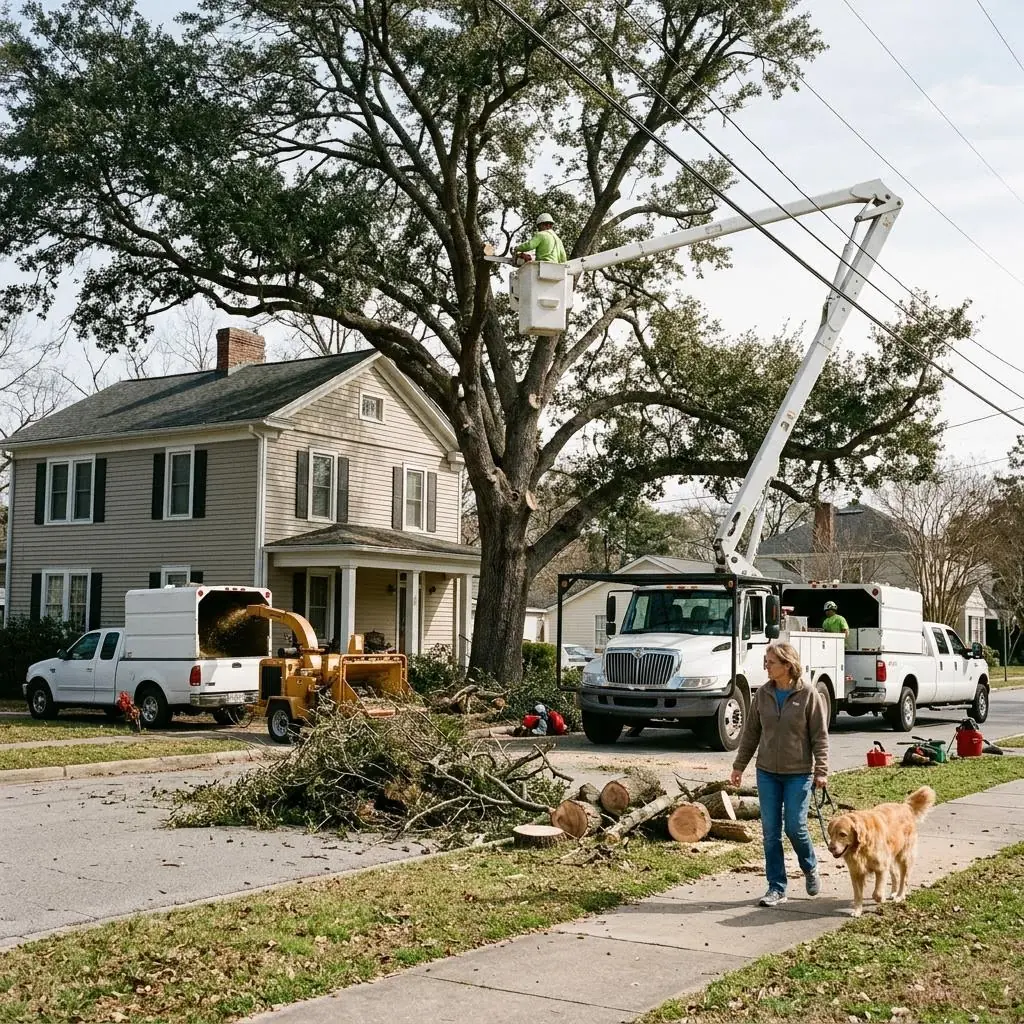
Tree crews set up in front yards, along streets, and in backyards with fences, houses, and power lines all around. Each job combines several serious hazards at once: a climber or bucket operator working at height, limbs and logs coming down, a chipper feeding brush at the curb, chainsaws, and trucks parked in or beside traffic. The crew leader has to decide on the spot where the drop zone is, how traffic and pedestrians are kept out, and whether the lines are far enough away.
OSHA Scan's hazard detection reads what is visible in a photo: a boom or climber close to overhead lines, people walking near the drop zone, brush piles spreading into the street, trucks with no cones or signs, fuel cans left on the grass, or crew members without visible PPE. For each finding it notes the OSHA rule it may relate to and a specific fix to confirm on site.
Tree care combines hazards that each have their own rules. Work near overhead lines is covered by OSHA's electrical safe work practices for workers who are not line-clearance qualified (29 CFR 1910.333(c)(3)) and by the electric power standard for qualified line-clearance tree trimmers (1910.269). Bucket trucks fall under the vehicle-mounted aerial devices standard (1910.67), which calls for daily control tests and a harness or belt tied off to the boom or bucket. Chainsaws, chippers, and noise bring in the PPE standards starting at 1910.132 and the noise standard (1910.95). Where no specific rule fits — such as falling limbs reaching the public — OSHA can use the General Duty Clause, and the industry's ANSI Z133 standard gives detailed work practices.
Most of these hazards are visible from the street, which is where a photo helps: a boom close to the lines, a pedestrian near fresh logs, brush piled into the lane, a truck with no cones. What a photo cannot judge is the distance to a line, the voltage, the tree's structure, or the wind. Those still need the crew leader, a qualified line-clearance worker or arborist, and the utility.
Run through these steps before crews start — each one covers a visible gap the AI can help you catch.
Find every line near the tree, confirm its voltage with the utility if it is unknown, and set approach distances for the crew's qualification. Work near lines may relate to 29 CFR 1910.333(c)(3) and 1910.269.
Put out cones, tape, and signs around the drop zone and the trucks, and assign a ground worker to hold pedestrians and cars. Public safety may relate to the OSHA General Duty Clause; street work may also need local permits.
Test the aerial lift controls, set outriggers on pads, point the chipper discharge away from people and the street, and confirm chain brakes work. Aerial lifts may relate to 29 CFR 1910.67.
Check hard hats, eye and hearing protection, chaps for saw users, and high-visibility clothing near traffic, and make sure the crew knows the aerial rescue plan. PPE may relate to 29 CFR 1910.132.
Photograph the tree, the trucks, and the drop zone and upload it to OSHA Scan for a second pass with AI hazard detection. The AI flags visible hazards, notes the rule each may relate to, and suggests a fix — treat the findings as a draft to verify on site. Free, no account needed (you may be asked for the free phone Access Pass).
The visible work-zone problems a tree crew can fix before the first cut, detected from one image.
Booms, buckets, climbers, and pole tools near overhead lines, and aerial lifts set up on slopes or soft ground.
People, pets, or cars inside or beside the area where limbs and logs come down, with no barrier or ground worker controlling it.
Brush piled at the chipper infeed, discharge pointed at people or cars, and saw users without chaps or eye and hearing protection.
Trucks parked in travel lanes with no cones or signs, brush piles in the street, and fuel cans left beside walkways.
Scan a photo like the one above and this is the report you get — score, findings, OSHA references, and fixes. It is an illustrative example, clearly marked — not live scan data.
Compliance score
67
Lower means more potential hazards found
Score uses visible confirmed findings only. Not a safety certification.
2 confirmed · 0 need review · 0 positive
1Aerial lift boom raised close to overhead power lines
Possibly related to approach distances near overhead lines (29 CFR 1910.333(c)(3)) and vehicle-mounted aerial devices (29 CFR 1910.67)
Observed condition: Contact with an overhead line — or an arc from getting too close — can electrocute the operator and anyone touching the truck. A single photo cannot show the real gap between the boom and the lines; booms often look closer or farther than they are.
Corrective action: Have a qualified person confirm the line voltage and the required clearance before the boom goes up. Unless the crew is qualified for line-clearance work, keep the boom, the bucket, and every tool at least 10 feet from lines up to 50 kV (more for higher voltages), or ask the utility to de-energize or cover the lines. Use a spotter whenever the boom moves near the lines.
Medium confidenceNot fully clear from the photo — verify on site.
2Person walking a dog past fresh log rounds next to the active work zone
Possibly related to the OSHA General Duty Clause (Section 5(a)(1)); the ANSI Z133 tree care standard also covers work-zone control
Observed condition: Falling limbs and rolling logs can travel well beyond the spot where they are cut. A pedestrian on the sidewalk beside fresh logs is close to the drop zone, and the photo cannot show how far the cut is from her path.
Corrective action: Mark the drop zone with cones and tape before cutting, close or redirect the sidewalk around it, and post a ground worker to hold pedestrians until it is clear. Pause overhead cutting whenever someone enters the zone.
Medium confidenceNot fully clear from the photo — verify on site.
Upload a photo like the one above and get a compliance score and hazard count. No account needed to scan, though you may be asked for the free phone Access Pass — create a free account to unlock the full report.
Use the real site or facility name. If you save the scan after signup, it becomes the report name.
Three angles, one deeper scan
Only the wide shot is required — every extra angle gives the AI more places to look.
Required: Set the scene — one wide shot lets the AI sweep the whole area at once
Stand at the entry point and capture corner to corner: floors, ladders, scaffolds, and everyone at work
Drop a job-site photo or walkthrough video
Click to upload, drag & drop, or snap a photo on site. Photos scan free with no signup and no card — you may be asked for the free phone Access Pass. Video walkthroughs (up to 3 min) run on a free account.
Small habits, sharper scans
Set the scene
Start with context
Fill the frame
2–3 ft for close-ups; keep ladders, cords and workers fully in view.
Capture clearly
Make the frame usable
Light it right
Keep the sun or lights behind you — glare and shadows hide hazards.
Tap to focus
Tap the hazard on screen and hold still one second — blur can't be flagged.
Choose the useful view
Give the AI room to understand
Go landscape
Turn your phone sideways — a wider frame catches more of the scene.
Only upload photos you have permission to use, and avoid images showing personal, customer, or confidential information. Demo photos and results are held privately for up to 48 hours so you can save them to a free account; unclaimed photos are deleted automatically. Results are an AI-assisted preliminary review, not an official OSHA determination.
New: Video walkthrough scans
Record up to 3 minutes of your site — the AI extracts frames and categorizes findings with exact timestamps. Free account required.
Get the best results
Wide shot first
Stand at the entrance and photograph the entire work area so AI sees the full context
Hazard areas
Photograph elevated surfaces, equipment, electrical panels, and anywhere workers are active
Close-ups last
Move in close on anything damaged, missing, or that looks risky — the AI catches more detail
Walk the work zone with these points during the job briefing, before the first cut. The first four are free — create a free account to unlock the full checklist and scan your own job photos.
Free checklist — 12 points
Enter your email to unlock the full checklist
Read the checklist here after entering your email. A free account is required to download the PDF.
One email with the checklist, one follow-up. Unsubscribe anytime.
Free printable templatePDF · US Letter
Walk the work zone with this form during the job briefing, before the first cut, and again if the weather or the work plan changes.
On the form
A free account is required to download it.
Non-English documents are automated translations, not official OSHA translations. Citations, limits and names are kept as written.
OSHA Scan template — not an official government form and not legal advice.
OSHA Scan reads a single photo. That makes it fast and easy for anyone on site — but it also means it has real limits. Here's an honest look at both.
Snap a photo of the job site, and the AI categorizes findings against OSHA standards.
Each finding includes consistent corrective actions and structured JHA outputs. Check items off as your crew resolves them.
Every inspection gets a deterministic 0-100 compliance score derived from hazard severity, so you can track sites at a glance.
A prioritization aid based on recorded findings—not a certification or a complete measure of site safety.
Generate detailed inspection reports and export data to Excel for record-keeping and stakeholders.
A qualified person must review AI-flagged items before making safety decisions. Do not replace required comprehensive safety walkthroughs with AI reports. Features, limits, and downloads depend on your account’s plan and permissions.
Illustrative AI-assisted workflows. Review the findings; they are not a compliance certification.
A scan is a fast first look, not the final word. Before treating this kind of area as safe, a competent person should still confirm:
Stand back far enough to get the tree, the trucks, the lines, and the drop zone in one photo, then upload it. The AI looks for visible hazards such as a boom near overhead lines, people walking beside the drop zone, and trucks with no cones, and lists each with the OSHA rule it may relate to and a suggested fix. Photos distort distance, so it cannot tell how far a boom is from a line, confirm voltage, or judge a tree's structure — a qualified person still checks those.
Tree care is covered by several OSHA rules rather than one: vehicle-mounted aerial lifts (29 CFR 1910.67), approach distances near overhead lines for workers who are not line-clearance qualified (1910.333(c)(3)), line-clearance tree trimming by qualified workers (1910.269), noise (1910.95), and personal protective equipment (1910.132 to 1910.138). The industry also follows the ANSI Z133 safety standard for tree care, and OSHA can use the General Duty Clause for hazards no specific rule covers.
It depends on the voltage and on whether the workers are qualified for line-clearance work. For workers who are not, OSHA's rule for work near overhead lines generally requires keeping people, tools, and equipment at least 10 feet away from lines up to 50 kV, with larger distances for higher voltages (29 CFR 1910.333(c)(3)). Trained, qualified line-clearance tree trimmers work under the electric power standard (29 CFR 1910.269), which sets different distances. A photo cannot judge distance to a line.
It depends on the task, which is why OSHA requires a workplace hazard assessment (29 CFR 1910.132(d)). Common needs include head protection, eye and face protection, hearing protection for saws and chippers, chainsaw chaps or pants for saw users, gloves, and high-visibility clothing near traffic.
Feed brush butt-end first from the side, keep hands, loose clothing, and jewelry away from the infeed, point the discharge chute away from people, cars, and the street, and make sure the emergency stop works. Follow the manufacturer's manual and keep the chipper inside the controlled work zone.
Yes. Any owner or crew leader can run it from a phone during the job briefing. Findings come back in plain language with a suggested fix. Treat them as a draft for someone on site to confirm.
Reviewed by OSHA Scan Editorial
This content is produced by the OSHA Scan Editorial team and reviewed with AI assistance. It is general safety information, not legal or compliance advice. OSHA Scan is an independent tool and is not affiliated with, endorsed by, or certified by OSHA or the U.S. Department of Labor.
More ways to see what an AI OSHA scan can do for your site.
The overview hub — how the scanner works and every job, site, and hazard it covers.
Common tree care hazards and how crews control them.
Mowers, slopes, walkways, and trailers for lawn crews.
Falling objects, moving vehicles, and work-zone traffic.
Overhead lines and other visible electrical hazards.
Noise from chainsaws and chippers.
Hard hats, eye protection, and high-visibility clothing in photos.
Chainsaw condition, guards, and safe use.
The complete hub of every hazard type and industry the scanner covers.
See a complete labelled example of everything a scan returns.
Start with one lifetime use per eligible scan type — no credit card. Build JHA-ready reports and catch changing conditions sooner.
Start your free trial