
1
Set the scene
Start with context
Fill the frame
2–3 ft for close-ups; keep ladders, cords and workers fully in view.
A job safety analysis template is a three-column worksheet — task steps, hazards, controls — usually completed at the pre-task huddle and signed by the crew. Blank JSA forms are free everywhere, OSHA's training materials include the structure, and none of them solve the real problem: the hazard column depends on what the foreman notices at 6:45 a.m. Photograph the task area instead and the AI drafts the visible hazards with the OSHA standard each may relate to and a suggested control — a pre-filled draft the crew verifies and signs. Free to try, no account (you may be asked for the free phone Access Pass), and the competent person keeps the final word.
Photo scan: no account needed (you may be asked for the free phone Access Pass) · Template downloads: free account required
Blank template
Break one task into the steps the crew actually performs, list the hazards of each step and the controls, then review it with the people doing the work.
Download formats
Free account required
Non-English documents are automated translations, not official OSHA translations. Citations, limits and names are kept as written.
Non-English documents are automated translations, not official OSHA translations. Citations, limits and names are kept as written.
OSHA Scan template — record fields, not legal requirements. Not an official government form.
On working crews the JSA template is the most-filled safety document there is: one page, filled at the tailgate, signed, and clipped to the board. Its volume is its weakness. A form completed daily under time pressure trends toward yesterday's answers — the same three hazards, the same 'gloves, glasses, hard hat' controls — while the actual work area changed overnight. The welding station gained a stack of cartons; the form still says what it said in March.
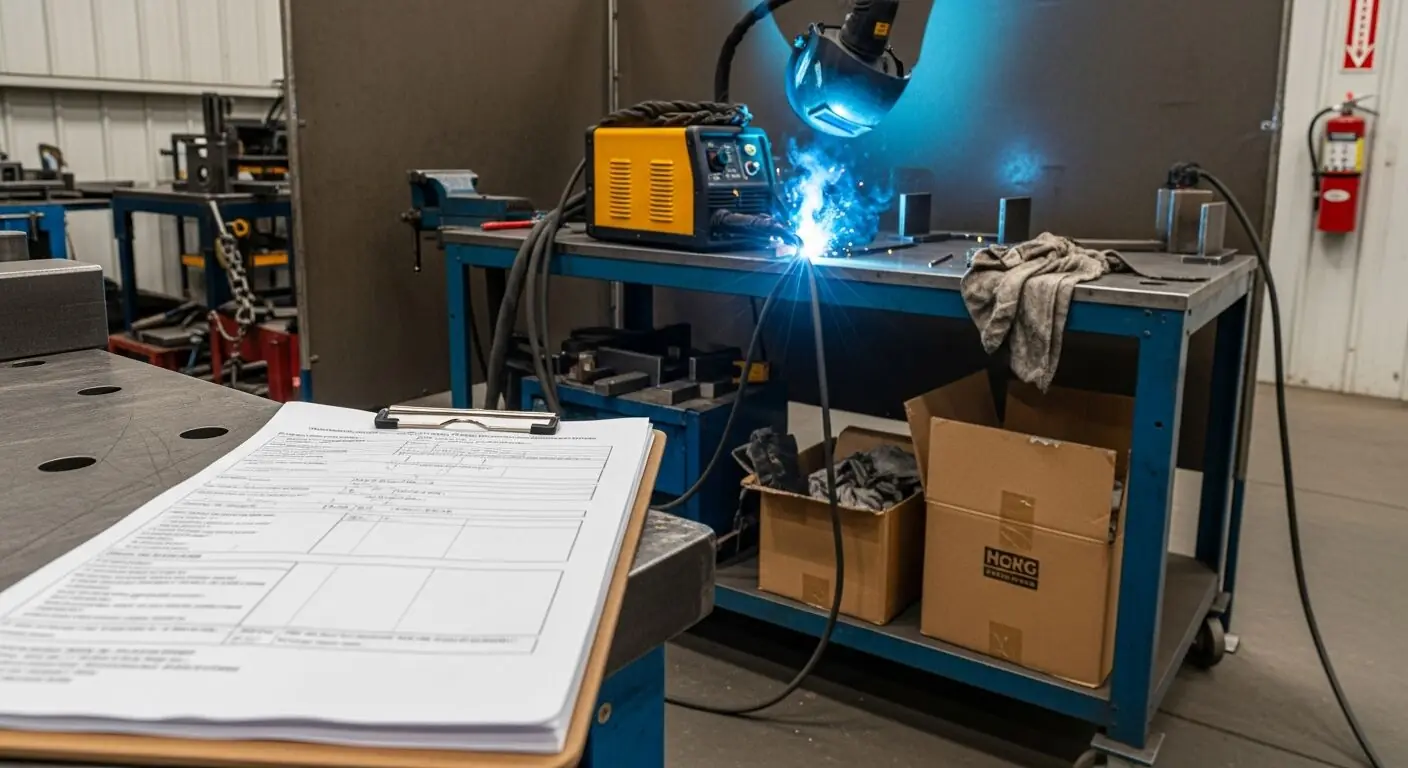
Drafting the form from a photo forces the day's reality into it. Photograph the station during setup and the scan flags what is actually there this morning — the combustibles beside the welding table, the missing screen — each with the OSHA standard it may relate to and a suggested control. The crew starts from findings about their own workspace, which changes the huddle's quality: verifying a specific drafted hazard takes discussion; re-signing a stale one takes a pen.
And because each scan saves as a dated, scored report, the JSA record stops being a stack of near-identical carbons. It becomes a timeline: what the station looked like, what was found, what was controlled, and how the score moved — the version of JSA documentation a GC prequalification or an incident review actually credits.
Every JSA template that survives contact with a US jobsite shares one property: it fits the morning. One page. Steps down the left, hazards in the middle, controls on the right, crew signature block at the bottom, done before the coffee is cold. Templates die when they grow — the four-page version with risk matrices and severity scoring gets filled out beautifully for two weeks and then becomes the thing the crew signs without reading.
OSHA's own worksheet in publication 3071 is deliberately that simple, and it is free — so the value a 'better' template adds is workflow, not columns. The improvement worth making is not more fields; it is starting the hazard column from a photo of the actual work area so the two minutes the crew spends go into verifying real conditions instead of remembering generic ones.
On collected pre-task forms, GC safety staff read for three things. Specificity: does the form name this task in this location, or could it describe any day on any site? Signatures: did the people doing the work sign it — the element that makes the form a briefing record rather than a solo paperwork exercise? And correspondence: does what the form says match what the walk-through sees? A form claiming 'housekeeping maintained' next to a debris-covered floor is worse than no form, because it documents that the review was fiction.
Attaching a dated, scored photo report to the day's JSA strengthens all three. The photo proves which area was reviewed, the findings are specific by construction, and the score gives the spot-checker an instant read on whether conditions matched the paperwork. It converts the form from a promise into a record.
Here is the full loop as US crews run it with a scanner in the pocket: during setup, the foreman photographs the work area — one wide frame, plus one per station for spread-out tasks. The scan returns the drafted hazards with suggested controls and the OSHA standard each may relate to. At the huddle, the crew walks the draft against the actual area, strikes what doesn't apply, adds what a camera can't see — energy, atmosphere, the sequence of moves — and signs.
The template gets filled from the verified draft, the dated report gets filed with it, and the record for that day is closed before work begins. When the setup changes at noon — new material staged, different equipment — a second photo updates the analysis. That is the daily cadence the template pages promise and paper never delivered.
One photo of the station during setup — these are the hazard-column entries it drafts.
Combustibles within the spark and spatter radius, missing screens and curtains, and fire-watch readiness around welding and cutting.
Cartons, rags, and stock stored where the task needs clear space — the overnight accumulation forms never catch.
Screens, extinguishers, guards, and PPE visible at the station, checked against the work about to start.
Clear paths to and from the station, extinguisher access, and exits unblocked by the day's staging.
Scan a photo like the one above and this is the report you get — score, findings, OSHA references, and fixes. It is an illustrative example, clearly marked — not live scan data.
Compliance score
75
Lower means more potential hazards found
Score uses visible confirmed findings only. Not a safety certification.
2 confirmed · 0 need review · 0 positive
1Cardboard boxes and rags staged beside the welding table
Possibly related to fire prevention for welding and cutting (29 CFR 1910.252)
Observed condition: Welding spatter travels well beyond the table edge, and cartons and oily rags inside that radius are fuel waiting for one spark — the classic hot-work hazard a daily JSA exists to catch before the arc strikes.
Corrective action: Move combustibles at least 35 feet from the welding area or shield them with fire-resistant covers, and add a pre-arc combustible sweep to the JSA steps.
High confidence
2No welding screen or curtain set up around the station
Possibly related to protection of adjacent workers from arc rays (29 CFR 1910.252)
Observed condition: An unscreened arc exposes everyone with a sightline to flash burn — a hazard to people who never signed this JSA, which is exactly why the screen belongs on the form as a setup step.
Corrective action: Set a welding curtain around the station before work starts and make screen placement a named control in the JSA.
Medium confidenceNot fully clear from the photo — verify on site.
Upload a photo like the one above and get a compliance score and hazard count. No account needed to scan, though you may be asked for the free phone Access Pass — create a free account to unlock the full report.
Use the real site or facility name. If you save the scan after signup, it becomes the report name.
Three angles, one deeper scan
Only the wide shot is required — every extra angle gives the AI more places to look.
Required: Set the scene — one wide shot lets the AI sweep the whole area at once
Stand at the entry point and capture corner to corner: floors, ladders, scaffolds, and everyone at work
Drop a job-site photo or walkthrough video
Click to upload, drag & drop, or snap a photo on site. Photos scan free with no signup and no card — you may be asked for the free phone Access Pass. Video walkthroughs (up to 3 min) run on a free account.
Small habits, sharper scans
Set the scene
Start with context
Fill the frame
2–3 ft for close-ups; keep ladders, cords and workers fully in view.
Capture clearly
Make the frame usable
Light it right
Keep the sun or lights behind you — glare and shadows hide hazards.
Tap to focus
Tap the hazard on screen and hold still one second — blur can't be flagged.
Choose the useful view
Give the AI room to understand
Go landscape
Turn your phone sideways — a wider frame catches more of the scene.
Only upload photos you have permission to use, and avoid images showing personal, customer, or confidential information. Demo photos and results are held privately for up to 48 hours so you can save them to a free account; unclaimed photos are deleted automatically. Results are an AI-assisted preliminary review, not an official OSHA determination.
New: Video walkthrough scans
Record up to 3 minutes of your site — the AI extracts frames and categorizes findings with exact timestamps. Free account required.
Get the best results
Wide shot first
Stand at the entrance and photograph the entire work area so AI sees the full context
Hazard areas
Photograph elevated surfaces, equipment, electrical panels, and anywhere workers are active
Close-ups last
Move in close on anything damaged, missing, or that looks risky — the AI catches more detail
The rows a JSA template needs to be an analysis rather than a signature sheet. The first four are free — create a free account to unlock the full structure and start drafting JSAs from photos.
Task, location, date, and crew
The header that ties this JSA to one task on one day — and makes it findable when someone asks for it months later.
A setup photo of the station
Attach a dated photo taken during setup. It anchors the form to today's conditions and gives the scan its input.
Steps in the order worked
List what the crew will actually do, in sequence — setup, task, breakdown. Hazards attach to steps, and steps change day to day.
Drafted hazards, then crew verification
Scan the photo for the visible hazards, then have the crew confirm each one at the station and add what the frame cannot show.
OSHA Scan reads a single photo. That makes it fast and easy for anyone on site — but it also means it has real limits. Here's an honest look at both.
Snap a photo of the job site, and the AI categorizes findings against OSHA standards.
Each finding includes consistent corrective actions and structured JHA outputs. Check items off as your crew resolves them.
Every inspection gets a deterministic 0-100 compliance score derived from hazard severity, so you can track sites at a glance.
A prioritization aid based on recorded findings—not a certification or a complete measure of site safety.
Generate detailed inspection reports and export data to Excel for record-keeping and stakeholders.
A qualified person must review AI-flagged items before making safety decisions. Do not replace required comprehensive safety walkthroughs with AI reports. Features, limits, and downloads depend on your account’s plan and permissions.
Illustrative AI-assisted workflows. Review the findings; they are not a compliance certification.
A scan is a fast first look, not the final word. Before treating this kind of area as safe, a competent person should still confirm:
Blank JSA forms are freely available — OSHA's hazard-assessment training materials include the structure, and most GCs issue their own. All share the steps-hazards-controls core. What this tool adds to any of them is a drafted hazard column: photograph the task area and the scan returns the visible hazards with suggested controls, free to try without an account (you may be asked for the free phone Access Pass).
Structurally nothing — both list steps, hazards, and controls. By site convention the JSA form is usually the daily, crew-signed pre-task version and the JHA the formal library document, but OSHA treats the terms as interchangeable names for one technique.
Yes. The scan drafts the hazard content; the crew's review, additions, and signatures are what make it a JSA. Export the dated report and route it through whatever sign-off your program uses — the draft speeds the huddle, it does not replace it.
Excel is easier to edit daily and to keep step libraries in; PDF prints and files cleanly. Either way the form starts blank — the improvement that matters is starting the hazard column from a photo of the actual station, then storing the completed form however your program requires.
Best practice is one analysis per task and work area, because that's how conditions actually vary — the hazards at the saw station and the hazards at the loading dock share a date and nothing else. Where crews rotate through short tasks, a form per area with a fresh photo scan of each keeps the paperwork honest without multiplying it. If the setup changes mid-shift, that's a new photo, not a new form from scratch.
No federal OSHA rule sets a general retention period for JSA forms. The expectations that matter are contractual and practical: GCs and owners often require project safety records be retained per the contract, and insurers value history through their claims window. Since a scanned JSA's photo report is stored digitally anyway, keeping the full history costs nothing — and a multi-year record of dated analyses is exactly what prequalification reviews credit.
Reviewed by OSHA Scan Editorial
This content is produced by the OSHA Scan Editorial team and reviewed with AI assistance. It is general safety information, not legal or compliance advice. OSHA Scan is an independent tool and is not affiliated with, endorsed by, or certified by OSHA or the U.S. Department of Labor.
Free PDF checklist
33 critical checks across 7 categories — the same visible gaps the AI scanner looks for. Sent to your inbox as a free PDF.
More ways to see what an AI OSHA scan can do for your site.
The overview hub — how the scanner works and every job, site, and hazard it covers.
The pre-task method this template captures on paper.
When the daily form should leave the clipboard entirely.
The formal JHA worksheet version of the same structure.
The hot-work specifics behind this page's example.
The daily pre-task analysis for service-call work.
Draft hazards and controls from one photo of the task.
Straight from OSHA: the booklet with blank worksheets the JSA form on this page is modeled on.
Official resource — osha.govSee a complete labelled example of everything a scan returns.
Start with one lifetime use per eligible scan type — no credit card. Build JHA-ready reports and catch changing conditions sooner.
Start your free trial