
1
Set the scene
Start with context
Fill the frame
2–3 ft for close-ups; keep ladders, cords and workers fully in view.
Every job hazard analysis template — OSHA's free worksheet included — comes down to three columns: the task step, the hazards in that step, and the controls. The template was never the hard part; filling the hazard column well is. That is what a photo scan changes: photograph the task area, and the AI drafts the visible hazards with the OSHA standard each may relate to and a suggested control, giving you a filled draft instead of a blank form. This page gives you the full 12-point structure a strong JHA covers — and the scan is free to try, no account needed (you may be asked for the free phone Access Pass). A competent person verifies every entry.
Photo scan: no account needed (you may be asked for the free phone Access Pass) · Template downloads: free account required
Blank template
Break one task into the steps the crew actually performs, list the hazards of each step and the controls, then review it with the people doing the work.
Download formats
Free account required
Non-English documents are automated translations, not official OSHA translations. Citations, limits and names are kept as written.
Non-English documents are automated translations, not official OSHA translations. Citations, limits and names are kept as written.
OSHA Scan template — record fields, not legal requirements. Not an official government form.
OSHA publishes a free JHA worksheet, and every safety vendor offers a template in PDF, Word, and Excel — so the template itself has been solved for decades. What the downloads all share is an empty hazard column, and that column is where the actual analysis lives. A supervisor staring at 'Step 2: set up the ladder' has to recall every way a ladder setup goes wrong, for this crew, on this ground, today. Under time pressure, the column gets filled from memory of the last form instead of observation of this task.
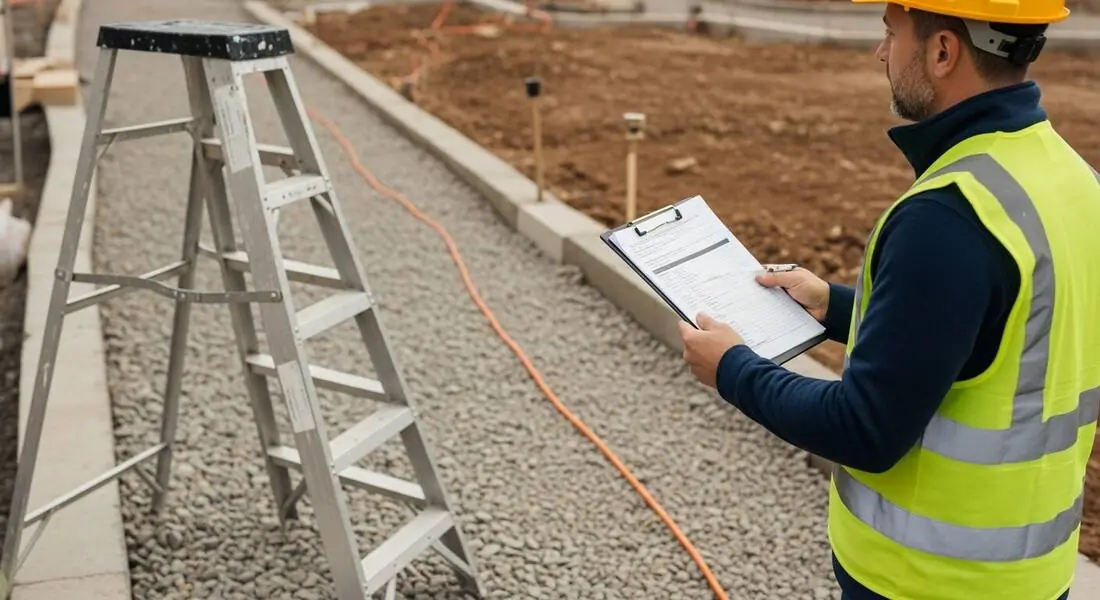
Starting from a photo inverts that. Photograph the task area — the ladder on the gravel, the cord across the path — and the scan returns the visible hazards with why each matters, the OSHA standard it may relate to, and a suggested control. Paste-ready content for the hazard and control columns, drawn from the actual site rather than from recall. The supervisor edits and verifies a draft instead of authoring from zero, and the analysis gains hazards that a memory-based fill would have missed.
The saved scan also gives the template what paper never had: an attached, dated photograph of the conditions the analysis describes, and a score to compare against the re-scan after controls go in. A completed JHA with its evidence photo is a far stronger document — for the GC, the insurer, or the incident file — than the same form filled from the truck.
A blank template is free — OSHA gives one away in publication 3071 — so nobody wins an audit on the form itself. What gets checked is the completed record: is it dated, is it signed, does it name the actual task and location, and do the hazards match what the job really involves? A stack of forms with identical hazard columns across different tasks is the classic red flag that the paperwork was copied, not performed, and reviewers on the GC side and the insurance side both know to look for it.
One element deserves special care for US employers: the written PPE hazard assessment under 29 CFR 1910.132(d) must be certified — meaning the document identifies the workplace evaluated, the person certifying, and the date. If your JHA template doubles as that assessment, make sure those three fields exist and get filled in. A dated, scored photo report attached to the form turns 'we assessed the area' from a signature into evidence.
On US commercial work the JHA form is not just a safety document — it is bid paperwork. General contractors and owners increasingly prequalify subs through platforms like ISNetworld, Avetta, and Veriforce, and those questionnaires ask directly whether you perform hazard analyses and for completed examples. A thin or obviously boilerplate JHA program costs prequalification points, and prequalification points cost invitations to bid.
The same economics apply to insurance: your experience modification rate follows your claims, your claims follow your uncontrolled hazards, and many GCs screen subs on EMR before price is even discussed. A template your crews actually complete — because the hazard column starts drafted instead of blank — protects the rating that keeps you on bid lists. That is the honest business case for making the form easy.
The failures reviewers see are consistent. Controls that are all PPE — a JHA whose every answer is 'wear gloves' skipped the hierarchy of controls and it shows. Wording nobody can verify — 'use caution near openings' cannot be checked on a walk; 'guardrails installed at the leading edge' can. Stale dates — an analysis from last season describing equipment that is no longer on site. And missing crew involvement — no signatures from the people who do the work, which OSHA's own guidance calls essential.
Every one of those is cheaper to fix at the drafting stage than at the audit. A photo scan pushes the form toward specific, verifiable language by default, because each finding names a visible condition in a specific frame with a suggested control you can point at. Fill the template from that, verify on the walk, and the form reads like the site — because it is the site.
Photograph the task setup and these are the hazard-column entries the AI drafts for you.
Footing on uneven or soft ground, setup angle, and what the ladder leans against — the classic step-two hazards.
Extension cords crossing walkways, running through wet areas, and visible jacket damage along the run.
Uneven grade, gravel and mud, debris in the approach, and the footing under each work position.
Barricades, signage, and PPE visible in the frame — so the control column starts from what exists, not from zero.
Scan a photo like the one above and this is the report you get — score, findings, OSHA references, and fixes. It is an illustrative example, clearly marked — not live scan data.
Compliance score
83
Lower means more potential hazards found
Score uses visible confirmed findings only. Not a safety certification.
2 confirmed · 0 need review · 0 positive
1Stepladder set up on uneven gravel surface
Possibly related to ladder stability requirements (29 CFR 1926.1053)
Observed condition: A ladder on loose, uneven gravel shifts under load — exactly the setup-step hazard a JHA's ladder line exists to control, and one of the most common findings in fall incident reviews.
Corrective action: Relocate the ladder to firm, level ground or use leg levelers rated for the ladder, and add footing checks to the setup step of the JHA.
High confidence
2Extension cord run across the walkway between work areas
Possibly related to protection of flexible cords (29 CFR 1926.405)
Observed condition: A cord across a traffic path is both a trip line and a damaged-insulation risk as it gets walked on — a hazard that belongs in the template's access step, with routing as the control.
Corrective action: Re-route the cord along the edge of the work area or protect it with a cord cover, and note cord routing as a control in the JHA.
High confidence
Upload a photo like the one above and get a compliance score and hazard count. No account needed to scan, though you may be asked for the free phone Access Pass — create a free account to unlock the full report.
Use the real site or facility name. If you save the scan after signup, it becomes the report name.
Three angles, one deeper scan
Only the wide shot is required — every extra angle gives the AI more places to look.
Required: Set the scene — one wide shot lets the AI sweep the whole area at once
Stand at the entry point and capture corner to corner: floors, ladders, scaffolds, and everyone at work
Drop a job-site photo or walkthrough video
Click to upload, drag & drop, or snap a photo on site. Photos scan free with no signup and no card — you may be asked for the free phone Access Pass. Video walkthroughs (up to 3 min) run on a free account.
Small habits, sharper scans
Set the scene
Start with context
Fill the frame
2–3 ft for close-ups; keep ladders, cords and workers fully in view.
Capture clearly
Make the frame usable
Light it right
Keep the sun or lights behind you — glare and shadows hide hazards.
Tap to focus
Tap the hazard on screen and hold still one second — blur can't be flagged.
Choose the useful view
Give the AI room to understand
Go landscape
Turn your phone sideways — a wider frame catches more of the scene.
Only upload photos you have permission to use, and avoid images showing personal, customer, or confidential information. Demo photos and results are held privately for up to 48 hours so you can save them to a free account; unclaimed photos are deleted automatically. Results are an AI-assisted preliminary review, not an official OSHA determination.
New: Video walkthrough scans
Record up to 3 minutes of your site — the AI extracts frames and categorizes findings with exact timestamps. Free account required.
Get the best results
Wide shot first
Stand at the entrance and photograph the entire work area so AI sees the full context
Hazard areas
Photograph elevated surfaces, equipment, electrical panels, and anywhere workers are active
Close-ups last
Move in close on anything damaged, missing, or that looks risky — the AI catches more detail
Use these as the rows and prompts of your template — whether you keep it in Word, Excel, or in scanned reports. The first four are free — create a free account to unlock the full structure and start filling templates from photos.
Job identification header
Task name, location, date, analyst, and the crew performing it — the fields that make the document retrievable and auditable later.
Task steps in performed order
One row per observable step, written from watching the job — not copied from the procedure manual. Six to ten steps is the healthy range.
A setup photo per step or station
Attach a dated photo of each work area. It anchors the analysis to real conditions and gives the scan something to draft hazards from.
Hazards per step — drafted, then verified
Scan the photos to draft the visible hazards, then have the competent person verify at the spot and add what the frame cannot show.
OSHA Scan reads a single photo. That makes it fast and easy for anyone on site — but it also means it has real limits. Here's an honest look at both.
Snap a photo of the job site, and the AI categorizes findings against OSHA standards.
Each finding includes consistent corrective actions and structured JHA outputs. Check items off as your crew resolves them.
Every inspection gets a deterministic 0-100 compliance score derived from hazard severity, so you can track sites at a glance.
A prioritization aid based on recorded findings—not a certification or a complete measure of site safety.
Generate detailed inspection reports and export data to Excel for record-keeping and stakeholders.
A qualified person must review AI-flagged items before making safety decisions. Do not replace required comprehensive safety walkthroughs with AI reports. Features, limits, and downloads depend on your account’s plan and permissions.
Illustrative AI-assisted workflows. Review the findings; they are not a compliance certification.
A scan is a fast first look, not the final word. Before treating this kind of area as safe, a competent person should still confirm:
OSHA's job hazard analysis publication (3071) includes a free worksheet, and its Job Hazard Analysis Worksheet PDF is downloadable from osha.gov. The structure is simple — steps, hazards, controls. The value this tool adds is on top of any template: it drafts the hazard and control columns from a photo of your actual task area instead of leaving them blank.
No. OSHA recommends the JHA technique and publishes an example worksheet, but no standard prescribes a specific form. What matters is the content — steps, hazards, controls, and evidence the analysis reflects your actual workplace. A dated photo-based report with findings and corrective actions meets that intent well.
Whichever your crews will actually complete. PDF prints cleanly, Word edits easily, Excel handles multi-step jobs. All three share the same failure mode: they start empty. However you store the final document, starting the hazard column from a photo scan is what changes completion quality.
The sample report on this page is a real example of the drafted core: a task-area photo, the hazards found in it, the standard each may relate to, and the suggested controls. A full completed JHA adds your task steps, ratings, owners, and crew sign-off around exactly that content.
OSHA sets no general retention period for JHA forms — the exceptions are specific documents like the PPE hazard-assessment certification, which must reflect current conditions. What sets your real retention bar is usually contractual: GCs, owners, and insurers commonly expect hazard-analysis records for the duration of a project plus their claims window. Digital storage makes the question cheap — a saved, dated scan history costs nothing to keep and answers audits years later.
Commonly, yes. Prequalification questionnaires on platforms like ISNetworld and Avetta ask whether your company performs hazard analyses, how often, and frequently request program documents or completed examples. A dated, photo-backed JHA with specific findings and closed corrective actions reads far stronger there than a generic filled-in form — it shows the program runs, not just that the template exists.
Reviewed by OSHA Scan Editorial
This content is produced by the OSHA Scan Editorial team and reviewed with AI assistance. It is general safety information, not legal or compliance advice. OSHA Scan is an independent tool and is not affiliated with, endorsed by, or certified by OSHA or the U.S. Department of Labor.
Free PDF checklist
33 critical checks across 7 categories — the same visible gaps the AI scanner looks for. Sent to your inbox as a free PDF.
More ways to see what an AI OSHA scan can do for your site.
The overview hub — how the scanner works and every job, site, and hazard it covers.
The method behind the template, step by step.
Draft the hazard and control columns from one photo.
The JSA version of the same worksheet, pre-task style.
When to move the template off paper entirely.
The broader self-inspection program the JHA feeds into.
The template applied to the highest-exposure trade.
The official booklet this page's template mirrors — OSHA's blank worksheets are inside, free.
Official resource — osha.govSee a complete labelled example of everything a scan returns.
Start with one lifetime use per eligible scan type — no credit card. Build JHA-ready reports and catch changing conditions sooner.
Start your free trial