
1
Set the scene
Start with context
Fill the frame
2–3 ft for close-ups; keep ladders, cords and workers fully in view.
OSHA compliance software is any tool that helps a company find hazards, fix them, and prove both happened. The category runs from heavyweight EHS suites to single-purpose apps — and the honest buying question is which failure you are trying to prevent. OSHA Scan is photo-first compliance AI: photograph a work area and the AI returns visible hazards with the OSHA standard each may relate to, corrective actions with owners, a 0-100 score, and exportable PDF/Excel reports — the find-fix-prove loop in one tool. It is free to start with no account (you may be asked for the free phone Access Pass), and a person verifies every finding.
Free · No account needed to scan · You may be asked for the free phone Access Pass
Strip away the feature lists and every piece of OSHA compliance software is selling the same loop: find hazards, fix them, prove both happened. Where products differ is which step they start from. Suites start from 'prove' — forms, workflows, and audit trails that assume the finding already exists. Checklist apps start from 'find' but leave finding quality entirely to whoever fills the form. The gap in the middle is the actual work: getting real hazards, from the real floor, into the system without an hour of data entry per walk.
Photo-first software starts at that gap. The input is a picture of the actual work area — the least-effort, highest-fidelity record a jobsite produces — and the software generates the rest: findings referenced to the OSHA standard family each may relate to, severity weighting into a 0-100 area score, suggested corrections that become owned checklist items, and a dated report that exports to PDF or Excel when a GC or insurer asks. The loop closes with a re-scan: same viewpoint, recovered score, documented fix.
That design has a blunt implication for buyers: if inspections are not happening consistently, workflow software will automate an empty pipeline. Fix the input first — make finding hazards nearly effortless — and the documentation, trending, and accountability features finally have something real to run on.
Enterprise EHS platforms bundle everything — incident management, chemical inventories, training matrices, permits, audits — priced and implemented accordingly: real deployments run months and the cost fits companies with a safety department to administer them. Point solutions do one job well: a form builder, a training tracker, an SDS library. Photo-first tools like OSHA Scan sit deliberately in the inspection lane: hazard identification, corrective actions, scoring, and reporting, built around the camera because that is the input a field team will actually use every week.
The honest boundary: OSHA Scan is not a full EHS suite. It does not manage your OSHA 300 log, chemical inventory, or training records. For a small or mid-size operation, that is usually the right trade — the inspection loop is where most programs are thinnest, and it is the part a phone camera genuinely transforms. Suites can come later; the dated inspection record you build now remains yours either way, exportable and portable.
First: will the field actually use it weekly? Adoption is the entire ballgame — a tool that needs a laptop, a login ritual, and twenty form fields per finding will be abandoned by March. If the input is a photo from a phone browser, the adoption bar drops to 'can take a picture.' Second: does it improve finding quality, or just record whatever someone types? AI analysis that surfaces hazards a tired walker skipped is additive; a blank text box is not. Third: does it close loops? Findings need owners, deadlines, completion states, and closing evidence — otherwise you have bought a complaint archive. Fourth: can you get your data out? Reports someone else asks for (GC prequalification, insurer reviews, corporate roll-ups) should be an export button, and your history should never be hostage to a subscription.
Run OSHA Scan against those four honestly: photo input in a browser, AI-generated findings a person verifies, corrective actions with owners tracked to closure with re-scan evidence, and one-click PDF/Excel export. That is the shape of the loop — and you can test it on one of your own photos, free, before any commitment.
No software makes a company OSHA-compliant — a sentence most vendors avoid. Compliance lives in conditions and behavior on the floor: guards on machines, training in heads, energy locked out, the competent person actually competent. Software's legitimate job is narrower and still decisive: make hazards visible sooner, make corrections trackable, and make the record provable. OSHA's own recommended practices center on exactly that find-and-fix cycle. Anything promising 'automatic compliance' is selling a comfort blanket — what you should demand instead is a shorter distance between a hazard existing and a fix being verified. That distance is measurable, and it is the metric this category should be judged on.
The find-fix-prove loop, built around the input your team already produces — photos of the floor.
Any phone, in the browser, no install — the inspection starts with a picture, and the AI drafts the findings with OSHA references.
Accepted findings become owned checklist items tracked to completion, with re-scan evidence closing the loop.
Every scan is a dated 0-100 data point — dashboards show which areas are drifting before the incident log does.
Branded PDF and Excel reports on demand — for GC prequalification packets, insurer reviews, and corporate roll-ups.
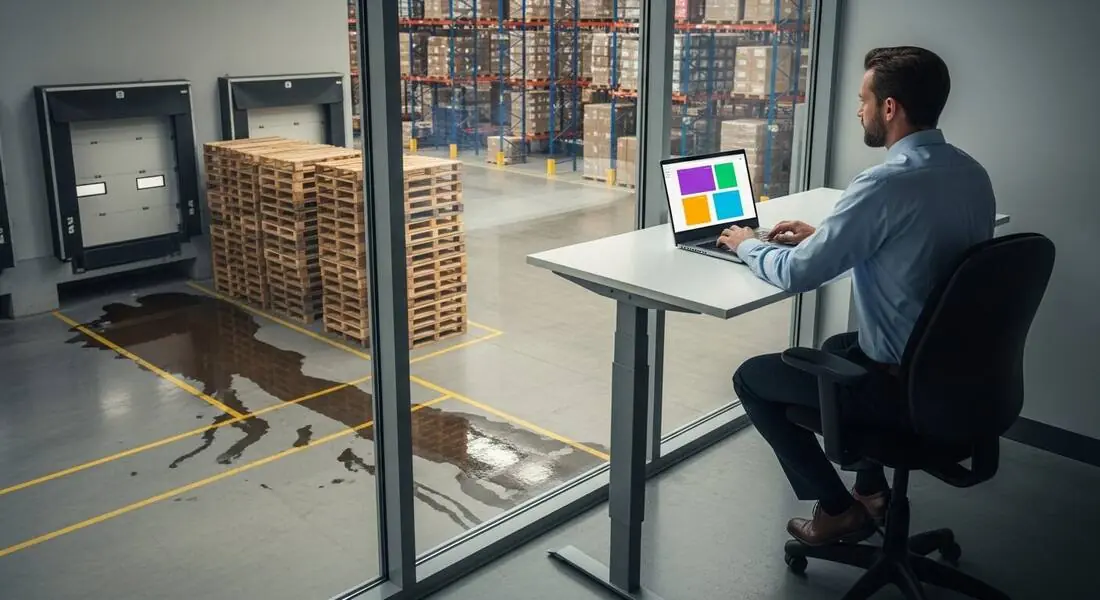
Scan a photo like the one above and this is the report you get — score, findings, OSHA references, and fixes. It is an illustrative example, clearly marked — not live scan data.
Compliance score
75
Lower means more potential hazards found
Score uses visible confirmed findings only. Not a safety certification.
2 confirmed · 0 need review · 0 positive
1Liquid spill spread across the marked floor lanes by the dock
Possibly related to walking-working surface condition (29 CFR 1910.22)
Observed condition: The spill covers the exact lanes pedestrians and equipment are routed through — a same-level slip zone sitting in the highest-traffic part of the dock.
Corrective action: Barricade the area, clean and dry the floor, and trace the source — a spill this size has one, and finding it is the fix that lasts.
High confidence
2Pallet stacks built to height beside the dock door
Possibly related to material handling and storage (29 CFR 1910.176)
Observed condition: Tall pallet stacks in a dock's traffic and vibration zone concentrate tip-over risk where people and forklifts converge — height that looks stable today loses to one clipped corner.
Corrective action: Bring stack heights down to what the footprint holds stably, cull damaged pallets, and keep the staging line clear of the door's swing and traffic path.
Medium confidenceNot fully clear from the photo — verify on site.
Upload a photo like the one above and get a compliance score and hazard count. No account needed to scan, though you may be asked for the free phone Access Pass — create a free account to unlock the full report.
Use the real site or facility name. If you save the scan after signup, it becomes the report name.
Three angles, one deeper scan
Only the wide shot is required — every extra angle gives the AI more places to look.
Required: Set the scene — one wide shot lets the AI sweep the whole area at once
Stand at the entry point and capture corner to corner: floors, ladders, scaffolds, and everyone at work
Drop a job-site photo or walkthrough video
Click to upload, drag & drop, or snap a photo on site. Photos scan free with no signup and no card — you may be asked for the free phone Access Pass. Video walkthroughs (up to 3 min) run on a free account.
Small habits, sharper scans
Set the scene
Start with context
Fill the frame
2–3 ft for close-ups; keep ladders, cords and workers fully in view.
Capture clearly
Make the frame usable
Light it right
Keep the sun or lights behind you — glare and shadows hide hazards.
Tap to focus
Tap the hazard on screen and hold still one second — blur can't be flagged.
Choose the useful view
Give the AI room to understand
Go landscape
Turn your phone sideways — a wider frame catches more of the scene.
Only upload photos you have permission to use, and avoid images showing personal, customer, or confidential information. Demo photos and results are held privately for up to 48 hours so you can save them to a free account; unclaimed photos are deleted automatically. Results are an AI-assisted preliminary review, not an official OSHA determination.
New: Video walkthrough scans
Record up to 3 minutes of your site — the AI extracts frames and categorizes findings with exact timestamps. Free account required.
Get the best results
Wide shot first
Stand at the entrance and photograph the entire work area so AI sees the full context
Hazard areas
Photograph elevated surfaces, equipment, electrical panels, and anywhere workers are active
Close-ups last
Move in close on anything damaged, missing, or that looks risky — the AI catches more detail
The evaluation and rollout points that separate software that changes the floor from software that decorates it. First four free; a free account unlocks the rest.
Pick the failure you are fixing first
Inspections not happening, fixes not closing, or proof not existing — the right software depends on which loop is actually broken.
Test adoption before features
Hand it to a supervisor for one real walk. If the first inspection takes more than minutes, the two-hundredth will not happen.
Demand finding quality, not just capture
A blank form records what someone noticed; AI photo analysis surfaces what they missed. Judge the delta on your own site — the free scan is the test.
Verify the AI's findings on the floor
Generated findings are drafts with confidence levels — the human confirm/dismiss step is what makes the record defensible.
OSHA Scan reads a single photo. That makes it fast and easy for anyone on site — but it also means it has real limits. Here's an honest look at both.
Snap a photo of the job site, and the AI categorizes findings against OSHA standards.
Each finding includes consistent corrective actions and structured JHA outputs. Check items off as your crew resolves them.
Every inspection gets a deterministic 0-100 compliance score derived from hazard severity, so you can track sites at a glance.
A prioritization aid based on recorded findings—not a certification or a complete measure of site safety.
Generate detailed inspection reports and export data to Excel for record-keeping and stakeholders.
A qualified person must review AI-flagged items before making safety decisions. Do not replace required comprehensive safety walkthroughs with AI reports. Features, limits, and downloads depend on your account’s plan and permissions.
Illustrative AI-assisted workflows. Review the findings; they are not a compliance certification.
A scan is a fast first look, not the final word. Before treating this kind of area as safe, a competent person should still confirm:
The useful core is one loop: find hazards, track fixes, prove both. Products differ in where they start — enterprise suites start from workflows and audit trails; photo-first tools like OSHA Scan start from the inspection itself: a photo becomes AI findings with OSHA references, corrective actions with owners, a 0-100 score, and exportable reports.
No — deliberately. It covers the inspection loop: hazard identification, corrective-action tracking, scoring, trends, and reporting. It does not manage OSHA 300 logs, training matrices, or chemical inventories. For most small and mid-size teams the inspection loop is where the program is thinnest, and it is the part a phone camera genuinely changes.
No software can — compliance lives in floor conditions and behavior, not in dashboards. What good software honestly does is shorten the distance between a hazard existing and a verified fix, and keep the dated record that proves the program operates. Claims of 'automatic compliance' are marketing.
A checklist app records what the walker noticed; photo analysis also surfaces what they missed. The photo is faster to capture than a form, and the AI drafts findings — with standards references, severity, and suggested fixes — that a person then verifies. Capture effort goes down while finding quality goes up.
Nothing. Upload a photo and get the score and hazard count with no account (you may be asked for the free phone Access Pass). A free account adds the full finding-by-finding reports, one lifetime use per eligible scan type, saved history, corrective-action tracking, and PDF/Excel export — enough to run a real evaluation on your own site before spending anything.
That is the right question for any tool in this category. OSHA Scan's answer is the input: it runs in the phone's browser and starts from a photo — the lowest-effort capture a jobsite has. The practical test is handing it to one supervisor for one real walk, which the free tier exists for.
Reviewed by OSHA Scan Editorial
This content is produced by the OSHA Scan Editorial team and reviewed with AI assistance. It is general safety information, not legal or compliance advice. OSHA Scan is an independent tool and is not affiliated with, endorsed by, or certified by OSHA or the U.S. Department of Labor.
Free PDF checklist
33 critical checks across 7 categories — the same visible gaps the AI scanner looks for. Sent to your inbox as a free PDF.
More ways to see what an AI OSHA scan can do for your site.
The overview hub — how the scanner works and every job, site, and hazard it covers.
Which compliance work automates honestly — and which never will.
How the report generates itself from the photo.
The hub for every photo-scanning use case.
The manual program checklist software should accelerate.
A buyer's guide to what to test before choosing a compliance tool.
The same compliance scans, run from any phone in the field.
OSHA's own free interactive tools — worth knowing what the agency provides at no cost before evaluating any paid compliance software.
Official resource — osha.govSee a complete labelled example of everything a scan returns.
Start with one lifetime use per eligible scan type — no credit card. Build JHA-ready reports and catch changing conditions sooner.
Start your free trial