
1
Set the scene
Start with context
Fill the frame
2–3 ft for close-ups; keep ladders, cords and workers fully in view.
A hazard detection app turns a phone camera into a safety scanner: photograph a work area and AI identifies the visible hazards — a ladder set on bad footing, a damaged cord, a blocked path — each referenced to the OSHA standard it may relate to, with a suggested fix, a confidence level, and a 0-100 area score. OSHA Scan runs entirely in the phone's browser: nothing to install, no app store, no IT ticket — open the page, take or upload a photo, get findings. Free to try with no account (you may be asked for the free phone Access Pass). A person verifies findings on site before they become the record.
Free · No account needed to scan · You may be asked for the free phone Access Pass
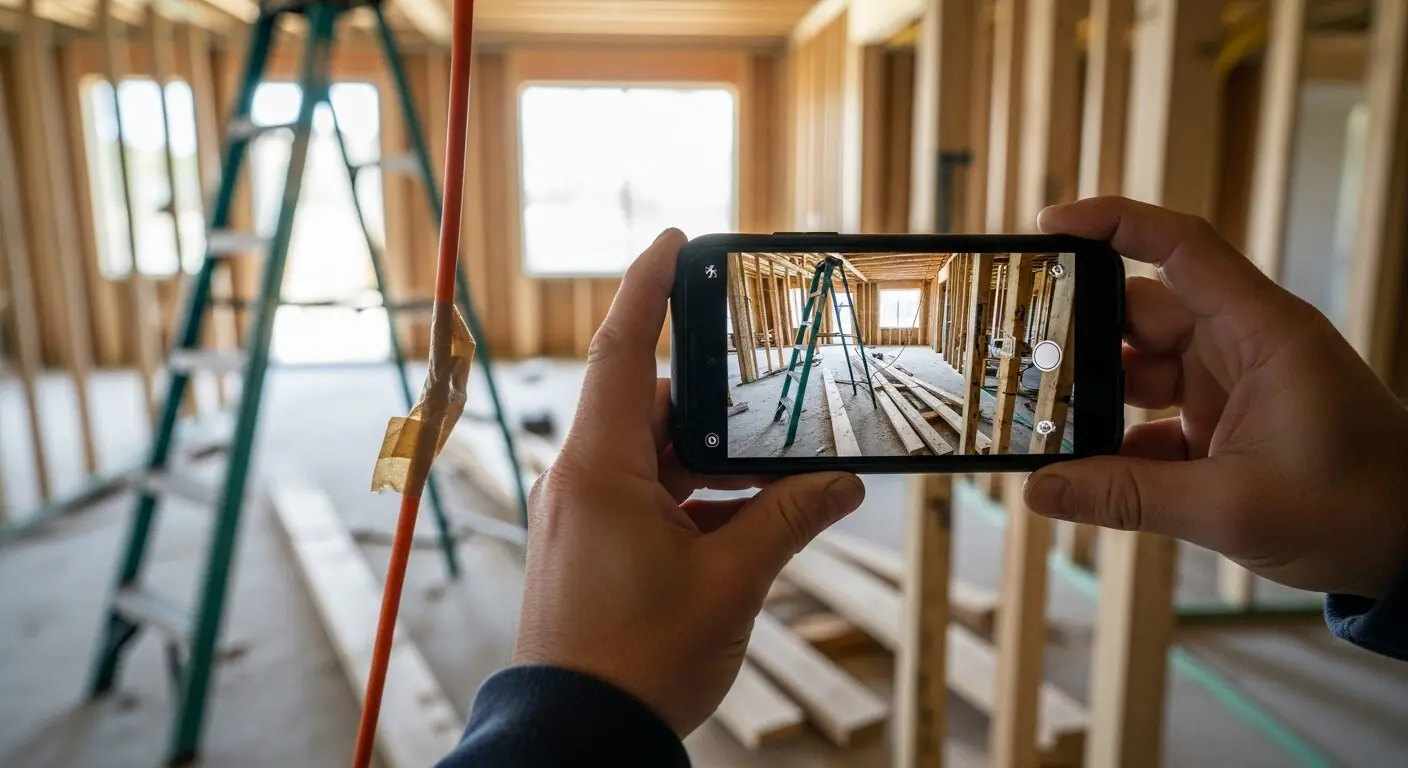
Every jobsite already carries the hardware for hazard detection — there is a capable camera in every pocket. What has been missing is the analysis layer: the phone takes the picture, but nothing reads it. Photos of hazards pile up in camera rolls and group chats, unexamined, unassigned, and unfindable three weeks later when someone asks what was done about it.
A hazard detection app closes that gap at the moment of capture. The photo goes straight into analysis: visible hazards named, referenced to the OSHA standard family each may relate to, weighted into a 0-100 score, and paired with suggested corrective actions. The finding list arrives while you are still standing where the photo was taken — which is exactly where and when the fix is cheapest.
Because OSHA Scan runs in the browser, the 'app' has no adoption tax: no app store, no version to update, no IT approval, and it works the same on the supervisor's iPhone, the foreman's Android, and the office desktop. The link is the install. For a crew that changes subcontractors monthly, that difference decides whether the tool gets used at all.
The app-store model fits tools you use daily and configure deeply. Field safety scanning is the opposite pattern: intermittent, urgent, and spread across people who never installed anything — the sub's foreman, the new hire, the client rep who spotted something. A browser-based scanner meets that pattern: anyone with the link can start a scan without installing anything. There is no version drift between team members, no 'it needs to update first,' no storage-full failure at the worst moment. iOS and Android both hand the camera to the browser natively, so 'take photo' works exactly as it would in a native app.
The trade-offs are honest ones: a browser app needs connectivity to run its analysis — there is no offline scanning — and it does not live on the home screen unless you add it there (both platforms allow it in two taps). For a tool whose job is 'photograph, analyze, assign the fix,' those trade-offs buy the thing that matters more: zero-friction access for every person who might ever need to scan.
Modern phone cameras produce more than enough detail for hazard analysis: cord damage, ladder angles, missing guards, and PPE presence all read clearly from a normal working distance. What matters more than megapixels is framing — the analysis reads relationships, so the useful photo contains both the hazard and its context: the ladder AND its footing, the cord AND the walkway it crosses, the worker AND the edge behind them. One photo per work area, taken from where a person would actually stand, out-performs a dozen zoomed close-ups.
The camera's limits are the analysis's limits. A photo cannot convey noise, atmosphere, energy state, weight, or what is behind the wall — and OSHA Scan does not pretend otherwise: findings are phrased as 'possibly related to' a standard, carry confidence levels, and the report structure assumes a person walks the floor to verify. The app's job is to make the visible half of hazard detection nearly instant, so the human half gets the time it deserves.
The compounding value of an app-based scanner arrives when it stops being one person's tool. Because every scan saves to the same organization — with locations, roles, and per-area history — the superintendent's Monday scan, the foreman's delivery-day scan, and the safety manager's audit scan all feed one record. Corrective actions get owners across the team, scores build per-location trend lines, and the PDF export for the GC or the insurer draws from everything, not just what one phone captured. The rollout playbook is short: send the link, set a cadence (each area, weekly, plus every changed condition), and route findings to owners the same day. The phones were already on site; the program was the missing piece.
Camera to findings — with nothing to install and nothing to configure.
The phone's camera hands off to the page natively — photograph the area or upload from the camera roll, no app store in between.
Visible hazards named and referenced to the OSHA standard each may relate to, with severity, confidence, and a 0-100 area score.
Accepted findings become corrective actions with owners — assigned before you leave the spot where the photo was taken.
Phone scans, tablet reviews, desktop exports — the same organization record everywhere, with per-location history and trends.
Scan a photo like the one above and this is the report you get — score, findings, OSHA references, and fixes. It is an illustrative example, clearly marked — not live scan data.
Compliance score
75
Lower means more potential hazards found
Score uses visible confirmed findings only. Not a safety certification.
2 confirmed · 0 need review · 0 positive
1Stepladder set up with feet on loose lumber and debris
Possibly related to ladder stability requirements (29 CFR 1926.1053(b))
Observed condition: A ladder is only as stable as what it stands on — feet on scattered boards shift under load, and the fall starts at exactly the height where it does damage.
Corrective action: Clear the debris and reset the ladder on firm, level footing before the next climb — and stage cut-offs away from work areas so the floor stays climbable.
High confidence
2Extension cord with a taped repair section in the work area
Possibly related to flexible cord condition (29 CFR 1926.405)
Observed condition: Tape over cord damage hides the conductor condition it is covering — a taped repair on an active-site cord is a shock and fire question nobody has answered.
Corrective action: Take the cord out of service — taped repairs are not an acceptable fix for damaged cords; replace it and check the site's other cords while you are at it.
High confidence
Upload a photo like the one above and get a compliance score and hazard count. No account needed to scan, though you may be asked for the free phone Access Pass — create a free account to unlock the full report.
Use the real site or facility name. If you save the scan after signup, it becomes the report name.
Three angles, one deeper scan
Only the wide shot is required — every extra angle gives the AI more places to look.
Required: Set the scene — one wide shot lets the AI sweep the whole area at once
Stand at the entry point and capture corner to corner: floors, ladders, scaffolds, and everyone at work
Drop a job-site photo or walkthrough video
Click to upload, drag & drop, or snap a photo on site. Photos scan free with no signup and no card — you may be asked for the free phone Access Pass. Video walkthroughs (up to 3 min) run on a free account.
Small habits, sharper scans
Set the scene
Start with context
Fill the frame
2–3 ft for close-ups; keep ladders, cords and workers fully in view.
Capture clearly
Make the frame usable
Light it right
Keep the sun or lights behind you — glare and shadows hide hazards.
Tap to focus
Tap the hazard on screen and hold still one second — blur can't be flagged.
Choose the useful view
Give the AI room to understand
Go landscape
Turn your phone sideways — a wider frame catches more of the scene.
Only upload photos you have permission to use, and avoid images showing personal, customer, or confidential information. Demo photos and results are held privately for up to 48 hours so you can save them to a free account; unclaimed photos are deleted automatically. Results are an AI-assisted preliminary review, not an official OSHA determination.
New: Video walkthrough scans
Record up to 3 minutes of your site — the AI extracts frames and categorizes findings with exact timestamps. Free account required.
Get the best results
Wide shot first
Stand at the entrance and photograph the entire work area so AI sees the full context
Hazard areas
Photograph elevated surfaces, equipment, electrical panels, and anywhere workers are active
Close-ups last
Move in close on anything damaged, missing, or that looks risky — the AI catches more detail
How to turn a phone into your site's scanner — and the habits that make it stick. First four points free; a free account unlocks the rest and your own scans.
Put the link where the team already looks
Group chat pin, QR on the gang box, bookmark on shared tablets — the app with no install still needs a front door people remember.
Add it to the home screen
Two taps on iOS or Android puts the scanner one touch from the lock screen — no app store, same effect.
Frame the hazard with its context
The ladder AND its footing, the cord AND the path it crosses — the analysis reads relationships, so the frame must contain them.
Scan one area per photo
A frame per room or zone localizes findings; one wide shot of everything buries them.
OSHA Scan reads a single photo. That makes it fast and easy for anyone on site — but it also means it has real limits. Here's an honest look at both.
Snap a photo of the job site, and the AI categorizes findings against OSHA standards.
Each finding includes consistent corrective actions and structured JHA outputs. Check items off as your crew resolves them.
Every inspection gets a deterministic 0-100 compliance score derived from hazard severity, so you can track sites at a glance.
A prioritization aid based on recorded findings—not a certification or a complete measure of site safety.
Generate detailed inspection reports and export data to Excel for record-keeping and stakeholders.
A qualified person must review AI-flagged items before making safety decisions. Do not replace required comprehensive safety walkthroughs with AI reports. Features, limits, and downloads depend on your account’s plan and permissions.
Illustrative AI-assisted workflows. Review the findings; they are not a compliance certification.
A scan is a fast first look, not the final word. Before treating this kind of area as safe, a competent person should still confirm:
Yes — OSHA Scan works as a hazard detection app that runs in your phone's browser: photograph or upload a picture of a work area and the AI returns visible hazards with OSHA standard references, suggested fixes, confidence levels, and a 0-100 score. There is nothing to install and it is free to try without an account (you may be asked for the free phone Access Pass).
By design. Field scanning involves people who will never install anything — subs, new hires, visiting managers. A browser app means the link is the install: same capability on any phone, no version drift, no IT approval, no storage-full failures. You can add it to your home screen in two taps for one-touch access.
No — the analysis runs when you have connectivity, so there is no offline scanning. You can take photos normally with your camera anywhere and upload them for analysis when you are back on signal.
Any reasonably current iPhone or Android — the analysis needs a normal photo, not a special camera. Framing matters more than hardware: include the hazard and its context in the same shot.
Yes — that is the point. Everyone scans with the same link, and every scan lands in the same organization record with locations, roles, corrective-action owners, and per-area history. Team findings build one trend line instead of scattering across personal camera rolls.
Free to try — upload a photo and see the score and hazard count with no account (you may be asked for the free phone Access Pass). A free account adds the complete finding-by-finding reports with OSHA references, one lifetime use per eligible scan type, saved history, corrective-action tracking, and PDF export.
Reviewed by OSHA Scan Editorial
This content is produced by the OSHA Scan Editorial team and reviewed with AI assistance. It is general safety information, not legal or compliance advice. OSHA Scan is an independent tool and is not affiliated with, endorsed by, or certified by OSHA or the U.S. Department of Labor.
Free PDF checklist
33 critical checks across 7 categories — the same visible gaps the AI scanner looks for. Sent to your inbox as a free PDF.
More ways to see what an AI OSHA scan can do for your site.
The overview hub — how the scanner works and every job, site, and hazard it covers.
The photos-you-already-take angle for construction crews.
Why on-site findings change what gets caught.
The vision pipeline behind every scan.
How the AI reads objects, conditions, and relationships.
The camera-replaces-clipboard inspection workflow.
The compliance-focused way to run these scans from your phone.
OSHA's free publications library — pocket guides and quick cards worth pairing with any app-based scanning habit.
Official resource — osha.govSee a complete labelled example of everything a scan returns.
Start with one lifetime use per eligible scan type — no credit card. Build JHA-ready reports and catch changing conditions sooner.
Start your free trial