
SDS for auto repair shops — scan the shelf once, and the QR poster does the rest
SDS management for an auto repair or body shop means keeping a current safety data sheet for every product on the shelf — paint, thinner, brake cleaner, degreasers, coolant, and the batteries in back — and making those sheets reachable by a tech at the bench, not buried in an office binder. Most shops run without a safety person, so the practical answer is to make the library build itself: with OSHA Scan a tech walks the flammables cabinet and parts shelf photographing labels, and each product lands in a searchable list with its signal word and GHS pictograms; you attach the manufacturer's SDS PDF, then print a QR poster for the cabinet so anyone can pull the sheets on their phone with no login.
Free · No account needed to scan · You may be asked for the free phone Access Pass
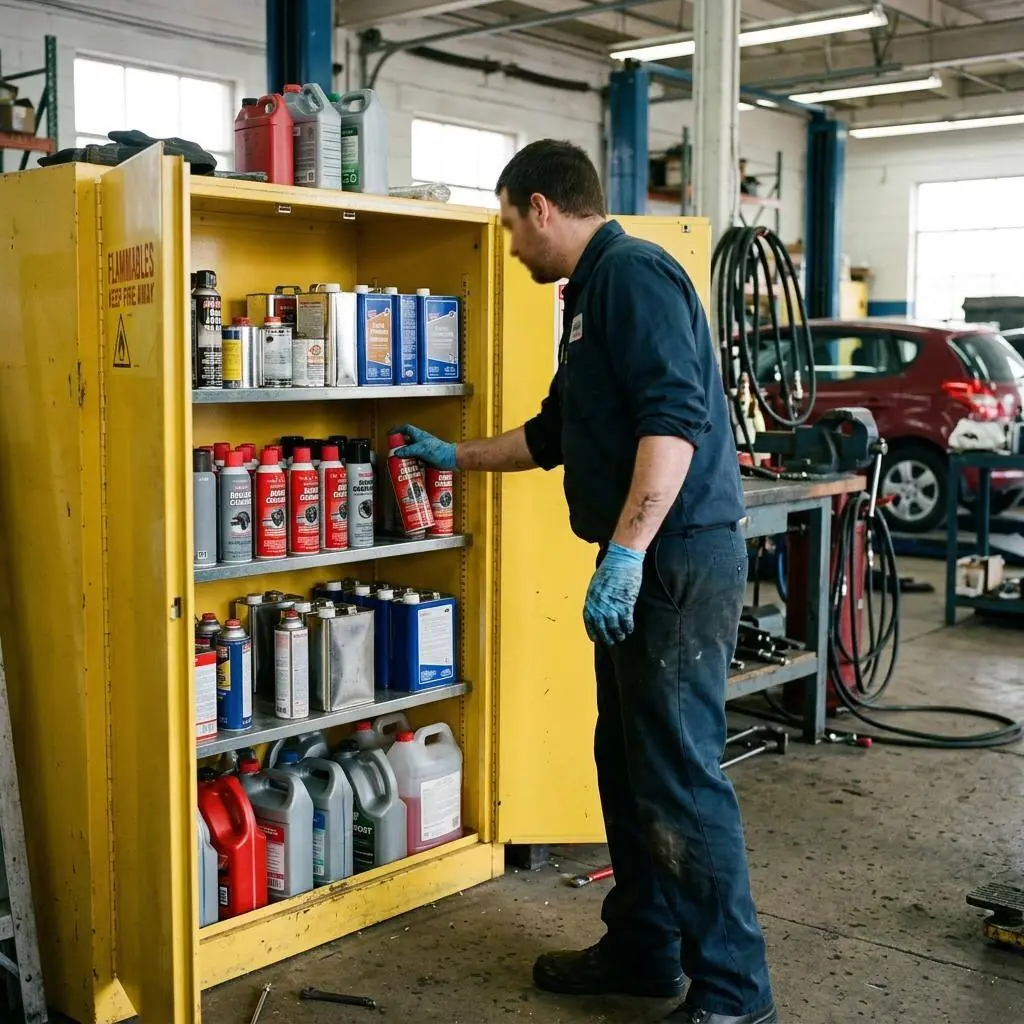
A shelf full of aerosols and solvents, and usually nobody whose job is compliance
An auto repair or body shop packs a surprising chemical load into a small footprint: brake and parts cleaner by the case, carburetor and throttle-body sprays, paint and clearcoat, reducers and hardeners, primers, thinner, degreasers, penetrating oils, coolant, brake fluid, and lead-acid batteries. The aerosols multiply fastest — a single bench can hold a dozen spray cans, and the flammables cabinet fills with reds and yellows the moment a paint job comes in. Nearly every one of these is a hazardous chemical under OSHA's HazCom standard, which means each needs a current SDS a tech can actually reach.
The catch is that the corner shop rarely has a safety officer; the owner or a lead tech is it, between customers. That's why 'build a binder' never sticks — it's another job nobody has time for. OSHA Scan flips it: a tech walks the flammables cabinet and parts shelf once, photographing each label, and the app reads the product name, manufacturer, signal word, and GHS pictograms into a searchable library. Attach each manufacturer's SDS PDF, print a QR poster, and stick it on the cabinet door — now any tech, or an inspector, scans it and opens the sheets on a phone with no account. The checklist below covers the HazCom pieces a scan can't do for you.
Auto shop HazCom: aerosols, isocyanates, and the citations small shops don't see coming
Automotive service and body work sit squarely under OSHA's general-industry Hazard Communication Standard (29 CFR 1910.1200), and the chemical inventory of even a small shop is deceptively large: brake and parts cleaner, carburetor spray, paint, clearcoat, reducers, hardeners, primers, thinner, degreasers, penetrating oils, coolant, brake fluid, and batteries. HazCom citations in this setting tend to cluster on the same points — unlabeled secondary containers at the parts washer, missing or wrong-product SDSs, and safety data sheets a tech can't reach without walking to the office. Because most independent shops have no dedicated safety staff, the program tends to be whatever the owner set up years ago, and the inventory has long since outrun the binder.
The hazard that catches body shops off guard is isocyanates. Two-component polyurethane paints and clearcoats use isocyanate hardeners, which are a leading cause of work-related occupational asthma and are sensitizers — once a painter is sensitized, even tiny exposures can trigger a severe reaction. OSHA has a National Emphasis Program history around isocyanates and cites shops for inadequate respiratory protection, missing SDS information, and lack of training on these products. A shop's SDS library is the starting point for getting the isocyanate hazard right: the SDS spells out the exposure controls and PPE, and the tech needs to be able to read it before spraying. OSHA Scan can capture the paint and hardener labels and hold the manufacturer SDS PDFs so that information is one phone-scan away at the booth; the respiratory program and fit testing behind it remain the shop's to run.
What one shelf scan captures for the shop library
What OSHA Scan reads off an automotive product label to build the searchable SDS library.
Product name & manufacturer
Reads the exact identifier off a brake-cleaner or clearcoat can so it files correctly — not as a generic 'aerosol' the tech can't search for later.
Signal word & GHS pictograms
Danger and the flame pictogram on flammable aerosols, the corrosive and health-hazard symbols on solvents and reducers — captured as each can enters the library.
Hazard & precautionary statements
The label's hazard and precautionary text lands in the entry so a tech gets the short version — flammable, harmful if inhaled, use with ventilation — on their phone.
SDS PDF attachment & QR reach
Attach the manufacturer's SDS PDF to each product; a QR poster on the flammables cabinet lets any tech open the shop's sheets with no login.
Demo: the library entry a scanned label comes back with
An illustrative example for this trade — product identity, signal word, GHS pictograms, and hazard statements, filed and searchable.
Non-chlorinated brake and parts cleaner (aerosol)
Example manufacturer
Brake cleaner gets sprayed at every bay, so a tech blasting a caliper near a running engine needs the extreme-flammability warning on their phone at the lift.
- H222 — Extremely flammable aerosol
- H319 — Causes serious eye irritation
Now scan your own label — free
Photograph any chemical product on your shelf. The AI transcribes the label — no account needed to try it, though you may be asked for the free phone Access Pass.
- A searchable chemical library built by photographing the shelf — no data entry
- Signal word, pictograms, and hazards read off each paint, solvent, and cleaner can
- A QR poster for the flammables cabinet so techs reach every SDS at the bench
One lifetime free label scan
The 12-point auto repair shop SDS checklist
How a shop with no safety staff keeps its chemical library and access honest. The first four are free — create a free account or leave your email to unlock the rest and scan your own shelf.
Free checklist — 12 points
Enter your email to unlock the full checklist
Read the checklist here after entering your email. A free account is required to download the PDF.
One email with the checklist, one follow-up. Unsubscribe anytime.
What the AI can and can't detect
OSHA Scan reads a single photo. That makes it fast and easy for anyone on site — but it also means it has real limits. Here's an honest look at both.
What it can catch from a photo
- Product name and manufacturer on a paint, solvent, or cleaner label
- Signal word and GHS pictograms on aerosols and liquids
- Label hazard and precautionary statements as text for the library
- Whether a can's label is faded, damaged, or missing
What a photo can't tell it
- Whether the library covers every product in the shop, including waste containers
- The exact chemical inside a decanted or unlabeled bottle
- Whether techs were trained on isocyanates or other product hazards
- Air concentrations of solvent or isocyanate vapor in the booth or bay
SDS digital library
Build a searchable chemical library from label photos. Review manufacturer SDS matches when available and follow the status of missing documents.
Missing-document requests enter a review queue; they do not automatically contact suppliers.
Job-site locations
Organize inspections by location and compare safety performance across every site you manage.
Team roles & permissions
Invite admins, managers, and supervisors with role-based access that keeps the right people in control.
A qualified person must review AI-flagged items before making safety decisions. Do not replace required comprehensive safety walkthroughs with AI reports. Features, limits, and downloads depend on your account’s plan and permissions.
See the workflow click into place
Illustrative AI-assisted workflows. Review the findings; they are not a compliance certification.
Always confirmed by a person on site
A scan is a fast first look, not the final word. Before treating this kind of area as safe, a competent person should still confirm:
- Every product on every shelf has a matching, current SDS PDF in the library
- The QR poster reaches the cabinet and bench where techs actually work
- Training records cover each tech for the products and hazard classes they use
- The written HazCom program names a live owner for labels, SDSs, and training
People also ask
Does brake cleaner need an SDS in an auto shop?
Yes. Brake cleaner — chlorinated or not — is a hazardous chemical under OSHA's HazCom standard, so your shop needs a current safety data sheet for the exact product on the shelf and must keep it accessible to techs during the shift. The two common brake-cleaner formulas have different hazards, so match the SDS to the product name on the can. With OSHA Scan you can photograph the can's label to build the library entry, then attach the manufacturer's SDS PDF to it.
What SDS do auto repair and body shops actually need?
One current SDS for every hazardous product in the shop: brake and parts cleaner, carb and throttle-body spray, paint, clearcoat, reducers, hardeners, primer, thinner, degreasers, penetrating oils, coolant, brake fluid, and lead-acid batteries. Paint lines add isocyanate hardeners, which carry serious respiratory hazards. Each needs a sheet techs can reach, plus GHS labels on containers and HazCom training — the full chain applies even to a two-bay shop.
How does a small shop with no safety person keep SDSs organized?
Make the library build itself. With OSHA Scan a tech walks the flammables cabinet and parts shelf once, photographing labels; each product lands in a searchable list with its signal word and pictograms read off the can. You attach the manufacturer's SDS PDF and print a QR poster for the cabinet so anyone can pull sheets on a phone. There's no automatic SDS lookup — you attach the real sheet — but the shelf scan removes the data entry that keeps small shops from ever finishing a binder.
Does OSHA Scan write our HazCom program or track training?
No. OSHA Scan builds the chemical inventory from label scans, stores the SDS PDFs, gives techs QR access, and prints chemical safety signs — the parts that keep drifting out of date. The written HazCom program and training records are shop responsibilities that stay manual; we'd rather be clear about that than oversell. The checklist above teaches those requirements so a shop owner can keep them current alongside the library.
Reviewed by OSHA Scan Editorial
This content is produced by the OSHA Scan Editorial team and reviewed with AI assistance. It is general safety information, not legal or compliance advice. OSHA Scan is an independent tool and is not affiliated with, endorsed by, or certified by OSHA or the U.S. Department of Labor.
Keep exploring
More ways to see what an AI OSHA scan can do for your site.
The AI OSHA inspection tool
The overview hub — how the scanner works and every job, site, and hazard it covers.
SDS scanner
Scan any product label to build the library and attach its SDS.
Auto repair shop safety inspection
Scan a bay photo for lift, flammable-storage, and PPE hazards.
Secondary container labeling
Generate workplace labels for parts-washer and spray bottles.
How to read an SDS
Make sense of the 16 sections a tech actually needs at the bench.
OSHA 1910.1200 — Hazard Communication
The federal HazCom standard that covers every chemical on your shop's shelf.
Official resource — osha.govA full sample report
See a complete labelled example of everything a scan returns.
Ready to secure your job sites?
Start with one lifetime use per eligible scan type — no credit card. Build JHA-ready reports and catch changing conditions sooner.
Start your free trial