
1
Set the scene
Start with context
Fill the frame
2–3 ft for close-ups; keep ladders, cords and workers fully in view.
Most jobsite photo apps organize pictures — projects, folders, sharing. OSHA Scan is the photo app that looks at them: photograph the room, the floor, the setup, and the AI reviews the frame for visible safety hazards — the cord across the doorway, the ladder in the debris — returning each with the OSHA standard it may relate to, a suggested fix, and a 0-100 score, saved as a dated report per photo. Contractors get what site photos were always supposed to provide: documentation that proves the condition of the site, plus the hazards caught while they were still cheap. Free to try, no account (you may be asked for the free phone Access Pass); a competent person verifies findings.
Free · No account needed to scan · You may be asked for the free phone Access Pass
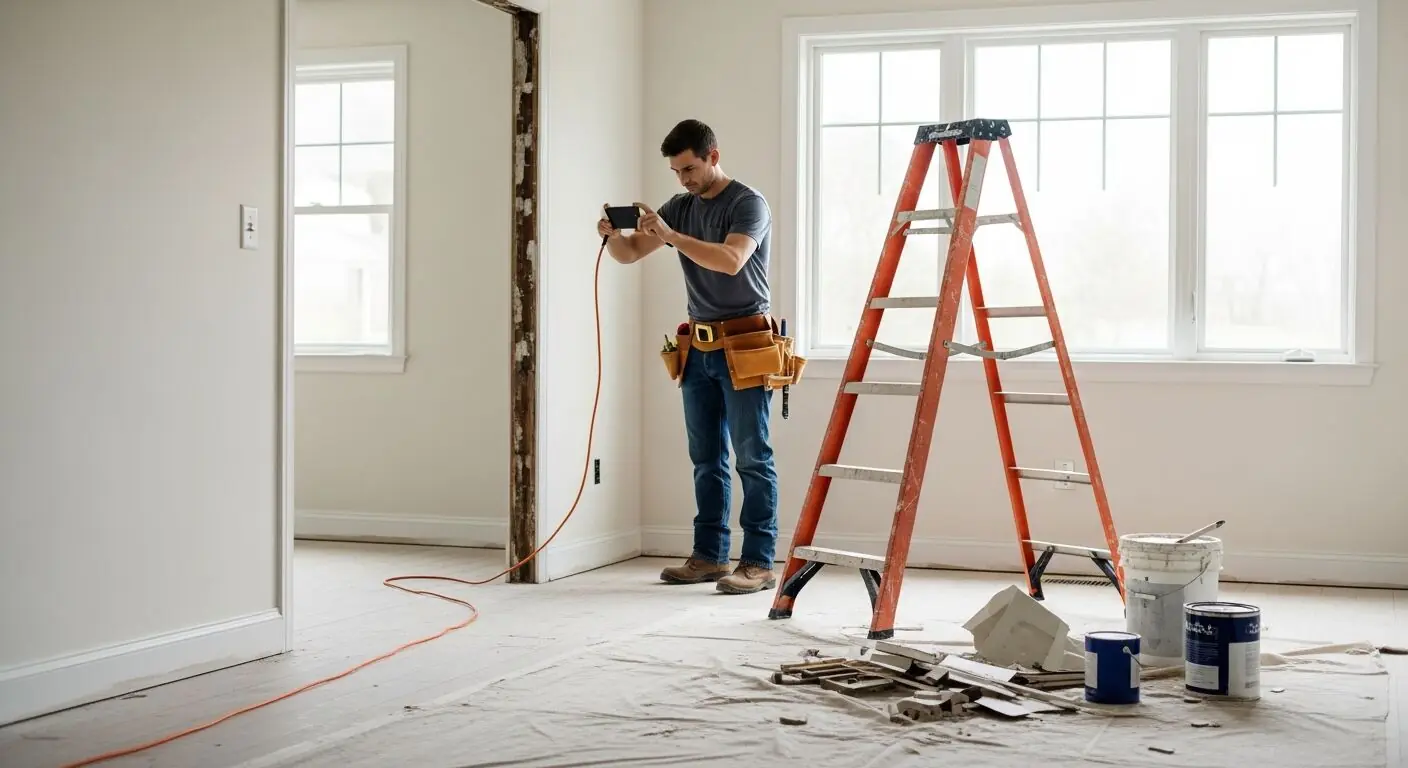
Contractors already photograph everything — before, during, after, for the client, for the sub dispute that might come, for the punch list. The photo apps built for that job file pictures well and understand none of them. Ten thousand organized photos of jobsites, and not one flagged the cord across the doorway that was visible in forty of them. The evidence of the hazard existed; nobody was ever going to look.
Running site photos through analysis changes what each shot is worth. The same picture taken for progress documentation comes back as a safety record: visible hazards named, the OSHA standard each may relate to, a suggested fix, and a score for the area. On a remodel that means the doorway cord and the ladder standing in demolition debris get caught the day they appear — by the photo that was being taken anyway — instead of surfacing in an incident report with a date stamp that shows they were photographed three weeks earlier.
For documentation, a scanned photo outworks a filed one. Each scan saves as a dated report tying the image to its findings and their resolution — evidence with a reading attached. When the question is 'what condition was the site in, and did you act on it,' a folder of images answers half; a history of dated, scored reports with closed corrective actions answers both. That second answer is what GCs, owners, and insurers actually weigh.
Walk any US jobsite and the documentation habit is already there: superintendents photograph progress for the daily log, foremen photograph completed work to get paid, everyone photographs the thing that looks wrong. The average project phone holds hundreds of jobsite photos — and every one of them contains safety information nobody extracted. The missing piece was never the camera; it was the twenty minutes of expert attention each photo would need.
That is the gap a scanning app closes. The same photo the super was taking anyway comes back as a hazard record: findings, severity, the OSHA standard each may relate to, a suggested fix, and a compliance score — from the phone, during the same walk. The habit your site already has becomes the inspection program it never had.
After a serious incident on a US site, three processes start asking the same question — what did the area look like before? OSHA's investigation reconstructs conditions; the workers' comp carrier evaluates the claim; and on multi-employer sites, every contractor's version of events gets compared. The employer with routine, dated, scored photo reports of the work area has a contemporaneous record. The employer without them has recollections.
Routine is the operative word. A photo taken after the incident documents the aftermath; a scanning habit — every area, every week, findings tracked to closure — documents a functioning safety program. The corrective-action trail matters as much as the photos: identified hazards with closed fixes tell the story of a contractor who looks and acts, which is exactly the good-faith evidence that matters when fault and penalties are being weighed.
A jobsite photo is a moment, and this page won't inflate it. The scan reads visible conditions in the frame: it cannot verify a scaffold's tag, measure an atmosphere, detect a live circuit, or show what the area looked like an hour later. A report is dated when the scan runs, and its findings are drafts for a competent person to verify on the ground — not citations, and not a substitute for the written programs specific OSHA standards require.
Used within those limits, the photo record is still the highest-leverage documentation a US site can produce, because it is the only kind that gets created without asking anyone to fill out a form. Point the camera at the work area, and the record writes itself. Try it below with any jobsite photo on your phone — the scan is free and no account is needed to see your score (you may be asked for the free phone Access Pass).
Every scan reviews the whole frame — these are the hazard families it drafts findings from.
Extension cords across doorways and walk paths, visible jacket damage, and cord runs through work traffic.
Demolition debris in work zones, materials underfoot around ladders and access points, and slick or cluttered floors.
Each photo returns named hazards with likely OSHA references and suggested fixes — a report per shot, not a thumbnail in a grid.
Dated, scored reports per area build the project's safety history — searchable evidence of what was found and fixed, when.
Scan a photo like the one above and this is the report you get — score, findings, OSHA references, and fixes. It is an illustrative example, clearly marked — not live scan data.
Compliance score
83
Lower means more potential hazards found
Score uses visible confirmed findings only. Not a safety certification.
2 confirmed · 0 need review · 0 positive
1Extension cord run across the doorway threshold
Possibly related to protection of flexible cords (29 CFR 1926.405)
Observed condition: A doorway is the highest-traffic line on the floor, and a cord across its threshold gets stepped on all day — a trip hazard for everyone carrying material through, and an insulation-damage path for the cord itself.
Corrective action: Re-route the cord around the doorway or overhead, or protect the crossing with a cord cover; keep thresholds clear as a standing rule.
High confidence
2Stepladder set up amid demolition debris and paint cans
Possibly related to construction housekeeping (29 CFR 1926.25)
Observed condition: Debris around a ladder's base compromises both the setup footing and the dismount — the two moments of a climb where a slip actually happens on remodel jobs.
Corrective action: Clear debris and cans from the ladder's footprint and dismount zone before use, and stage the ladder on swept floor as part of setup.
High confidence
Upload a photo like the one above and get a compliance score and hazard count. No account needed to scan, though you may be asked for the free phone Access Pass — create a free account to unlock the full report.
Use the real site or facility name. If you save the scan after signup, it becomes the report name.
Three angles, one deeper scan
Only the wide shot is required — every extra angle gives the AI more places to look.
Required: Set the scene — one wide shot lets the AI sweep the whole area at once
Stand at the entry point and capture corner to corner: floors, ladders, scaffolds, and everyone at work
Drop a job-site photo or walkthrough video
Click to upload, drag & drop, or snap a photo on site. Photos scan free with no signup and no card — you may be asked for the free phone Access Pass. Video walkthroughs (up to 3 min) run on a free account.
Small habits, sharper scans
Set the scene
Start with context
Fill the frame
2–3 ft for close-ups; keep ladders, cords and workers fully in view.
Capture clearly
Make the frame usable
Light it right
Keep the sun or lights behind you — glare and shadows hide hazards.
Tap to focus
Tap the hazard on screen and hold still one second — blur can't be flagged.
Choose the useful view
Give the AI room to understand
Go landscape
Turn your phone sideways — a wider frame catches more of the scene.
Only upload photos you have permission to use, and avoid images showing personal, customer, or confidential information. Demo photos and results are held privately for up to 48 hours so you can save them to a free account; unclaimed photos are deleted automatically. Results are an AI-assisted preliminary review, not an official OSHA determination.
New: Video walkthrough scans
Record up to 3 minutes of your site — the AI extracts frames and categorizes findings with exact timestamps. Free account required.
Get the best results
Wide shot first
Stand at the entrance and photograph the entire work area so AI sees the full context
Hazard areas
Photograph elevated surfaces, equipment, electrical panels, and anywhere workers are active
Close-ups last
Move in close on anything damaged, missing, or that looks risky — the AI catches more detail
How to shoot a jobsite so the photos work as documentation and as inspections. The first four points are free — create a free account to unlock the full checklist and scan your own site photos.
Shoot every room, every visit
Documentation gaps cluster where nothing seemed worth photographing. A full pass per visit costs minutes and makes the record continuous.
Wide frames before detail shots
The wide shot holds the relationships — cord to doorway, ladder to debris — that both dispute evidence and hazard analysis depend on.
Include floors and thresholds
Angle down enough to capture walking surfaces; the hazards that generate claims on remodels live at floor level.
Scan as you shoot
Run each area's photo through analysis the same day — a hazard found while the crew is still on site is a fix, not a finding.
OSHA Scan reads a single photo. That makes it fast and easy for anyone on site — but it also means it has real limits. Here's an honest look at both.
Snap a photo of the job site, and the AI categorizes findings against OSHA standards.
Each finding includes consistent corrective actions and structured JHA outputs. Check items off as your crew resolves them.
Every inspection gets a deterministic 0-100 compliance score derived from hazard severity, so you can track sites at a glance.
A prioritization aid based on recorded findings—not a certification or a complete measure of site safety.
Generate detailed inspection reports and export data to Excel for record-keeping and stakeholders.
A qualified person must review AI-flagged items before making safety decisions. Do not replace required comprehensive safety walkthroughs with AI reports. Features, limits, and downloads depend on your account’s plan and permissions.
Illustrative AI-assisted workflows. Review the findings; they are not a compliance certification.
A scan is a fast first look, not the final word. Before treating this kind of area as safe, a competent person should still confirm:
Photo documentation apps organize and share pictures; this one analyzes them. Every photo you scan comes back with visible hazards named, the OSHA standard each may relate to, suggested fixes, and a 0-100 area score — saved as a dated report. It is the difference between filing evidence and reading it.
The scans produce dated, scored reports tied to each photo, with findings and their resolution tracked — strong condition-of-site documentation. It is a safety-analysis tool at its core, so pair it with your existing project-photo workflow: shoot for both, scan what matters.
No — it runs in the phone's browser. Photograph the area, upload, and the findings come back. That also means it works the same from the office desktop for reviewing reports, dashboards, and exports.
Yes: scan a jobsite photo with no account (you may be asked for the free phone Access Pass) and see the score and hazard count. A free account unlocks the full finding-by-finding report with OSHA references, one lifetime use per eligible scan type, saved history, corrective-action tracking, and PDF/Excel export.
OSHA doesn't prescribe a format for hazard-review records, so dated, scored photo reports absolutely serve as evidence that inspections happened and hazards were addressed — the good-faith documentation that matters in an inspection. They are not a substitute for the specific written documents certain standards require (like the PPE hazard-assessment certification) or for injury recordkeeping on the OSHA 300 log; they sit alongside those as the day-to-day record of a running program.
A normal phone photo, taken in decent light, framed wide enough to show the work area and not just the object — the surroundings are where many findings live. One wide frame per area plus a closer shot of anything questionable is the pattern that works. Large files are handled automatically, so shoot at full quality; the main things that hurt a scan are darkness, heavy blur, and framing so tight the context is gone.
Reviewed by OSHA Scan Editorial
This content is produced by the OSHA Scan Editorial team and reviewed with AI assistance. It is general safety information, not legal or compliance advice. OSHA Scan is an independent tool and is not affiliated with, endorsed by, or certified by OSHA or the U.S. Department of Labor.
Free PDF checklist
33 critical checks across 7 categories — the same visible gaps the AI scanner looks for. Sent to your inbox as a free PDF.
More ways to see what an AI OSHA scan can do for your site.
The overview hub — how the scanner works and every job, site, and hazard it covers.
Turn scanned photos into the pre-task JSA record.
The inspection workflow built on the photos you already take.
The same camera-first inspection for any facility.
Exactly what the AI reads in a frame, family by family.
Turn a task photo into a drafted hazard analysis.
The 0-100 score each scanned photo feeds.
The whole-site review your photos draft, area by area.
The standards, resources, and guidance the scan's OSHA references point into — direct from OSHA.
Official resource — osha.govSee a complete labelled example of everything a scan returns.
Start with one lifetime use per eligible scan type — no credit card. Build JHA-ready reports and catch changing conditions sooner.
Start your free trial