
1
Set the scene
Start with context
Fill the frame
2–3 ft for close-ups; keep ladders, cords and workers fully in view.
Use this manufacturing safety inspection checklist for a practical plant-floor walkthrough between formal audits. Check machine guards, hazardous-energy controls during servicing, chemical labels, PPE, aisles, exits, electrical access, housekeeping, and emergency equipment. Record the location, owner, and corrective-action due date for each issue. Photos can document conditions and help surface visible gaps, but a supervisor or EHS professional must verify them; the checklist does not replace machine-specific, industrial-hygiene, process-safety, or regulatory audits.
Free · No account needed to scan · You may be asked for the free phone Access Pass
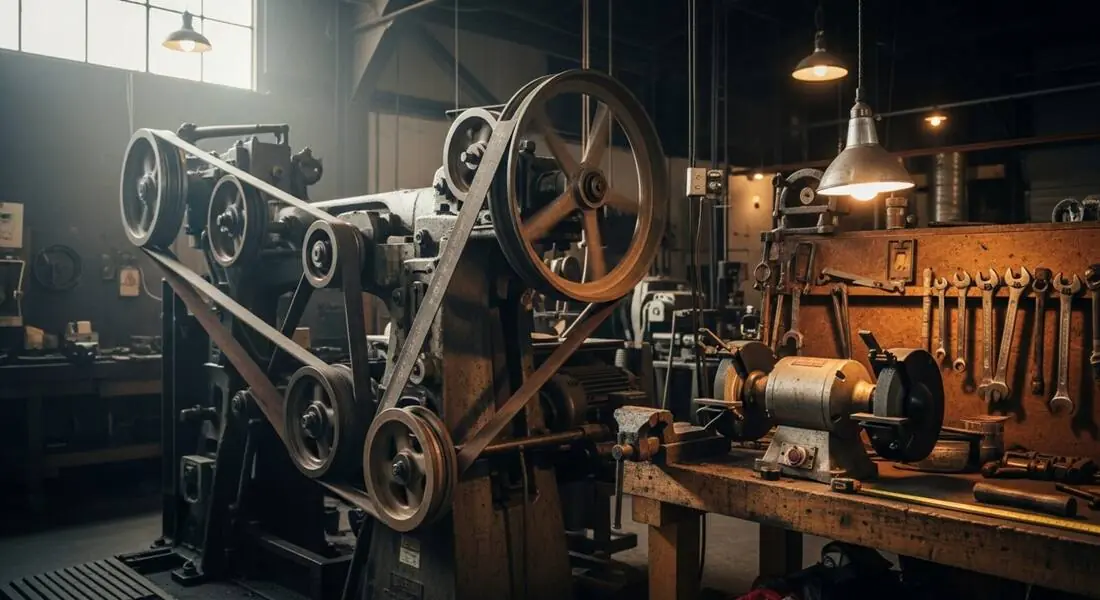
Manufacturing plants generate hazards continuously: a guard removed for a maintenance task and never replaced, a drum of solvent without a label, an aisle blocked by scrap material. Paper checklists depend on someone being available and disciplined enough to complete them at the end of a busy shift. A photo-based check lets a supervisor walk the floor and document what they see in the time it takes to take a few pictures.
The scanner is tuned to visible manufacturing hazards such as unguarded nip points and moving parts, lockout/tagout gaps, chemical storage and hazard communication, inadequate PPE for the visible task, and housekeeping conditions. It is not a process safety management (PSM) tool and does not evaluate covered-process compliance — that requires a qualified process safety engineer.
A useful manufacturing walkthrough maps each checklist line to the standards and procedures that apply in that facility. Typical topics include machine guarding, hazardous-energy control, hazard communication, powered industrial trucks, electrical safety, walking-working surfaces, and PPE. A visible condition can prompt follow-up, but compliance often also depends on procedures, training, maintenance records, exposure data, and employee interviews that a photo cannot supply.
Process Safety Management under 29 CFR 1910.119 is a separate, facility-specific program for covered processes involving highly hazardous chemicals above applicable thresholds. It requires document review and process analysis beyond a routine visual walkthrough. Keep the between-audits checklist focused on changing floor conditions, then route specialized findings to qualified personnel and the facility's formal compliance programs.
Run through these steps before crews start — each one covers a visible gap the AI can help you catch.
Walk each machine cell and confirm point-of-operation guards, power-transmission guards, and nip-point barriers are in place and secured — no guard removed for a maintenance task and left off. Unguarded moving parts are a serious amputation exposure and may relate to 29 CFR 1910.212.
For every cleaning, maintenance, or jam-clearing task, confirm the equipment is de-energized with a LOTO lock and a tagout tag on the disconnect. Watch for equipment running without controls during service, which may relate to 29 CFR 1910.147.
Check that every container and drum carries a legible label with hazard pictograms, that flammables are in listed safety cabinets, and that the SDS binder is accessible in the area. Unlabeled containers may relate to hazard communication under 29 CFR 1910.1200.
Verify workers wear the PPE the visible task requires — face shields at grinders, gloves, hearing protection — and that aisles, egress paths, and eyewash stations are not blocked by scrap or WIP material. These conditions may relate to 29 CFR 1910.132 and 1910.22.
Photograph the production line, machine cell, and chemical storage area and upload to OSHA Scan for an AI second pass. The scan flags visible hazards, references the OSHA standard each may relate to, and suggests a corrective action — a preliminary review a person still verifies on site. Free, no account needed (you may be asked for the free phone Access Pass).
Use the photo as supporting evidence while a person completes the full plant-floor walkthrough.
Look for missing, displaced, damaged, or bypassed guards at points of operation, nip points, rotating parts, power-transmission components, and cutting tools.
During cleaning, maintenance, or jam clearing, verify the machine-specific energy-control procedure and each authorized employee's lock; a photo alone cannot confirm isolation.
Check workplace container labels, storage compatibility, closed containers, spill controls where required, and ready employee access to safety data sheets.
Workers visible without required PPE for the task, and housekeeping conditions — scrap, spills, blocked aisles — that create slip and struck-by hazards.
This illustrative public sample of the real report interface shows visible manufacturing-floor findings, suggested actions, and checklist context.
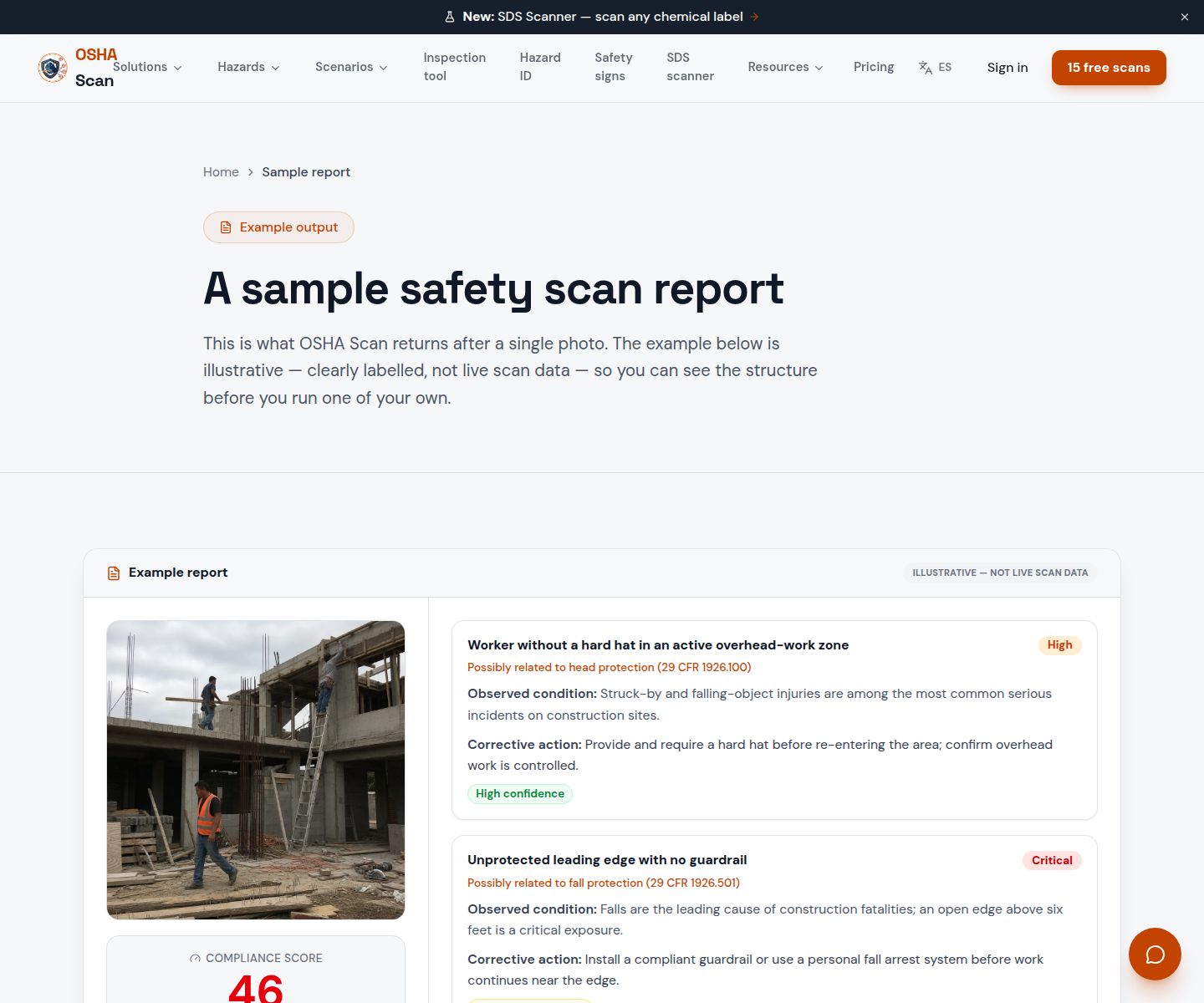
Scan a photo like the one above and this is the report you get — score, findings, OSHA references, and fixes. It is an illustrative example, clearly marked — not live scan data.
Compliance score
57
Lower means more potential hazards found
Score uses visible confirmed findings only. Not a safety certification.
2 confirmed · 0 need review · 0 positive
1Point-of-operation guard missing on a punch press
Possibly related to machine guarding (29 CFR 1910.212)
Observed condition: An unguarded point of operation can expose hands or other body parts to crushing, cutting, or amputation hazards and may violate 29 CFR 1910.212.
Corrective action: Remove the machine from service immediately, restore the guard, and do not resume operation until the guard is verified in place by the supervisor.
High confidence
2Chemical drum without a hazard label in the production area
Possibly related to hazard communication (29 CFR 1910.1200)
Observed condition: An unlabeled container means workers cannot identify the chemical, its hazards, or what PPE is needed — a fundamental HazCom violation.
Corrective action: Label the drum immediately with the chemical identity and hazard pictograms, and locate or print the SDS for the area binder.
High confidence
Upload a photo like the one above and get a compliance score and hazard count. No account needed to scan, though you may be asked for the free phone Access Pass — create a free account to unlock the full report.
Use the real site or facility name. If you save the scan after signup, it becomes the report name.
Three angles, one deeper scan
Only the wide shot is required — every extra angle gives the AI more places to look.
Required: Set the scene — one wide shot lets the AI sweep the whole area at once
Stand at the entry point and capture corner to corner: floors, ladders, scaffolds, and everyone at work
Drop a job-site photo or walkthrough video
Click to upload, drag & drop, or snap a photo on site. Photos scan free with no signup and no card — you may be asked for the free phone Access Pass. Video walkthroughs (up to 3 min) run on a free account.
Small habits, sharper scans
Set the scene
Start with context
Fill the frame
2–3 ft for close-ups; keep ladders, cords and workers fully in view.
Capture clearly
Make the frame usable
Light it right
Keep the sun or lights behind you — glare and shadows hide hazards.
Tap to focus
Tap the hazard on screen and hold still one second — blur can't be flagged.
Choose the useful view
Give the AI room to understand
Go landscape
Turn your phone sideways — a wider frame catches more of the scene.
Only upload photos you have permission to use, and avoid images showing personal, customer, or confidential information. Demo photos and results are held privately for up to 48 hours so you can save them to a free account; unclaimed photos are deleted automatically. Results are an AI-assisted preliminary review, not an official OSHA determination.
New: Video walkthrough scans
Record up to 3 minutes of your site — the AI extracts frames and categorizes findings with exact timestamps. Free account required.
Get the best results
Wide shot first
Stand at the entrance and photograph the entire work area so AI sees the full context
Hazard areas
Photograph elevated surfaces, equipment, electrical panels, and anywhere workers are active
Close-ups last
Move in close on anything damaged, missing, or that looks risky — the AI catches more detail
Walk production lines, machine cells, chemical storage, and maintenance areas with these points. The first four are free — create a free account to unlock the full checklist and scan your own manufacturing photos.
Free checklist — 12 points
Enter your email to unlock the full checklist
Read the checklist here after entering your email. A free account is required to download the PDF.
One email with the checklist, one follow-up. Unsubscribe anytime.
Jump to this page's downloadable manufacturing safety checklist.
View the manufacturing checklistOSHA Scan reads a single photo. That makes it fast and easy for anyone on site — but it also means it has real limits. Here's an honest look at both.
Snap a photo of the job site, and the AI categorizes findings against OSHA standards.
Each finding includes consistent corrective actions and structured JHA outputs. Check items off as your crew resolves them.
Every inspection gets a deterministic 0-100 compliance score derived from hazard severity, so you can track sites at a glance.
A prioritization aid based on recorded findings—not a certification or a complete measure of site safety.
Generate detailed inspection reports and export data to Excel for record-keeping and stakeholders.
A qualified person must review AI-flagged items before making safety decisions. Do not replace required comprehensive safety walkthroughs with AI reports. Features, limits, and downloads depend on your account’s plan and permissions.
Illustrative AI-assisted workflows. Review the findings; they are not a compliance certification.
A scan is a fast first look, not the final word. Before treating this kind of area as safe, a competent person should still confirm:
At minimum, cover machine guarding, hazardous-energy control, chemical labels and safety data sheet access, task-specific PPE, walking-working surfaces, exits, electrical panels, powered industrial truck routes, emergency equipment, and housekeeping. Add machine- and process-specific checks from manufacturer instructions, the facility's hazard assessments, and applicable OSHA standards.
A trained supervisor or EHS representative can lead a routine walkthrough, with operators and maintenance employees contributing because they know how the equipment is actually used. Specialized reviews such as industrial hygiene sampling, machine safeguarding validation, and process safety assessments require appropriately qualified personnel.
Common plant-floor topics include machine guarding (29 CFR 1910.212), hazardous-energy control (1910.147), hazard communication (1910.1200), walking-working surfaces (1910 Subpart D), electrical safety (1910 Subpart S), PPE (1910 Subpart I), and powered industrial trucks (1910.178). The applicable list depends on the facility's equipment, materials, processes, and hazard assessments.
No. PSM audits cover covered-quantity highly hazardous chemicals, process hazard analyses, and management-of-change procedures — these require qualified process safety engineers. OSHA Scan looks at visible, general-industry safety conditions: guarding, LOTO indicators, labeling, and PPE in the photo.
Any shift supervisor or area lead can run it. The report gives a specific suggested fix for each finding in plain language, making it a practical pre-shift tool without requiring a dedicated EHS manager on every line.
Set the frequency from the facility's hazards, change rate, manufacturer instructions, past findings, and applicable standards. Many plants use shift or daily operator checks for changing conditions plus scheduled supervisor and EHS inspections. A walkthrough between formal audits does not replace any inspection interval required by a specific standard.
A Job Hazard Analysis (JHA) is a written pre-task hazard review for a specific job step. A manufacturing safety inspection checklist is a periodic walk-through of the physical workplace. OSHA Scan supports both — use it for the walk-through, and use the JHA generator for task-specific analysis before new or high-risk work.
Reviewed by OSHA Scan Editorial
This content is produced by the OSHA Scan Editorial team and reviewed with AI assistance. It is general safety information, not legal or compliance advice. OSHA Scan is an independent tool and is not affiliated with, endorsed by, or certified by OSHA or the U.S. Department of Labor.
More ways to see what an AI OSHA scan can do for your site.
The overview hub — how the scanner works and every job, site, and hazard it covers.
See location-organized scores, visible hazards, recent inspections, and corrective-action progress.
AI-powered detection of missing guards and exposed moving parts.
LOTO compliance before every maintenance and cleaning task.
Chemical labeling and SDS compliance across the plant.
Powered-industrial-truck checks for aisles where forklifts and pedestrians share the plant floor.
Build a plant SDS library by scanning chemical labels and post QR access per department.
See a complete labelled example of everything a scan returns.
Start with one lifetime use per eligible scan type — no credit card. Build JHA-ready reports and catch changing conditions sooner.
Start your free trial