
1
Set the scene
Start with context
Fill the frame
2–3 ft for close-ups; keep ladders, cords and workers fully in view.
Identify visible label and information gaps.
Use visual review to prompt checks of labels and storage, then verify the chemical inventory, SDS library, written program, and training records.
Free preliminary visual review · No account required · You may be asked for the free phone Access Pass
OSHA Scan may flag visible concerns. A photo may flag an apparently unlabeled or unreadable container, but it cannot identify unknown contents, confirm a chemical hazard classification, verify an SDS is current or accessible, or establish worker understanding.
Use the real site or facility name. If you save the scan after signup, it becomes the report name.
Three angles, one deeper scan
Only the wide shot is required — every extra angle gives the AI more places to look.
Required: Set the scene — one wide shot lets the AI sweep the whole area at once
Stand at the entry point and capture corner to corner: floors, ladders, scaffolds, and everyone at work
Drop a job-site photo or walkthrough video
Click to upload, drag & drop, or snap a photo on site. Photos scan free with no signup and no card — you may be asked for the free phone Access Pass. Video walkthroughs (up to 3 min) run on a free account.
Small habits, sharper scans
Set the scene
Start with context
Fill the frame
2–3 ft for close-ups; keep ladders, cords and workers fully in view.
Capture clearly
Make the frame usable
Light it right
Keep the sun or lights behind you — glare and shadows hide hazards.
Tap to focus
Tap the hazard on screen and hold still one second — blur can't be flagged.
Choose the useful view
Give the AI room to understand
Go landscape
Turn your phone sideways — a wider frame catches more of the scene.
Only upload photos you have permission to use, and avoid images showing personal, customer, or confidential information. Demo photos and results are held privately for up to 48 hours so you can save them to a free account; unclaimed photos are deleted automatically. Results are an AI-assisted preliminary review, not an official OSHA determination.
OSHA Scan reads a single photo. That makes it fast and easy for anyone on site — but it also means it has real limits. Here's an honest look at both.
Important Limitation: A photo may flag an apparently unlabeled or unreadable container, but it cannot identify unknown contents, confirm a chemical hazard classification, verify an SDS is current or accessible, or establish worker understanding.
OSHA's Hazard Communication Standard requires chemical hazard information to be available and understandable through labels, Safety Data Sheets, a written program, and employee information and training.
HazCom connects the chemical inventory, hazard classification, container labels, Safety Data Sheets, workplace procedures, and worker training. Employers must make the information available and understandable for the hazardous chemicals present in their work areas.
The 2024 HCS final rule took effect July 19, 2024. OSHA's January 15, 2026 extension moved the first updated deadline from January 19 to May 19, 2026 and moved other compliance dates four months; check OSHA's current notices before relying on a deadline.
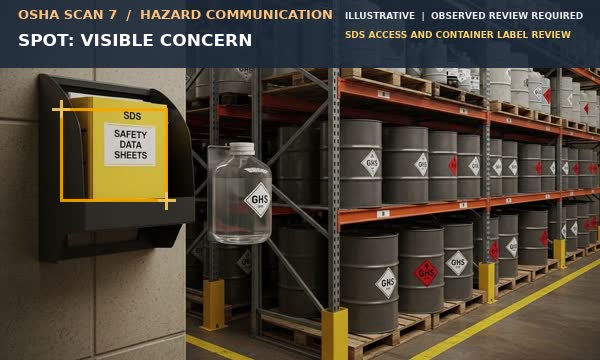
The reviewed scene shows a posted SDS cabinet and labeled chemical storage for review. Visual AI can flag visible cues, not validate the chemical program behind them.
Flag a container whose label appears missing, damaged, obscured, or unreadable; confirm the chemical identity from records.
Note whether a posted SDS cabinet or access station is visible; test availability, currency, and employee access separately.
Flag visibly incompatible or unstable storage for a qualified review; a photo cannot establish chemical compatibility or all hazards.
Record visible PPE context without inferring the correct selection, fit, use, or exposure controls.
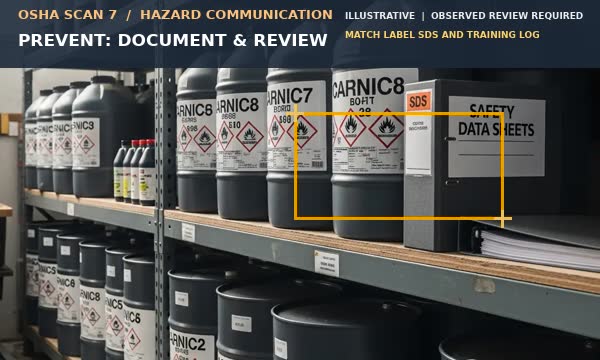
The reviewed scene shows labeled chemical containers supporting a label, SDS, and training documentation workflow.
Use product identifiers and required hazard information; confirm the narrow immediate-use exception before leaving a secondary container unlabeled.
Keep current SDSs accessible during each shift and connect them to the inventory and work areas.
Use the SDS and written program to select segregation, handling, PPE, engineering, and emergency controls.
Assign responsibility for inventory changes, new hazards, labels, SDS updates, training, and employee questions.
Train employees at initial assignment and when a new chemical hazard is introduced or the program changes.
Keep the chemical inventory, label/SDS revision and source, written-program version, access checks, training content and attendance, new-hazard notices, employee questions, inspections, and corrective-action close-out. Attach the original photo, date, location, visible observation, owner, and verification evidence.
A visual check can document the appearance of a label or storage area on a particular date. It cannot verify contents, classification, SDS completeness, or training comprehension.
Photo-based reviews support documentation. Your responsible program owner must arrange on-site verification by people with the qualifications and designated roles required for the task.
Review the cited requirements, proposals, and educational guidance separately. State plans may have additional or different requirements.
Binding general-industry requirements for hazard classification, labels, SDSs, written programs, and training.
Binding construction HazCom reference; apply the standard to the construction work and chemicals involved.
OSHA's dated extension and correction notices explain the current transition dates and technical corrections; they do not replace 1910.1200.
Educational overview linking labels, SDSs, information, and training.
Educational reference to the SDS purpose and the information workers use.
A.No. It can flag that a container appears unlabeled or unreadable, but identity, classification, concentration, and required controls must come from reliable records and the responsible employer program.
A.An SDS communicates properties, hazards, protective measures, handling, storage, and emergency information. Workers need access to the current SDSs for chemicals in their work areas.
A.Provide training at initial assignment and when a new chemical hazard is introduced, with site-specific information about the written program, labels, SDSs, and protective measures.
Reviewed by OSHA Scan Editorial
Last updated October 17, 2026
This content is produced by the OSHA Scan Editorial team and reviewed with AI assistance. It is general safety information, not legal or compliance advice. OSHA Scan is an independent tool and is not affiliated with, endorsed by, or certified by OSHA or the U.S. Department of Labor.
Upload a job site photo and let our AI act as a second set of eyes. It's free to try and requires no account, though you may be asked for the free phone Access Pass.
Analyze Hazard Communication + Free Scan