
1
Set the scene
Start with context
Fill the frame
2–3 ft for close-ups; keep ladders, cords and workers fully in view.
Most JHA software digitizes the form — dropdown steps, hazard libraries, e-signatures — and leaves the actual analysis exactly as slow as it was on paper, because a human still has to notice every hazard. OSHA Scan starts from the other end: photograph the task area on your phone, and the AI drafts the hazard list itself — each visible hazard with the OSHA standard it may relate to, why it matters, and a suggested control — then saves it as a dated, scored report with corrective-action tracking, dashboards, and PDF/Excel export. Free to try with no account (you may be asked for the free phone Access Pass); a competent person verifies every finding.
Free · No account needed to scan · You may be asked for the free phone Access Pass
The JHA software category grew up around the document: build the form faster, store it in the cloud, route it for signatures, report on completion rates. All real improvements — and none of them touch the step where JHAs actually succeed or fail, which is a person standing in a work area trying to notice everything that could hurt someone. Software that starts at the form inherits the form's dependency on whoever fills it.
Starting at the camera changes what the software automates. A supervisor photographs the task area — the aisle, the rack line, the staging zone — and the scan returns the hazard analysis core: what is visibly wrong, the OSHA standard each finding may relate to, why it matters, and what to do about it. The human effort shifts to verification and judgment, which is where it was always irreplaceable, and the part that made JHAs a Friday-afternoon chore is done before the coffee cools.
Around that core sit the software functions the category expects: every scan saved as a dated, scored report; corrective actions tracked to closure with owners; site-by-site dashboards and score trends; roles for admins, managers, and supervisors across locations; and one-click PDF or Excel export for the GC, the insurer, or the audit binder. The difference is what fills the reports — drafted findings from your actual sites, not blank fields waiting for recall.
Paper JHAs fail quietly and expensively. A thorough hazard walk for one task can cost a supervisor an hour, so on a busy US jobsite the analysis gets copied from the last job and the binder fills with paperwork that describes no real site. Then the requests arrive — a GC's safety manager wants last month's analyses, the insurance auditor wants proof of a hazard program, an OSHA compliance officer wants to see what you knew about the area where the incident happened — and someone spends a day digging through boxes.
Software earns its place by making both halves cheap: the analysis (a photo drafts the hazard list, so the form actually gets done) and the retrieval (every report is dated, scored, tied to a location, and exportable on demand). The measure of JHA software is not features — it is whether the crew that never filled out the paper form fills out this one.
Three audiences will eventually read your JHA records, and they want different things. Prequalification platforms (ISNetworld, Avetta, Veriforce) want program-level proof: that hazard analyses happen, on a schedule, with examples. Insurers and brokers want loss-control evidence — documented hazard identification and corrected findings are the story that supports your experience modification rate at renewal. And OSHA, when it visits, wants the specific record for the specific area: what was identified, when, and what was done about it.
One system that captures dated, task-specific, corrective-action-tracked reports serves all three without extra work. That is the real return on moving off paper: the record you create for the morning huddle is the same record that answers the auditor in October. PDF and Excel export means it lands in whatever format the requester demands.
Evaluate JHA software against the field, not the demo. It has to work on the phone the foreman already carries, in work gloves, in the time a pre-task huddle allows. It should speak US regulatory language — findings tied to the 1910 and 1926 standards a compliance officer or GC reviewer will recognize. It should not price per seat in a way that punishes putting it in every crew's hands, because a hazard program only the safety manager can afford to use is a paperwork program.
And it should be honest about what it automates. Software that claims to make you 'OSHA compliant' by itself is overselling — compliance lives in the conditions on the floor, not the app. What good software does is compress the drafting and the record-keeping so your competent people spend their hours verifying and fixing. Test that claim for free below: scan a photo of your own site and time how long the drafted hazard list takes.
The hazard-identification engine behind the reports — this is what it reads in a frame.
Equipment parked or operating in marked walkways, blocked aisles, and people and machines sharing unseparated space.
Leaning or unstable stacks, material against rack uprights, overloaded beams, and staging that pinches access routes.
Housekeeping, cords and hoses, floor conditions, and guards and covers in the work zone being analyzed.
Each scan grades the area 0-100, so the dashboard shows whether the same tasks are getting safer month over month.
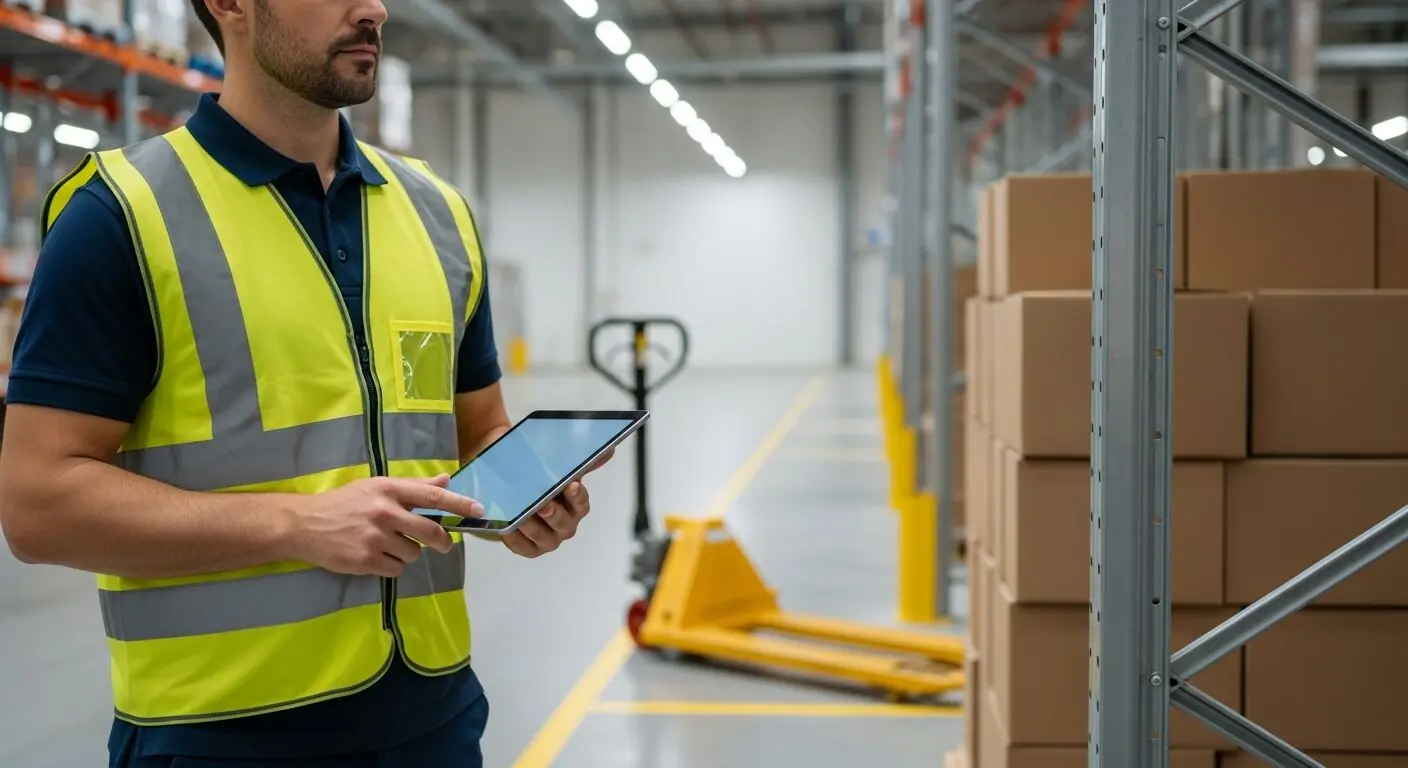
Scan a photo like the one above and this is the report you get — score, findings, OSHA references, and fixes. It is an illustrative example, clearly marked — not live scan data.
Compliance score
83
Lower means more potential hazards found
Score uses visible confirmed findings only. Not a safety certification.
2 confirmed · 0 need review · 0 positive
1Pallet jack left parked in the marked pedestrian aisle
Possibly related to keeping aisles and passageways clear (29 CFR 1910.176)
Observed condition: A pedestrian aisle exists to separate people from equipment and load traffic; a pallet jack parked in it pushes walkers out into the very traffic the marking protects them from.
Corrective action: Stage the pallet jack in its designated parking zone and make aisle clearance a named control in the material-handling JHA.
High confidence
2Boxes stacked leaning against a rack upright
Possibly related to secure storage of materials (29 CFR 1910.176)
Observed condition: A leaning stack against a rack column loads the upright sideways and can topple onto the aisle — stability of stored material is exactly what the storage step of a JHA should control.
Corrective action: Restack the boxes flat and stable on a pallet or shelf clear of the upright, and add stack-stability checks to the storage JHA step.
High confidence
Upload a photo like the one above and get a compliance score and hazard count. No account needed to scan, though you may be asked for the free phone Access Pass — create a free account to unlock the full report.
Use the real site or facility name. If you save the scan after signup, it becomes the report name.
Three angles, one deeper scan
Only the wide shot is required — every extra angle gives the AI more places to look.
Required: Set the scene — one wide shot lets the AI sweep the whole area at once
Stand at the entry point and capture corner to corner: floors, ladders, scaffolds, and everyone at work
Drop a job-site photo or walkthrough video
Click to upload, drag & drop, or snap a photo on site. Photos scan free with no signup and no card — you may be asked for the free phone Access Pass. Video walkthroughs (up to 3 min) run on a free account.
Small habits, sharper scans
Set the scene
Start with context
Fill the frame
2–3 ft for close-ups; keep ladders, cords and workers fully in view.
Capture clearly
Make the frame usable
Light it right
Keep the sun or lights behind you — glare and shadows hide hazards.
Tap to focus
Tap the hazard on screen and hold still one second — blur can't be flagged.
Choose the useful view
Give the AI room to understand
Go landscape
Turn your phone sideways — a wider frame catches more of the scene.
Only upload photos you have permission to use, and avoid images showing personal, customer, or confidential information. Demo photos and results are held privately for up to 48 hours so you can save them to a free account; unclaimed photos are deleted automatically. Results are an AI-assisted preliminary review, not an official OSHA determination.
New: Video walkthrough scans
Record up to 3 minutes of your site — the AI extracts frames and categorizes findings with exact timestamps. Free account required.
Get the best results
Wide shot first
Stand at the entrance and photograph the entire work area so AI sees the full context
Hazard areas
Photograph elevated surfaces, equipment, electrical panels, and anywhere workers are active
Close-ups last
Move in close on anything damaged, missing, or that looks risky — the AI catches more detail
What to actually test when choosing job hazard analysis software. The first four points are free — create a free account to unlock the full checklist and run your first drafted JHA.
Does it help identify hazards, or just record them?
The core test. Form builders assume the hazards are already known; analysis software should shorten the noticing — the step that consumes the hours.
Time a real JHA end to end
Photograph one of your own task areas and time photo-to-drafted-findings. Minutes versus an afternoon is the honest comparison against your current process.
Check the OSHA references on findings
Findings should point to the standard each may relate to, phrased as a lead for verification — not as a legal verdict no software can give.
Works from a phone in the field
JHAs happen where the work is. If the workflow needs a desktop, the analysis happens later, from memory — the failure mode you are buying your way out of.
OSHA Scan reads a single photo. That makes it fast and easy for anyone on site — but it also means it has real limits. Here's an honest look at both.
Snap a photo of the job site, and the AI categorizes findings against OSHA standards.
Each finding includes consistent corrective actions and structured JHA outputs. Check items off as your crew resolves them.
Every inspection gets a deterministic 0-100 compliance score derived from hazard severity, so you can track sites at a glance.
A prioritization aid based on recorded findings—not a certification or a complete measure of site safety.
Generate detailed inspection reports and export data to Excel for record-keeping and stakeholders.
A qualified person must review AI-flagged items before making safety decisions. Do not replace required comprehensive safety walkthroughs with AI reports. Features, limits, and downloads depend on your account’s plan and permissions.
Illustrative AI-assisted workflows. Review the findings; they are not a compliance certification.
A scan is a fast first look, not the final word. Before treating this kind of area as safe, a competent person should still confirm:
Traditional JHA software digitizes the worksheet: templates, hazard libraries, routing, and storage. OSHA Scan adds the analysis step itself — AI reads a photo of the task area and drafts the hazards, references, and controls — then provides the expected software layer around it: saved scored reports, corrective-action tracking, dashboards, team roles, and export.
Yes — OSHA Scan runs in the phone's browser, so the workflow is photograph, scan, review, right at the task. No install is needed, and the same account works from the office for dashboards and exports.
Nothing — upload a photo and see the score and hazard count with no account (you may be asked for the free phone Access Pass). A free account unlocks full finding-by-finding reports, one lifetime use per eligible scan type, saved history, corrective-action tracking, and export. Scan packs extend the volume when you need more.
No, and any vendor claiming otherwise is overselling. Compliance is judged on the conditions on your site and on the specific written programs individual standards require — software doesn't change either. What good software does is make the hazard-identification and record-keeping work fast enough that it actually happens, and give you the dated documentation that demonstrates good faith when OSHA, a GC, or an insurer asks.
The method works everywhere — state plans must be at least as effective as federal OSHA, and hazard identification is the core of both. Scan findings reference the federal 1910 and 1926 standards; where your state enforces a stricter or additional rule, your competent person applies the local standard on top. The dated reports serve as hazard-review documentation under any US jurisdiction.
Reviewed by OSHA Scan Editorial
This content is produced by the OSHA Scan Editorial team and reviewed with AI assistance. It is general safety information, not legal or compliance advice. OSHA Scan is an independent tool and is not affiliated with, endorsed by, or certified by OSHA or the U.S. Department of Labor.
Free PDF checklist
33 critical checks across 7 categories — the same visible gaps the AI scanner looks for. Sent to your inbox as a free PDF.
More ways to see what an AI OSHA scan can do for your site.
The overview hub — how the scanner works and every job, site, and hazard it covers.
The photo side of the workflow: site pictures that come back read.
The method the software accelerates, step by step.
The drafting engine on its own: photo in, hazards out.
The same platform framed for daily pre-task JSAs.
Staying on paper? Start the columns from a scan anyway.
The broader compliance platform around the JHA engine.
The trade analysis the software drafts panel-side.
The certification requirement JHA software must help you document: the written PPE hazard assessment.
Official resource — osha.govSee a complete labelled example of everything a scan returns.
Start with one lifetime use per eligible scan type — no credit card. Build JHA-ready reports and catch changing conditions sooner.
Start your free trial