
1
Set the scene
Start with context
Fill the frame
2–3 ft for close-ups; keep ladders, cords and workers fully in view.
JSA software succeeds or fails on one question: will the crew still be using it in week six? Digital forms that take as long as paper get abandoned back to paper. OSHA Scan makes the daily JSA start with a photo instead of a blank screen — photograph the task area, and the AI drafts the visible hazards with the OSHA standard each may relate to and a suggested control, from any phone browser. The crew verifies, the competent person signs off, and the JSA saves as a dated, scored report with tracked corrective actions and PDF/Excel export. Free to try, no account needed (you may be asked for the free phone Access Pass).
Free · No account needed to scan · You may be asked for the free phone Access Pass
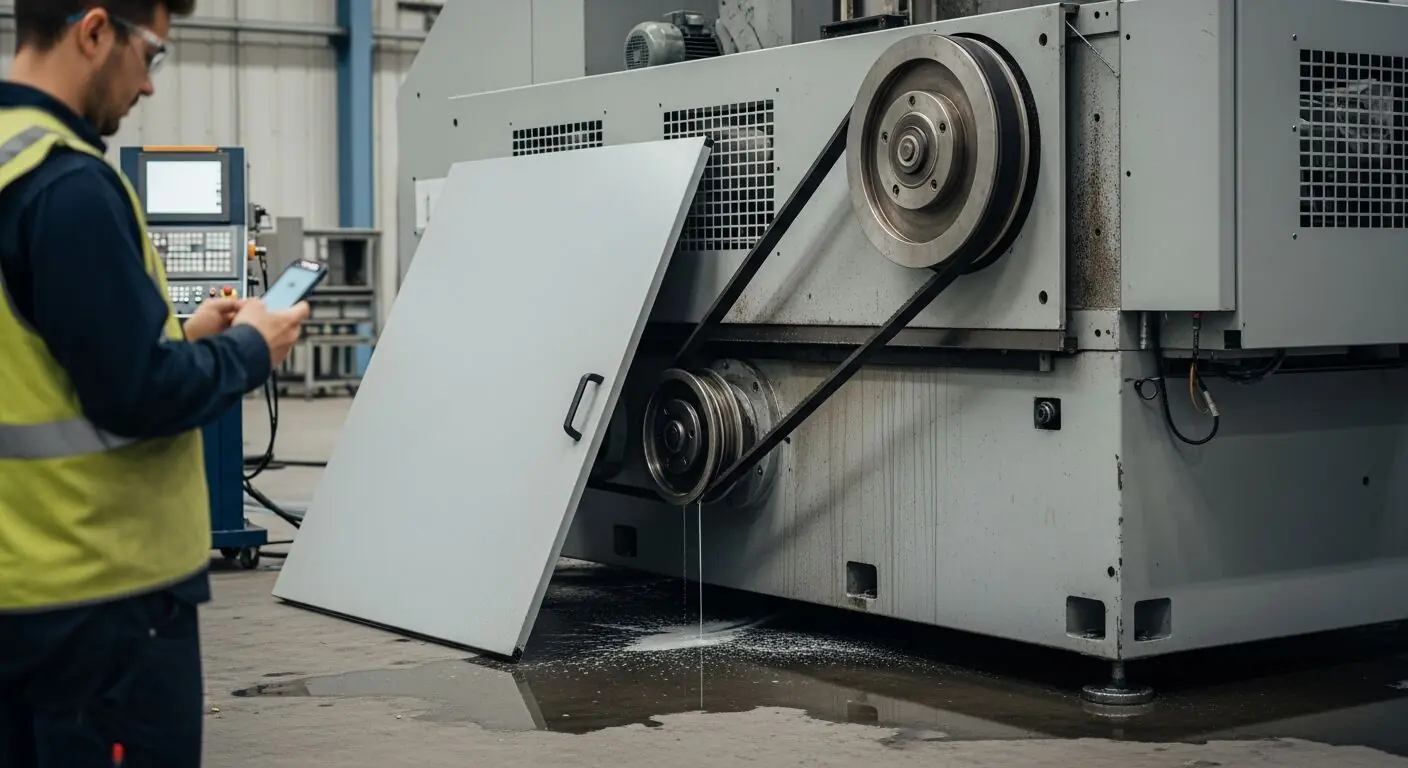
Every safety manager who has rolled out JSA software knows the adoption curve: strong first week, tapering by month two, and back to the photocopied forms by spring — because the digital version asked the foreman to do the same typing on a smaller screen. A daily-cadence document lives or dies on speed. If the software isn't faster than the shortcut, the shortcut wins.
A photo-first JSA is faster than the shortcut. The setup walk the lead already does becomes the input: photograph the machine, the line, the work zone, and the drafted hazard list is waiting before the huddle forms — the open guard leaning against the base, the coolant on the floor, each with the standard it may relate to and a control to propose. Verifying a specific list beats writing a vague one, in both minutes and quality, and that is what keeps a crew on the tool in week six.
The record side comes free with the workflow: every scan is a dated, scored report tied to the area, corrective actions carry owners and status, dashboards show the trend across lines and sites, and any report exports to PDF or Excel for the customer audit or the corporate roll-up. The JSA stops being a compliance artifact that costs time and becomes the fastest way the shift actually starts.
JSA software succeeds or dies at the huddle, not in the safety office. US field crews have watched plenty of apps arrive with training sessions and disappear by the next pay period, and the pattern is always the same: the tool added minutes to the morning instead of removing them. The adoption test is brutal and fair — if the foreman can't produce a better pre-task record in less time than the paper form took, the clipboard wins.
That is why the photo is the right front door. Taking a picture is a zero-training action every foreman already performs daily; the analysis, the standard references, and the record-keeping happen behind it. Start one crew, let the drafted hazard lists sell themselves at the huddle, and expand — the pattern that works is pull from the field, not push from the office.
A season of paper JSAs is a box. A season of scanned inspections is a database: every report dated, scored, tied to a location, with corrective actions tracked to closure. The difference shows up whenever someone outside the crew asks a question. The GC wants proof pre-task planning happened all quarter — filter and export. The broker wants loss-control evidence before renewal — the trend chart is the evidence. An incident needs the history of that work area — it is three taps, not an afternoon of digging.
Trend data also changes what the safety manager can see before an incident. Scores that drift down at one site over three weeks are a conversation to have now; paper forms in a box carry the same signal, but nobody can read it. Turning the daily JSA into structured data is what makes the safety program measurable instead of anecdotal.
Price JSA software against the loaded cost of the supervisor hour it saves, not against zero. A foreman's hour on a US commercial project costs real money, and a thorough manual hazard walk for one task can eat that hour; a photo scan compresses the identification step to one photo and a review. If the tool gets one extra task per week genuinely analyzed instead of pencil-whipped, it has paid for itself before any incident math enters the picture.
The pricing model matters as much as the number. Per-seat licensing punishes exactly the behavior a safety program wants — putting the tool in every crew's hands — which is why OSHA Scan starts free (scan a photo below, no account needed; you may be asked for the free phone Access Pass) and sells scan volume rather than seats. Every role that needs eyes on the record gets them without a license fee gating the field.
One phone photo during the setup walk — this is what comes back drafted.
Removed or open guards, exposed belts and pulleys, and panels off — the machine conditions a pre-task JSA has to catch first.
Coolant, oil, and water on the floor, hoses and cords in the walk paths, and slick zones around the equipment being worked.
Staging, adjacent traffic, blocked egress, and housekeeping in the zone where the day's task actually happens.
Because each area's scans are dated and scored, yesterday's report makes this morning's differences stand out.
Scan a photo like the one above and this is the report you get — score, findings, OSHA references, and fixes. It is an illustrative example, clearly marked — not live scan data.
Compliance score
75
Lower means more potential hazards found
Score uses visible confirmed findings only. Not a safety certification.
2 confirmed · 0 need review · 0 positive
1Machine belt guard removed and leaning against the machine base
Possibly related to machine guarding (29 CFR 1910.212)
Observed condition: An exposed belt and pulley is a caught-in point at hand height, and a guard leaning nearby usually means the machine is expected to run before it goes back on — the exact condition a pre-task JSA exists to stop.
Corrective action: Reinstall the guard before the machine returns to service, and make guard verification a named first step in the task's JSA.
High confidence
2Coolant pooled on the floor beneath the machine
Possibly related to walking-working surface conditions (29 CFR 1910.22)
Observed condition: A slick patch beside a running machine combines a slip with everything a worker might grab on the way down — and a persistent puddle points at a leak the JSA should flag for maintenance, not just a mop.
Corrective action: Clean the coolant, find and correct the leak source, and add floor-condition checks around the machine to the daily JSA.
High confidence
Upload a photo like the one above and get a compliance score and hazard count. No account needed to scan, though you may be asked for the free phone Access Pass — create a free account to unlock the full report.
Use the real site or facility name. If you save the scan after signup, it becomes the report name.
Three angles, one deeper scan
Only the wide shot is required — every extra angle gives the AI more places to look.
Required: Set the scene — one wide shot lets the AI sweep the whole area at once
Stand at the entry point and capture corner to corner: floors, ladders, scaffolds, and everyone at work
Drop a job-site photo or walkthrough video
Click to upload, drag & drop, or snap a photo on site. Photos scan free with no signup and no card — you may be asked for the free phone Access Pass. Video walkthroughs (up to 3 min) run on a free account.
Small habits, sharper scans
Set the scene
Start with context
Fill the frame
2–3 ft for close-ups; keep ladders, cords and workers fully in view.
Capture clearly
Make the frame usable
Light it right
Keep the sun or lights behind you — glare and shadows hide hazards.
Tap to focus
Tap the hazard on screen and hold still one second — blur can't be flagged.
Choose the useful view
Give the AI room to understand
Go landscape
Turn your phone sideways — a wider frame catches more of the scene.
Only upload photos you have permission to use, and avoid images showing personal, customer, or confidential information. Demo photos and results are held privately for up to 48 hours so you can save them to a free account; unclaimed photos are deleted automatically. Results are an AI-assisted preliminary review, not an official OSHA determination.
New: Video walkthrough scans
Record up to 3 minutes of your site — the AI extracts frames and categorizes findings with exact timestamps. Free account required.
Get the best results
Wide shot first
Stand at the entrance and photograph the entire work area so AI sees the full context
Hazard areas
Photograph elevated surfaces, equipment, electrical panels, and anywhere workers are active
Close-ups last
Move in close on anything damaged, missing, or that looks risky — the AI catches more detail
How to pick — and keep crews on — a digital JSA tool. The first four points are free — create a free account to unlock the full checklist and scan your own floor.
Time it against the paper form
Photograph one real task area and time photo-to-draft. If the digital JSA is not clearly faster than the clipboard, adoption will decide for you.
Phone-browser first, no install
Every install step and login screen costs field users. A tool that opens in the phone's browser at the machine wins the 6:45 test.
Drafted hazards, not empty dropdowns
Hazard libraries still make the foreman do the noticing. The draft should come from the actual photo of the actual area, ready to verify.
Standards attached to findings
Each finding should name the OSHA standard it may relate to — phrased for verification, giving the safety manager a checkable trail.
OSHA Scan reads a single photo. That makes it fast and easy for anyone on site — but it also means it has real limits. Here's an honest look at both.
Snap a photo of the job site, and the AI categorizes findings against OSHA standards.
Each finding includes consistent corrective actions and structured JHA outputs. Check items off as your crew resolves them.
Every inspection gets a deterministic 0-100 compliance score derived from hazard severity, so you can track sites at a glance.
A prioritization aid based on recorded findings—not a certification or a complete measure of site safety.
Generate detailed inspection reports and export data to Excel for record-keeping and stakeholders.
A qualified person must review AI-flagged items before making safety decisions. Do not replace required comprehensive safety walkthroughs with AI reports. Features, limits, and downloads depend on your account’s plan and permissions.
Illustrative AI-assisted workflows. Review the findings; they are not a compliance certification.
A scan is a fast first look, not the final word. Before treating this kind of area as safe, a competent person should still confirm:
Software that manages job safety analyses — the daily pre-task reviews of steps, hazards, and controls. Most tools digitize the form; OSHA Scan drafts its core instead: AI reads a photo of the task area and returns the visible hazards, the standard each may relate to, and suggested controls, saved as dated scored reports with tracked corrective actions.
OSHA Scan runs in any phone browser, which for field use works like an app without the install: photograph the area at the machine, scan, review the draft with the crew, done. Dashboards and exports work from any desktop.
It generates the draft — hazards, references, suggested controls — automatically from a photo. It deliberately does not generate the whole JSA: steps, crew input, non-visible hazards like lockout status, and sign-off belong to your competent person. Automation that skips verification isn't a JSA, it's liability with a timestamp.
Trying it is free with no account (you may be asked for the free phone Access Pass) — upload a photo and see the score and hazard count. A free account adds full reports, one lifetime use per eligible scan type, history, corrective-action tracking, and export; scan packs extend volume for daily-cadence teams.
Photos don't need coverage — take them anywhere, any time. The analysis itself runs when the phone has a connection, so on a dead-zone site the practical pattern is: photograph the work areas during setup, then upload them once you're back in signal, and each report comes back when its scan finishes. The dated record still ties each report to its photo; only the analysis step waits for coverage.
Yes — that visibility is most of the point. Reports roll up to a shared dashboard by location, with role-based access for admins, managers, and supervisors, so the safety manager sees every site's scores, findings, and open corrective actions without collecting anything. The trend view is the early-warning system: a site whose scores drift down gets a conversation before it gets an incident.
Reviewed by OSHA Scan Editorial
This content is produced by the OSHA Scan Editorial team and reviewed with AI assistance. It is general safety information, not legal or compliance advice. OSHA Scan is an independent tool and is not affiliated with, endorsed by, or certified by OSHA or the U.S. Department of Labor.
Free PDF checklist
33 critical checks across 7 categories — the same visible gaps the AI scanner looks for. Sent to your inbox as a free PDF.
More ways to see what an AI OSHA scan can do for your site.
The overview hub — how the scanner works and every job, site, and hazard it covers.
Where the JSA photos come from: site pictures that come back read.
The daily pre-task method this software speeds up.
The paper structure, and how a scan pre-fills it.
The same platform framed for formal JHA programs.
The guarding specifics behind this page's example.
The whole-site review that pairs with per-task JSAs.
The drafting engine on its own: photo in, hazards out.
The program framework a JSA workflow slots into — OSHA's own guidance on running it.
Official resource — osha.govSee a complete labelled example of everything a scan returns.
Start with one lifetime use per eligible scan type — no credit card. Build JHA-ready reports and catch changing conditions sooner.
Start your free trial