
1
Set the scene
Start with context
Fill the frame
2–3 ft for close-ups; keep ladders, cords and workers fully in view.
Automated safety reporting means the documentation is generated from the inspection itself instead of typed up afterward. With OSHA Scan, one photo produces the report: the AI analysis identifies visible hazards, references the OSHA standard each may relate to, suggests corrective actions, scores the area 0-100, and assembles it all into a saved inspection record with a corrective-action checklist — exportable as a branded PDF or Excel file. No transcription, no template-filling, no end-of-week write-up. Free to try on a photo with no account (you may be asked for the free phone Access Pass); a person verifies findings before they become the record.
Photo scan: no account needed (you may be asked for the free phone Access Pass) · Template downloads: free account required
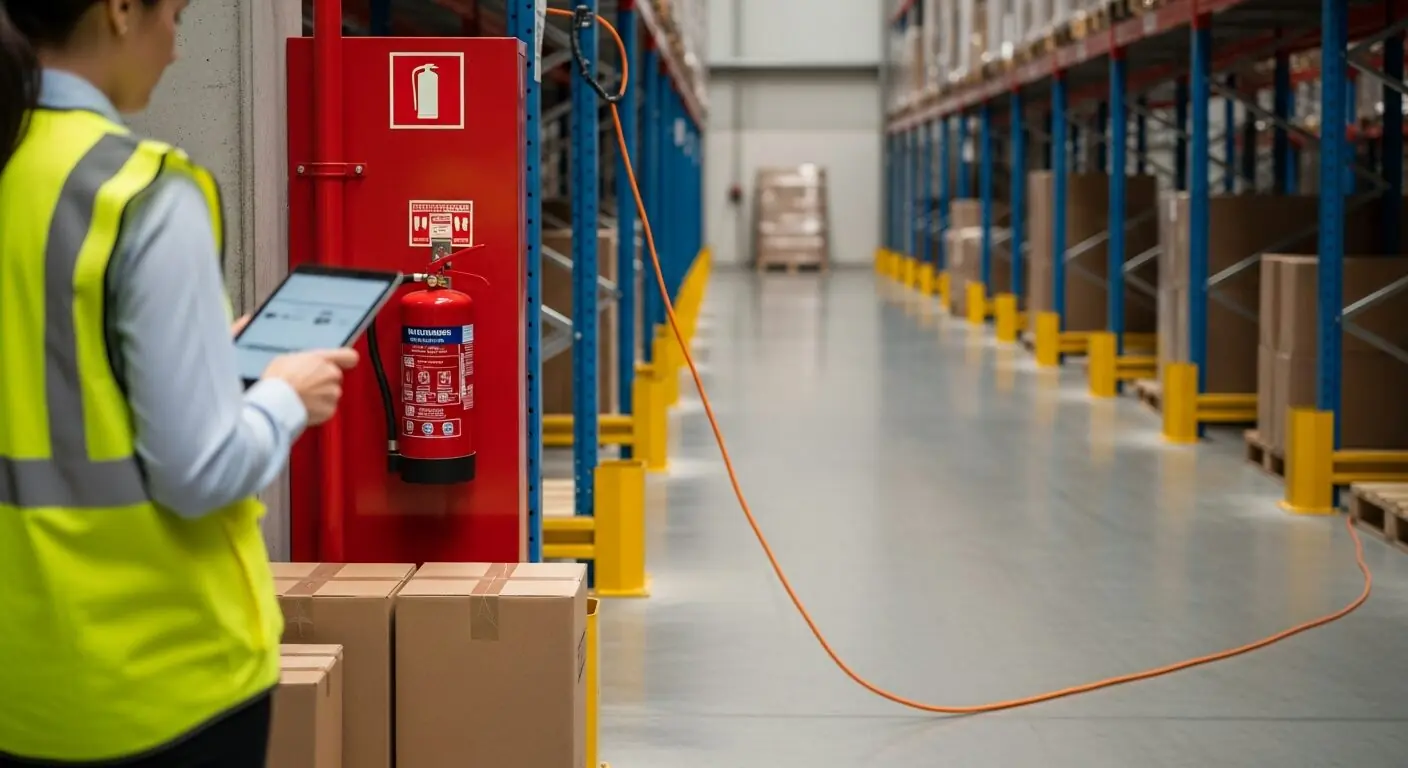
Ask any supervisor what they skip when the week gets busy, and it is never the walk — it is the write-up. The hazards get noticed; the documentation dies in a notes app. The result is a program that looks worse on paper than it is in practice: inspections that happened but left no record, corrections that were made but cannot be proven, and an audit trail with gaps exactly where the busiest weeks were.
Automating the reporting flips the ratio of effort. The photo that took two seconds is the input; the report — findings, OSHA references, severity, suggested corrections, area score — is assembled by the analysis itself. The supervisor's job shrinks to what actually requires a person: verifying findings on the floor, dismissing what does not apply, and updating checklist progress as work is completed. The record keeps the inspection and its status together.
Reports that generate themselves also standardize themselves. Every inspection captures the same fields, phrases findings the same way, and rolls into the same dashboard — so the March report is comparable to the September one regardless of who held the phone. Consistency is what makes documentation useful later, and it is precisely what hand-written reports never have.
Each scan produces a complete inspection record: the site photo, the 0-100 compliance score, every visible finding with its severity, the OSHA standard family it may relate to, why it matters, a suggested corrective action, and a confidence level. Accepted findings become a corrective-action checklist with pending or completed status, so the report remains useful as fixes are verified. Zero-hazard scans are recorded too: a dated 'no visible findings' entry is useful evidence that the area was reviewed.
Export matters as much as generation. Every report exports as a branded, sectioned PDF — meta panel, stat boxes, the photo, executive summary, findings table, corrective-action status — or as Excel for anyone who lives in spreadsheets. The version a GC, an insurer, or a corporate office asks for is one click, not one evening.
Be precise about what this automates. OSHA's formal recordkeeping obligations — the OSHA 300 log of recordable injuries, the 300A annual summary, incident reports — are a separate regime with their own criteria, and scan reports do not file or replace them. What automated inspection reporting covers is the proactive side: the hazard-identification and corrective-action documentation that OSHA's recommended practices call for, that GC prequalification questionnaires ask about, and that insurers increasingly want to see. A dated stream of inspections, findings, and closed corrections is the evidence that a safety program actually operates — and it is the part of the paperwork that automation can honestly take off your plate.
The discipline the automation cannot supply is verification. A generated finding becomes a record only after a person confirms it on the floor — and a dismissed finding with a documented reason is itself evidence of review. Keep that human step and the automated record is defensible; skip it and you have fast paperwork about unverified claims.
The compounding value arrives when reports accumulate. Because every scan is scored and dated, areas develop trend lines automatically: the dock's scores over twelve weeks, the effect of the new staging policy, the drift that started when the second shift changed. Management reviews stop being anecdote exchanges and start being chart readings. And when someone asks 'show me the program' — an auditor, a client, a lawyer — the answer is a filtered export, not an archaeology project through binders and camera rolls. That is the real promise of automated reporting: not saving typing time, but making the record complete enough to rely on.
One photo generates the full inspection record — findings, references, actions, score, and export.
Visible hazards identified, severity-rated, and referenced to the OSHA standard family each may relate to — no transcription step.
Accepted findings become a checklist with pending and completed states so verified progress stays with the report.
Branded, sectioned PDF reports and Excel exports for GCs, insurers, and corporate — generated from the record, not retyped into it.
Scored, dated reports accumulate into per-area compliance trends — drift shows up in the chart before it shows up in the incident log.
This illustrative public sample of the real report interface shows visible findings, suggested actions, score, and export-ready inspection details.
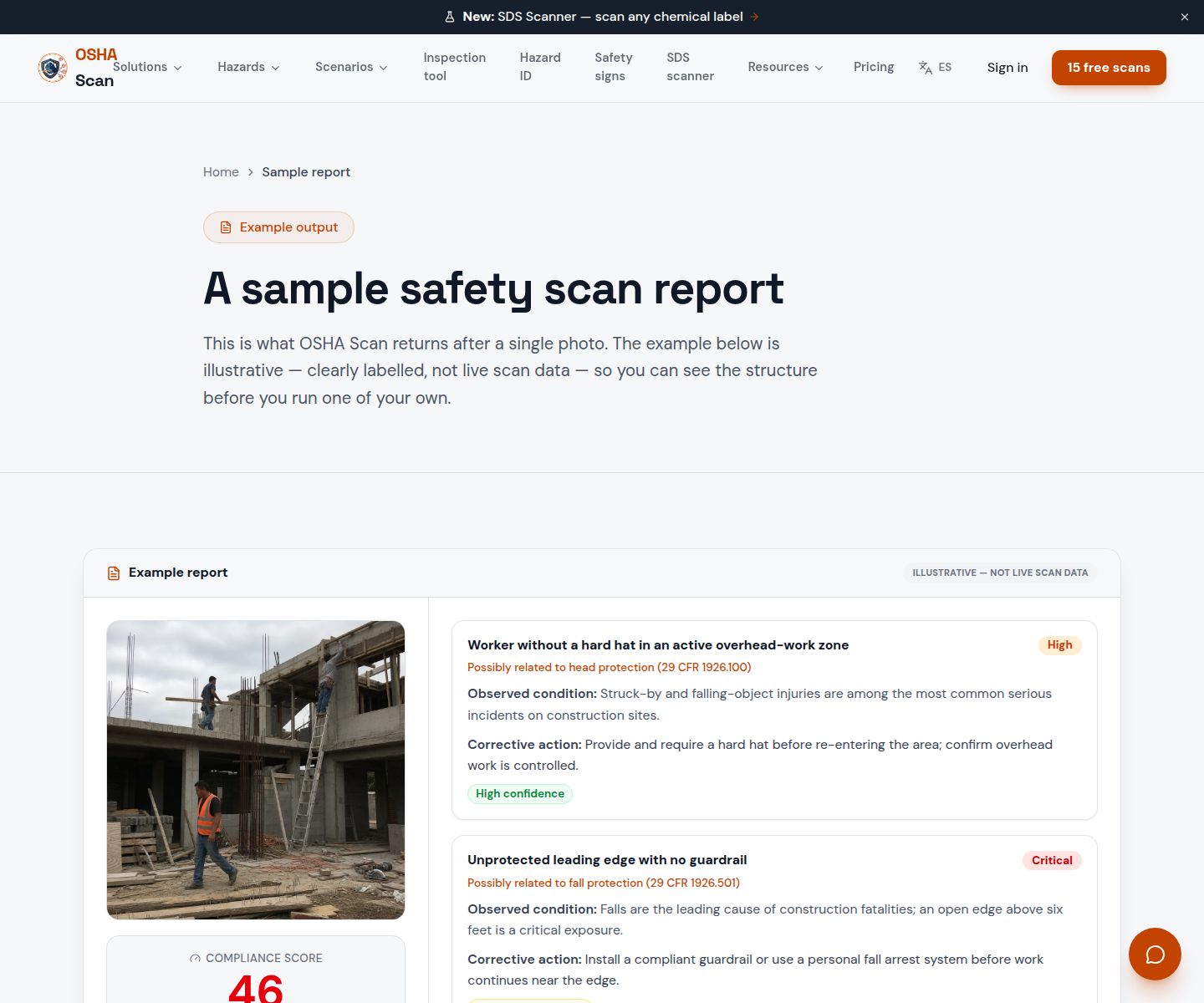
Scan a photo like the one above and this is the report you get — score, findings, OSHA references, and fixes. It is an illustrative example, clearly marked — not live scan data.
Compliance score
83
Lower means more potential hazards found
Score uses visible confirmed findings only. Not a safety certification.
2 confirmed · 0 need review · 0 positive
1Boxes stacked in front of the mounted fire extinguisher
Possibly related to portable fire extinguisher access (29 CFR 1910.157)
Observed condition: An extinguisher that takes thirty seconds to reach is not the extinguisher the fire plan assumed — access has to survive everyday staging habits, and this station is losing to them.
Corrective action: Clear the staging from the station now, mark a keep-clear zone on the floor, and check whether this aisle needs closer staging space so boxes stop migrating here.
High confidence
2Extension cord run across the pedestrian aisle
Possibly related to walking-working surfaces and cord management (29 CFR 1910.22)
Observed condition: A cord across an active aisle is a trip point for every pass and an insulation-abrasion path under every wheel — the kind of temporary fix that quietly becomes permanent.
Corrective action: Re-route the cord overhead or along the racking, or protect the crossing with a cord cover — and trace why power is being pulled across the aisle at all.
High confidence
Upload a photo like the one above and get a compliance score and hazard count. No account needed to scan, though you may be asked for the free phone Access Pass — create a free account to unlock the full report.
Use the real site or facility name. If you save the scan after signup, it becomes the report name.
Three angles, one deeper scan
Only the wide shot is required — every extra angle gives the AI more places to look.
Required: Set the scene — one wide shot lets the AI sweep the whole area at once
Stand at the entry point and capture corner to corner: floors, ladders, scaffolds, and everyone at work
Drop a job-site photo or walkthrough video
Click to upload, drag & drop, or snap a photo on site. Photos scan free with no signup and no card — you may be asked for the free phone Access Pass. Video walkthroughs (up to 3 min) run on a free account.
Small habits, sharper scans
Set the scene
Start with context
Fill the frame
2–3 ft for close-ups; keep ladders, cords and workers fully in view.
Capture clearly
Make the frame usable
Light it right
Keep the sun or lights behind you — glare and shadows hide hazards.
Tap to focus
Tap the hazard on screen and hold still one second — blur can't be flagged.
Choose the useful view
Give the AI room to understand
Go landscape
Turn your phone sideways — a wider frame catches more of the scene.
Only upload photos you have permission to use, and avoid images showing personal, customer, or confidential information. Demo photos and results are held privately for up to 48 hours so you can save them to a free account; unclaimed photos are deleted automatically. Results are an AI-assisted preliminary review, not an official OSHA determination.
New: Video walkthrough scans
Record up to 3 minutes of your site — the AI extracts frames and categorizes findings with exact timestamps. Free account required.
Get the best results
Wide shot first
Stand at the entrance and photograph the entire work area so AI sees the full context
Hazard areas
Photograph elevated surfaces, equipment, electrical panels, and anywhere workers are active
Close-ups last
Move in close on anything damaged, missing, or that looks risky — the AI catches more detail
How to set up reporting that maintains itself — and stays defensible. First four points free; a free account unlocks the rest plus your own generated reports.
Make the photo the report's starting point
If documentation starts from the picture, it starts complete — the frame carries the evidence the write-up used to paraphrase.
Scan on a cadence, not a mood
Weekly per area beats monthly site-wide. Automated assembly makes frequency nearly free — use it to close the gaps between formal inspections.
Verify before the report becomes the record
Generated findings are drafts. The floor check — confirm, dismiss with a reason, or escalate — is what makes the record defensible.
Record zero-finding scans too
A dated clean scan of an area is evidence the program looked — exactly what is missing when incidents happen in 'fine' areas.
Blank template
Track every open finding until someone verifies the fix. One row per finding; nothing closes without a verification note.
Download formats
Free account required
Non-English documents are automated translations, not official OSHA translations. Citations, limits and names are kept as written.
Non-English documents are automated translations, not official OSHA translations. Citations, limits and names are kept as written.
OSHA Scan template — record fields, not legal requirements. Not an official government form.
See the public report example before scanning a workplace photo.
View sample reportOSHA Scan reads a single photo. That makes it fast and easy for anyone on site — but it also means it has real limits. Here's an honest look at both.
Snap a photo of the job site, and the AI categorizes findings against OSHA standards.
Each finding includes consistent corrective actions and structured JHA outputs. Check items off as your crew resolves them.
Every inspection gets a deterministic 0-100 compliance score derived from hazard severity, so you can track sites at a glance.
A prioritization aid based on recorded findings—not a certification or a complete measure of site safety.
Generate detailed inspection reports and export data to Excel for record-keeping and stakeholders.
A qualified person must review AI-flagged items before making safety decisions. Do not replace required comprehensive safety walkthroughs with AI reports. Features, limits, and downloads depend on your account’s plan and permissions.
Illustrative AI-assisted workflows. Review the findings; they are not a compliance certification.
A scan is a fast first look, not the final word. Before treating this kind of area as safe, a competent person should still confirm:
The report is generated from the inspection input — a photo — instead of written up afterward. The AI identifies visible hazards, references the OSHA standard each may relate to, suggests corrections, scores the area, and assembles a saved inspection record with a corrective-action checklist, exportable as PDF or Excel. The human work becomes verification and follow-up, not typing.
No — and any tool that implies otherwise is overselling. The OSHA 300/300A injury and illness logs are a separate formal obligation with their own criteria. Automated inspection reporting covers the proactive documentation side: hazard identification, corrective actions, and the dated inspection trail that OSHA's recommended practices, GC prequalification, and insurers look for.
Branded, sectioned PDF — meta panel, score stats, site photo, executive summary, findings table, corrective-action status — and Excel for spreadsheet workflows. Both are generated from the saved record in one click.
Accepted findings become checklist items on the inspection record with pending or completed status. A follow-up scan from a similar viewpoint can add dated evidence that visible conditions changed.
The generation is fast; the reliability comes from the built-in verification step. Findings carry confidence levels, a person confirms or dismisses each one on the floor, and dismissals record a reason. Verified findings plus documented review is what makes an automated record defensible.
Yes — upload a photo and see the score and hazard count with no account (you may be asked for the free phone Access Pass). A free account unlocks the full report generation with OSHA references and corrective actions, one lifetime use per eligible scan type, saved history, and PDF export.
Reviewed by OSHA Scan Editorial
This content is produced by the OSHA Scan Editorial team and reviewed with AI assistance. It is general safety information, not legal or compliance advice. OSHA Scan is an independent tool and is not affiliated with, endorsed by, or certified by OSHA or the U.S. Department of Labor.
Free PDF checklist
33 critical checks across 7 categories — the same visible gaps the AI scanner looks for. Sent to your inbox as a free PDF.
More ways to see what an AI OSHA scan can do for your site.
The overview hub — how the scanner works and every job, site, and hazard it covers.
Move accepted findings from pending to completed while keeping them with the saved inspection.
See inspection scores, dated trends, hazards, locations, and checklist progress together.
Which compliance work automates honestly — and which never will.
The buyer's guide to compliance tools, and where photo-first fits.
What the AI extracts from a single workplace picture.
How the 0-100 score builds trend lines across reports.
The manual checklist your automated reports replace retyping of.
The report structure the scan fills in for you, section by section.
OSHA's official recordkeeping requirements — the formal 300-log regime that sits alongside, and is not replaced by, automated inspection reporting.
Official resource — osha.govSee a complete labelled example of everything a scan returns.
Start with one lifetime use per eligible scan type — no credit card. Build JHA-ready reports and catch changing conditions sooner.
Start your free trial