
1
Set the scene
Start with context
Fill the frame
2–3 ft for close-ups; keep ladders, cords and workers fully in view.
Keep visible paths and response roles ready.
Use visual review to prompt egress and equipment checks, then verify the written plan, alarms, roles, drills, accessibility, and accountability process.
Free preliminary visual review · No account required · You may be asked for the free phone Access Pass
OSHA Scan may flag visible concerns. A photo may flag a blocked route, obscured sign, or inaccessible equipment, but it cannot verify alarm audibility, emergency lighting, plan currency, headcounts, employee readiness, or system function.
Use the real site or facility name. If you save the scan after signup, it becomes the report name.
Three angles, one deeper scan
Only the wide shot is required — every extra angle gives the AI more places to look.
Required: Set the scene — one wide shot lets the AI sweep the whole area at once
Stand at the entry point and capture corner to corner: floors, ladders, scaffolds, and everyone at work
Drop a job-site photo or walkthrough video
Click to upload, drag & drop, or snap a photo on site. Photos scan free with no signup and no card — you may be asked for the free phone Access Pass. Video walkthroughs (up to 3 min) run on a free account.
Small habits, sharper scans
Set the scene
Start with context
Fill the frame
2–3 ft for close-ups; keep ladders, cords and workers fully in view.
Capture clearly
Make the frame usable
Light it right
Keep the sun or lights behind you — glare and shadows hide hazards.
Tap to focus
Tap the hazard on screen and hold still one second — blur can't be flagged.
Choose the useful view
Give the AI room to understand
Go landscape
Turn your phone sideways — a wider frame catches more of the scene.
Only upload photos you have permission to use, and avoid images showing personal, customer, or confidential information. Demo photos and results are held privately for up to 48 hours so you can save them to a free account; unclaimed photos are deleted automatically. Results are an AI-assisted preliminary review, not an official OSHA determination.
OSHA Scan reads a single photo. That makes it fast and easy for anyone on site — but it also means it has real limits. Here's an honest look at both.
Important Limitation: A photo may flag a blocked route, obscured sign, or inaccessible equipment, but it cannot verify alarm audibility, emergency lighting, plan currency, headcounts, employee readiness, or system function.
An Emergency Action Plan organizes reporting, evacuation, routes, accountability, critical-operation shutdown, rescue or medical duties, and employee training for reasonably expected workplace emergencies.
An EAP turns foreseeable emergency scenarios into clear reporting, alarm, evacuation or shelter, route, accountability, shutdown, rescue, medical, and communication actions. OSHA recommends an EAP for all employers; particular standards determine when one is required.
General-industry 1910.38 requires a written plan kept at the workplace and available for review when the standard applies; employers with 10 or fewer employees may communicate it orally. Construction 1926.35 has additional plan and training provisions.
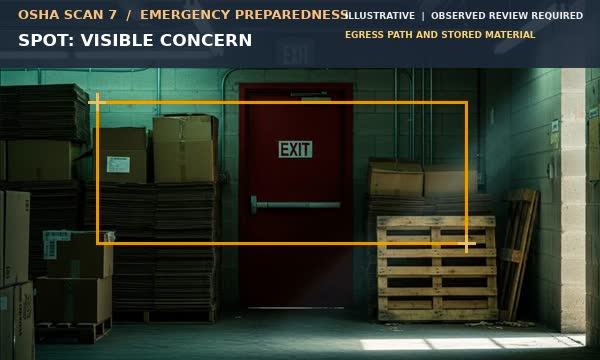
The reviewed scene shows stored material near an exit route. Visual review can flag an obstruction for immediate housekeeping and plan review, but it cannot verify the complete life-safety system.
Flag stored material, equipment, or clutter that appears to narrow or obstruct an exit route or door.
Note obscured or missing visible signage and route information; verify the plan and accessibility separately.
Flag an extinguisher, alarm, first-aid point, or communication device that appears blocked or inaccessible.
Use the image to prompt the appropriate emergency scenario and responsible-person review, not to predict response performance.
The reviewed scene shows a guided evacuation scene supporting a drill, roster, and route-documentation workflow.
Use housekeeping, route markings, accessible doors, and routine inspections to maintain an unobstructed path.
Test and maintain systems through the responsible program; a photo cannot verify audibility or function.
Name responsible people, assembly locations, headcount methods, shutdown roles, and support for people needing assistance.
Run drills or exercises appropriate to the hazards, capture lessons, and revise the plan when conditions change.
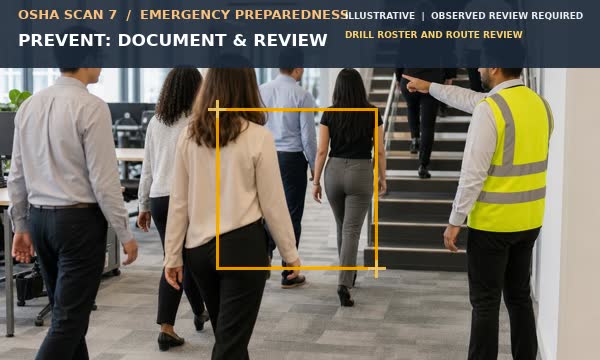
Before implementation, designate and train people to assist orderly evacuation; review each employee's relevant duties on initial assignment and when the plan changes.
Keep the plan version, hazard/scenario assessment, contacts, maps, routes, alarm and communication tests, training and drill attendance, accountability results, shutdown/rescue roles, equipment inspections, lessons learned, and corrective close-out. Attach dated photos only to document visible conditions.
A photo cannot prove alarm audibility, emergency-light performance, route capacity, headcount success, plan currency, or employee readiness. Verify those through inspection, testing, drills, and records.
Photo-based reviews support documentation. Your responsible program owner must arrange on-site verification by people with the qualifications and designated roles required for the task.
Review the cited requirements, proposals, and educational guidance separately. State plans may have additional or different requirements.
Binding general-industry EAP requirements when a Part 1910 standard requires one, including minimum plan elements and training review.
Binding construction EAP and employee training provisions when an applicable standard requires a plan.
Binding general-industry physical requirements for exit routes.
Binding general-industry exit-route maintenance and safeguards.
Educational planning guidance; OSHA recommends EAPs for all employers while specific standards determine when one is required.
A.OSHA recommends an EAP for all employers, but 1910.38 applies when a Part 1910 standard requires one. Employers with 10 or fewer employees may communicate a required plan orally under 1910.38; check construction and other applicable standards.
A.No. It can flag visible obstruction or access issues, but cannot verify route requirements, alarm or lighting function, extinguisher condition, or emergency readiness.
A.Record the plan/version, scenario, time, routes, attendance and accountability, role performance, accessibility needs, communications, lessons, and corrective actions.
Reviewed by OSHA Scan Editorial
Last updated October 17, 2026
This content is produced by the OSHA Scan Editorial team and reviewed with AI assistance. It is general safety information, not legal or compliance advice. OSHA Scan is an independent tool and is not affiliated with, endorsed by, or certified by OSHA or the U.S. Department of Labor.
Upload a job site photo and let our AI act as a second set of eyes. It's free to try and requires no account, though you may be asked for the free phone Access Pass.
Analyze Emergency Preparedness + Free Scan