
1
Set the scene
Start with context
Fill the frame
2–3 ft for close-ups; keep ladders, cords and workers fully in view.
Form 300A, the Summary of Work-Related Injuries and Illnesses, totals your OSHA 300 log for the year. Every employer that keeps a 300 log must complete it, have a company executive certify it, and post it where employee notices go from February 1 to April 30 — even in a year with zero recordable cases. Some establishments must also submit the summary electronically to OSHA by March 2. In a signed-in account, OSHA Scan's injury log totals the 300A from each site's log and prints it in English and Spanish; a company executive still certifies it, and you post it and submit any data to OSHA yourself. Its photo scans check your work areas, including the break room where the summary hangs, for visible hazards like blocked extinguishers and cords near wet floors. The free checklist below covers each step from review to posting.
Photo scan: no account needed (you may be asked for the free phone Access Pass) · Template downloads: free account required
The 300A is short — a page of totals, establishment details, and a signature — which is exactly why it gets rushed. The common mistakes are predictable: totals copied from a log nobody reviewed, hours worked that include vacation and holiday pay, a signature from someone who doesn't qualify as a company executive, or a summary that goes up late, comes down early, or ends up covered by newer notices. The rule asks for more than a form on the wall: review the log first, certify that you reasonably believe the totals are correct and complete, and keep the summary posted and legible from February 1 through April 30.
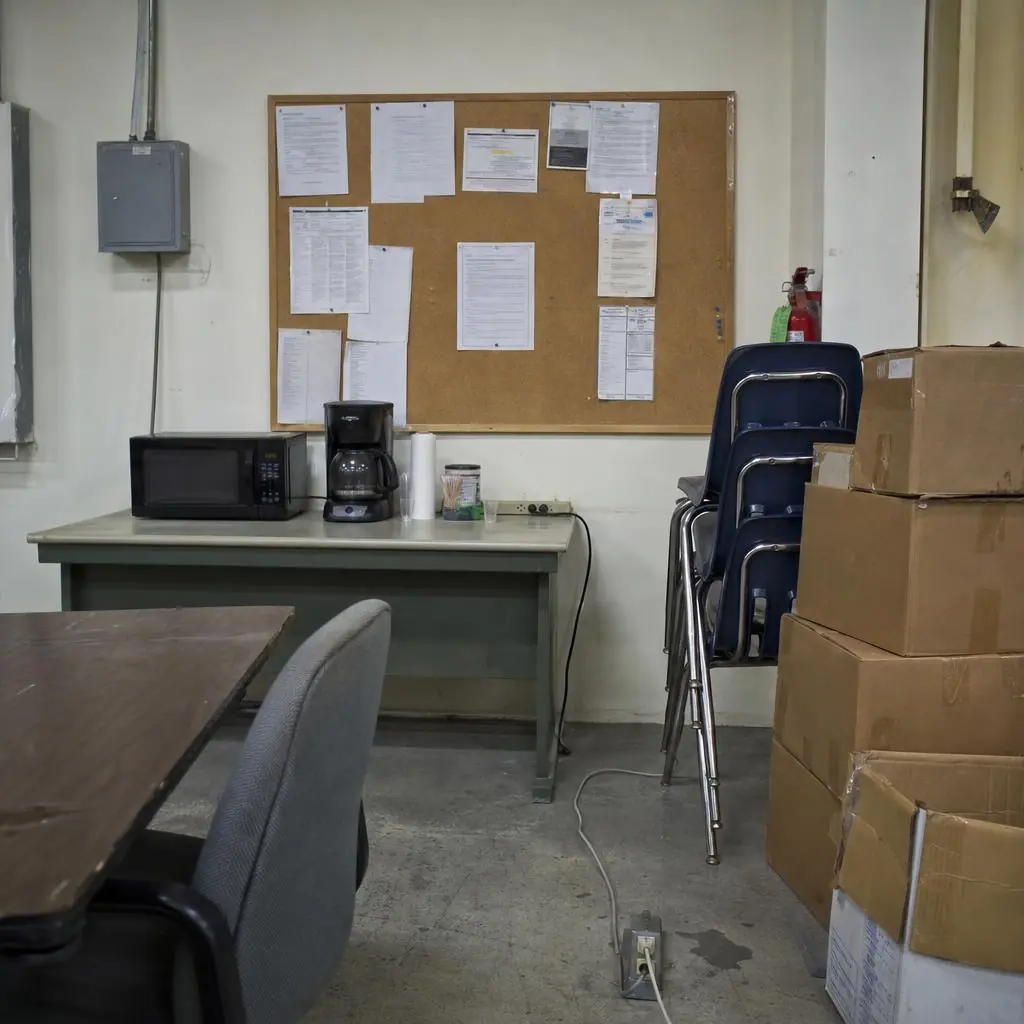
The summary also tells you where to look next. A year of days-away cases from slips in the same building, or strains on the same line, points to the conditions you should be checking every week. The photo scan works separately from the summary. It reviews photos of the areas behind the numbers — and, in this example, the break room where the summary is posted, where the extinguisher sits behind stacked chairs and boxes and a power strip lies on the floor next to a wet spot.
The 300A turns a year of cases into a few numbers, and those numbers become rates. The total recordable incident rate (TRIR) is total recordable cases multiplied by 200,000 and divided by total hours worked; the DART rate uses only days-away and job transfer or restriction cases. As an illustration of the math, an establishment with 4 recordable cases and 180,000 hours worked has a TRIR of about 4.4. The Bureau of Labor Statistics publishes industry rates by NAICS code, so customers and insurers can see how your rate compares — which is why the hours figure matters. Paid vacation, sick leave, and holidays don't count as hours worked, and padding the denominator lowers the rate on paper without making anyone safer.
OSHA reads the same data. Electronically submitted 300A summaries have been used to help select establishments for programmed inspections, and a compliance officer on site will compare the posted summary against the log behind it. A summary certified without a real review, a missing posting at one of several locations, or totals that don't match the log all suggest the records weren't taken seriously. The fix is a short January routine — review, total, certify, post, submit if covered — and a year-round habit of inspecting the places where last year's cases happened.
Run through these steps before crews start — each one covers a visible gap the AI can help you catch.
Before totaling anything, check each case on last year's 300 log for recordability, classification, and day counts, and fix errors or missing cases.
Enter the number of deaths, days-away cases, job transfer or restriction cases, and other recordable cases, the total days away and days restricted, and the totals for each injury and illness type.
Use the 300A worksheet: the annual average number of employees is the total number paid in all pay periods divided by the number of pay periods, and hours worked leaves out vacation, sick leave, and holidays.
The owner of a sole proprietorship or partnership, a corporate officer, the highest-ranking official at the establishment, or that person's immediate supervisor reviews and signs the summary.
Post the certified summary where employee notices go from February 1 to April 30, submit it through OSHA's Injury Tracking Application by March 2 if your establishment is covered, and keep it for five years.
The 300A summarizes last year. A photo scan checks the areas behind those numbers today — including the room where the summary itself is posted.
Extinguishers, exits, and alarm pulls blocked by chairs, boxes, or storage — conditions that are easy to miss in a room people use every day.
Power strips on the floor, cords across walkways, and spills near outlets — shock and slip exposures in a single spot.
Boxes and furniture crowding aisles, doors, and the path to emergency equipment.
Each scan is time-stamped, so the fixes you make between one summary and the next are documented with a date.
Scan a photo like the one above and this is the report you get — score, findings, OSHA references, and fixes. It is an illustrative example, clearly marked — not live scan data.
Compliance score
72
Lower means more potential hazards found
Score uses visible confirmed findings only. Not a safety certification.
3 confirmed · 0 need review · 0 positive
1Fire extinguisher hidden behind stacked chairs and boxes
Possibly related to portable fire extinguisher access (29 CFR 1910.157(c)(1))
Observed condition: In a fire, nobody has time to move a stack of chairs; an extinguisher has to be readily accessible and easy to spot.
Corrective action: Move the chairs and boxes away from the extinguisher, keep the space in front of it clear, and mark it so it stays visible.
High confidence
2Power strip lying on the floor next to a wet spot
Possibly related to electrical equipment hazards and floor condition (29 CFR 1910.303(b)(1) and 1910.22(a))
Observed condition: Water near energized equipment adds a shock exposure to the slip hazard, and a floor-level power strip is easy to kick, step on, or soak.
Corrective action: Clean up the water and find its source, unplug the floor-level strip, and mount power where it stays off the floor and away from liquids.
High confidence
3Notices on the board can't be read in the photo — the 300A posting needs a human check
Possibly related to annual summary posting (29 CFR 1904.32(b)(5)–(6))
Observed condition: From February 1 to April 30, the certified 300A has to hang where employee notices go. A photo can't confirm which papers are posted, so this is flagged for review, not as a violation.
Corrective action: During the posting window, confirm last year's certified 300A is on this board, legible, and not covered by newer notices.
Low confidenceNot fully clear from the photo — verify on site.
Upload a photo like the one above and get a compliance score and hazard count. No account needed to scan, though you may be asked for the free phone Access Pass — create a free account to unlock the full report.
Use the real site or facility name. If you save the scan after signup, it becomes the report name.
Three angles, one deeper scan
Only the wide shot is required — every extra angle gives the AI more places to look.
Required: Set the scene — one wide shot lets the AI sweep the whole area at once
Stand at the entry point and capture corner to corner: floors, ladders, scaffolds, and everyone at work
Drop a job-site photo or walkthrough video
Click to upload, drag & drop, or snap a photo on site. Photos scan free with no signup and no card — you may be asked for the free phone Access Pass. Video walkthroughs (up to 3 min) run on a free account.
Small habits, sharper scans
Set the scene
Start with context
Fill the frame
2–3 ft for close-ups; keep ladders, cords and workers fully in view.
Capture clearly
Make the frame usable
Light it right
Keep the sun or lights behind you — glare and shadows hide hazards.
Tap to focus
Tap the hazard on screen and hold still one second — blur can't be flagged.
Choose the useful view
Give the AI room to understand
Go landscape
Turn your phone sideways — a wider frame catches more of the scene.
Only upload photos you have permission to use, and avoid images showing personal, customer, or confidential information. Demo photos and results are held privately for up to 48 hours so you can save them to a free account; unclaimed photos are deleted automatically. Results are an AI-assisted preliminary review, not an official OSHA determination.
New: Video walkthrough scans
Record up to 3 minutes of your site — the AI extracts frames and categorizes findings with exact timestamps. Free account required.
Get the best results
Wide shot first
Stand at the entrance and photograph the entire work area so AI sees the full context
Hazard areas
Photograph elevated surfaces, equipment, electrical panels, and anywhere workers are active
Close-ups last
Move in close on anything damaged, missing, or that looks risky — the AI catches more detail
From reviewing the log to taking the summary down on April 30. The first four are free — create a free account to unlock the rest and scan your own work areas for the hazards behind your totals.
Review the 300 log before you total it
Check each case's recordability, classification, and day counts, and correct anything missing or wrong before the numbers go on the summary.
Carry every total onto Form 300A
Deaths, days-away cases, job transfer or restriction cases, other recordable cases, total days away, total days of transfer or restriction, and each injury and illness type.
Fill in the establishment information
Name, address, industry description and NAICS code, the annual average number of employees, and total hours worked by all employees last year — leaving out vacation, sick leave, and holidays.
Complete it even with zero cases
A year with no recordable cases still needs a summary: enter zeros on the total line, certify it, and post it.
Free printable templatePDF · US Letter
Use this form when you prepare, certify, post, and submit the annual summary. It is a review aid, not Form 300A: enter the totals only on the OSHA form or an equivalent form.
On the form
A free account is required to download it.
Non-English documents are automated translations, not official OSHA translations. Citations, limits and names are kept as written.
OSHA Scan template — not an official government form and not legal advice.
The injury log totals the summary from your 300 log, records the executive's certification, reminds you about the February 1 to April 30 posting window, and prints the 300A in English and Spanish. Your executive certifies it, and you post and submit it yourself. A free account includes on-screen use and one form download.
Start your injury log freeOSHA Scan reads a single photo. That makes it fast and easy for anyone on site — but it also means it has real limits. Here's an honest look at both.
Snap a photo of the job site, and the AI categorizes findings against OSHA standards.
Each finding includes consistent corrective actions and structured JHA outputs. Check items off as your crew resolves them.
Every inspection gets a deterministic 0-100 compliance score derived from hazard severity, so you can track sites at a glance.
A prioritization aid based on recorded findings—not a certification or a complete measure of site safety.
Generate detailed inspection reports and export data to Excel for record-keeping and stakeholders.
A qualified person must review AI-flagged items before making safety decisions. Do not replace required comprehensive safety walkthroughs with AI reports. Features, limits, and downloads depend on your account’s plan and permissions.
Illustrative AI-assisted workflows. Review the findings; they are not a compliance certification.
A scan is a fast first look, not the final word. Before treating this kind of area as safe, a competent person should still confirm:
From February 1 through April 30 of the year after the year the records cover (29 CFR 1904.32(b)(6)). Post it at each establishment in a conspicuous place where notices to employees are customarily posted, and make sure it isn't altered, defaced, or covered by other material during those three months.
A company executive: an owner of the company (only if it is a sole proprietorship or partnership), an officer of the corporation, the highest-ranking company official working at the establishment, or that person's immediate supervisor (29 CFR 1904.32(b)(4)). By signing, the executive certifies that they examined the records and reasonably believe, based on their knowledge of how the information was recorded, that the summary is correct and complete.
Yes. If no recordable injuries or illnesses occurred during the year, you still complete the 300A, enter zeros on the total line, have it certified, and post it from February 1 to April 30. A posted zero-case summary tells employees the records exist and were reviewed.
Under 29 CFR 1904.41, establishments with 250 or more employees that must keep injury records, and establishments with 20 to 249 employees in designated industries, submit their 300A data through OSHA's Injury Tracking Application by March 2 each year. Establishments with 100 or more employees in certain designated high-hazard industries must also submit information from their 300 and 301 forms. Check OSHA's injury reporting page for the current industry lists before assuming you're exempt.
It fills in the totals, but it never certifies, posts, or submits anything. The injury log in a signed-in OSHA Scan account totals the 300A from each site's 300 log, collects the average number of employees and total hours worked, records the name, title, and date the executive gives when certifying, and prints the summary in English and Spanish. It also prepares a CSV file in the upload layout OSHA's Injury Tracking Application uses. A company executive still certifies the summary, you post it from February 1 to April 30, and you upload any required data on osha.gov yourself. OSHA Scan is not affiliated with OSHA, and it can't tell whether your summary is posted; that check stays with you. Separately, its photo scans flag visible hazards — like the blocked extinguisher and floor-level power strip in the example above — with a possibly related standard and a corrective action.
Reviewed by OSHA Scan Editorial
This content is produced by the OSHA Scan Editorial team and reviewed with AI assistance. It is general safety information, not legal or compliance advice. OSHA Scan is an independent tool and is not affiliated with, endorsed by, or certified by OSHA or the U.S. Department of Labor.
More ways to see what an AI OSHA scan can do for your site.
The overview hub — how the scanner works and every job, site, and hazard it covers.
The running log your 300A totals — who keeps it and how to fill out each column.
The case-by-case report behind every line of the log.
The test that decides which cases count in your totals.
The written programs, postings, and records a site is expected to keep.
Where covered establishments submit 300A data, with the current industry lists and deadlines.
Official resource — osha.govSee a complete labelled example of everything a scan returns.
Start with one lifetime use per eligible scan type — no credit card. Build JHA-ready reports and catch changing conditions sooner.
Start your free trial