
1
Set the scene
Start with context
Fill the frame
2–3 ft for close-ups; keep ladders, cords and workers fully in view.
DANGER, WARNING, and CAUTION are signal words that rank how serious a hazard is. Under OSHA's sign rule, 29 CFR 1910.145, danger signs are only for immediate hazards and caution signs are for potential hazards or unsafe practices — the rule has no WARNING sign class. WARNING comes from ANSI Z535.2, the voluntary consensus standard: DANGER (red) marks a hazard that will cause death or serious injury if not avoided, WARNING (orange) one that could, and CAUTION (yellow) one that could cause minor or moderate injury. In construction, 29 CFR 1926.200 accepts the Z535.2-2011 designs. OSHA Scan does not rate your signs. It scans photos for hazards whose warning is weaker than the risk, and for signs that are hidden or blank. The free checklist below covers each signal word.
Photo scan: no account needed (you may be asked for the free phone Access Pass) · Template downloads: free account required
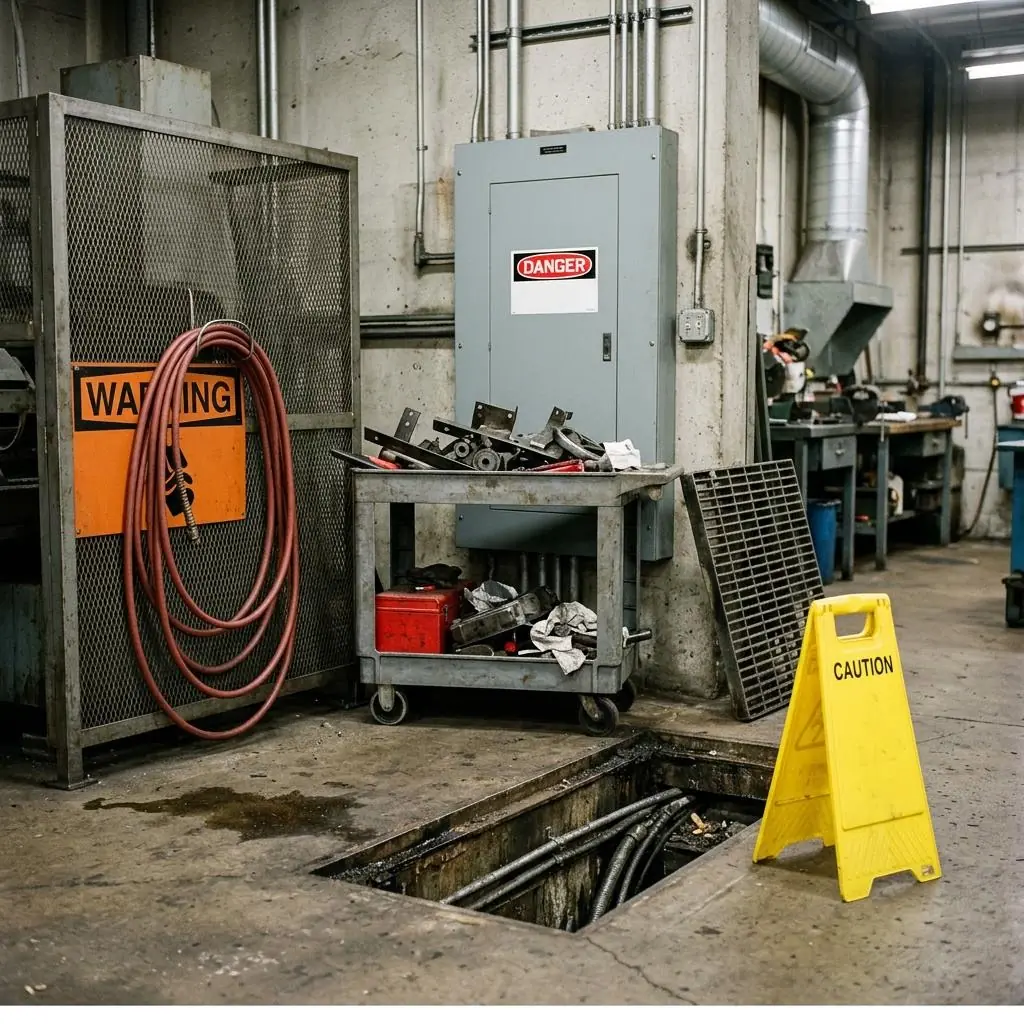
Signal words exist so a worker can judge a hazard from across the room without reading the fine print. OSHA's general industry rule keeps the system simple: 29 CFR 1910.145 reserves danger signs for immediate hazards where special precautions are necessary, and caution signs for potential hazards or unsafe practices. ANSI Z535.2, the consensus standard most sign makers follow, adds WARNING between them — for hazards that could cause death or serious injury — and uses orange to set it apart. The construction rule accepts either the older ANSI designs or Z535.2-2011, so a construction site may properly carry all three words.
The mistakes that matter on a real site are mismatches. A caution floor stand beside an open trench understates a hazard that calls for a cover or guardrail, not just a sign. A danger label with nothing written under it raises the alarm without saying what the hazard is. And any signal word is useless when a hose or a cart hangs in front of it. OSHA Scan reviews a photo of the area and flags those conditions with a possibly related standard and a fix. It does not grade sign design; it shows you where the warning and the hazard don't line up.
OSHA's general industry sign rule recognizes two hazard levels on signs: danger and caution. It requires that danger signs for specific dangers not vary in design, that workers be told danger means immediate danger needing special precautions, and that caution signs be used only for potential hazards or unsafe practices. ANSI Z535.2 splits the upper level in two: DANGER for hazards that will cause death or serious injury if not avoided, and WARNING for those that could. It also adds NOTICE, in blue, for practices not related to personal injury, and pairs the personal-injury signal words with a safety alert symbol.
In practice, the choice comes down to two questions: how bad is the worst likely outcome, and how close are people to the hazard? Exposed live parts or a trench people walk past is a DANGER-level problem, and the first fix is a barrier, cover, or lock — the sign comes second. A wet floor or a low beam is a CAUTION-level problem. Whatever words you use, keep them consistent across the site so a red header always means the same thing. A routine photo scan helps you spot the places where the sign on the wall no longer matches the hazard in front of it.
Run through these steps before crews start — each one covers a visible gap the AI can help you catch.
Describe the hazard and who is exposed: what could happen, how badly someone could be hurt, and how close people work to it.
Cover, guard, barricade, or lock out the hazard wherever a rule requires it. Signs add a warning; they don't replace protection.
Use DANGER for hazards that will cause death or serious injury, WARNING (the ANSI word) for those that could, and CAUTION for minor or moderate injury or unsafe practices.
Under the signal word, state the hazard and what to do in plain words, with a symbol and a second language if your workers need one.
Mount the sign where people approaching the hazard will see it, explain the signal words in training, and re-check signs regularly. A dated photo scan documents each check.
A scan doesn't rate signal words, but it can see when a warning is weaker than the hazard next to it — or when no one can see the warning at all.
A caution stand at an open hole or an unguarded edge, where the rule calls for a cover, guardrail, or barrier rather than a sign.
Hoses, carts, and stored material hung over or parked in front of signs, hiding the signal word or the message under it.
Blocked electrical panels, open pits, and missing guards that a sign points to but doesn't fix.
Each flagged item comes with a possibly related OSHA standard and a corrective action, ranked by risk, so the worst exposure gets fixed first.
Scan a photo like the one above and this is the report you get — score, findings, OSHA references, and fixes. It is an illustrative example, clearly marked — not live scan data.
Compliance score
72
Lower means more potential hazards found
Score uses visible confirmed findings only. Not a safety certification.
3 confirmed · 0 need review · 0 positive
1Floor trench left open with its grating leaned against the wall — only a caution floor stand beside it
Possibly related to protecting holes with covers or guardrails (29 CFR 1910.28(b)(3))
Observed condition: Someone stepping backward or walking past with a load can step straight into the trench. A caution stand signals a minor hazard, but OSHA's walking-working surfaces rule calls for a cover or a guardrail at a hole, not a sign.
Corrective action: Put the grating back as soon as work in the trench stops, or surround the opening with a guardrail or barricade while it has to stay open. Keep the floor stand as extra warning, not the only protection.
High confidence
2Utility cart loaded with scrap parked in front of the electrical panel
Possibly related to working space around electrical equipment (29 CFR 1910.303(g)(1))
Observed condition: In an emergency, someone has to reach that panel fast to shut off power. A loaded cart in the way slows them down, and OSHA says the working space in front of electrical equipment may not be used for storage.
Corrective action: Move the cart and mark the floor in front of the panel as a keep-clear zone so nothing gets parked there again.
High confidence
3Orange warning sign on the cage partly covered by a coiled air hose
Possibly related to accident prevention signs that identify specific hazards (29 CFR 1910.145(a)(1))
Observed condition: The hose hangs across most of the sign's message area. Workers can see the signal word but not what the hazard is or what to do about it.
Corrective action: Hang the hose on a hook or reel away from the sign, and confirm what the sign warns about inside the cage.
High confidence
Upload a photo like the one above and get a compliance score and hazard count. No account needed to scan, though you may be asked for the free phone Access Pass — create a free account to unlock the full report.
Use the real site or facility name. If you save the scan after signup, it becomes the report name.
Three angles, one deeper scan
Only the wide shot is required — every extra angle gives the AI more places to look.
Required: Set the scene — one wide shot lets the AI sweep the whole area at once
Stand at the entry point and capture corner to corner: floors, ladders, scaffolds, and everyone at work
Drop a job-site photo or walkthrough video
Click to upload, drag & drop, or snap a photo on site. Photos scan free with no signup and no card — you may be asked for the free phone Access Pass. Video walkthroughs (up to 3 min) run on a free account.
Small habits, sharper scans
Set the scene
Start with context
Fill the frame
2–3 ft for close-ups; keep ladders, cords and workers fully in view.
Capture clearly
Make the frame usable
Light it right
Keep the sun or lights behind you — glare and shadows hide hazards.
Tap to focus
Tap the hazard on screen and hold still one second — blur can't be flagged.
Choose the useful view
Give the AI room to understand
Go landscape
Turn your phone sideways — a wider frame catches more of the scene.
Only upload photos you have permission to use, and avoid images showing personal, customer, or confidential information. Demo photos and results are held privately for up to 48 hours so you can save them to a free account; unclaimed photos are deleted automatically. Results are an AI-assisted preliminary review, not an official OSHA determination.
New: Video walkthrough scans
Record up to 3 minutes of your site — the AI extracts frames and categorizes findings with exact timestamps. Free account required.
Get the best results
Wide shot first
Stand at the entrance and photograph the entire work area so AI sees the full context
Hazard areas
Photograph elevated surfaces, equipment, electrical panels, and anywhere workers are active
Close-ups last
Move in close on anything damaged, missing, or that looks risky — the AI catches more detail
How to choose the right signal word and keep it believable. The first four are free — create a free account to unlock the rest and scan your own site for sign problems.
Rank the hazard before you pick a sign
Ask what happens if someone ignores the warning. Death or serious injury that will happen points to DANGER, death or serious injury that could happen points to WARNING, and minor or moderate injury points to CAUTION.
Use DANGER only for immediate hazards
OSHA's sign rule limits danger signs to immediate hazards where special precautions are necessary (1910.145(c)(1)), and 1926.200(b) does the same in construction. Overusing DANGER teaches people to ignore it.
Use CAUTION for potential hazards
Caution signs warn of potential hazards or unsafe practices (1910.145(c)(2), 1926.200(c)) — not open holes, exposed live parts, or other hazards that can kill on contact.
Know that WARNING is an ANSI signal word
OSHA's general industry sign rule has no WARNING sign class. ANSI Z535.2 uses WARNING in orange for hazards that could cause death or serious injury, and OSHA's tag rule allows WARNING tags between caution and danger (1910.145(f)(7)).
Free printable templatePDF · US Letter
Use this form when you choose a new sign and when you walk the site to check existing ones. Rank the hazard first, then check that the signal word, colors, and wording fit it.
On the form
A free account is required to download it.
Non-English documents are automated translations, not official OSHA translations. Citations, limits and names are kept as written.
OSHA Scan template — not an official government form and not legal advice.
Pick the signal word yourself, write the hazard message in English, Spanish, or both, and print on Letter, A4, or Tabloid paper. Your logo can appear on the sign, but it never changes the signal word colors. Once a sign is up, record where it's posted and log condition checks. A free account includes sign downloads, the on-screen sign register, and one site report download.
Make your site signs freeOSHA Scan reads a single photo. That makes it fast and easy for anyone on site — but it also means it has real limits. Here's an honest look at both.
Snap a photo of the job site, and the AI categorizes findings against OSHA standards.
Each finding includes consistent corrective actions and structured JHA outputs. Check items off as your crew resolves them.
Every inspection gets a deterministic 0-100 compliance score derived from hazard severity, so you can track sites at a glance.
A prioritization aid based on recorded findings—not a certification or a complete measure of site safety.
Generate detailed inspection reports and export data to Excel for record-keeping and stakeholders.
A qualified person must review AI-flagged items before making safety decisions. Do not replace required comprehensive safety walkthroughs with AI reports. Features, limits, and downloads depend on your account’s plan and permissions.
Illustrative AI-assisted workflows. Review the findings; they are not a compliance certification.
A scan is a fast first look, not the final word. Before treating this kind of area as safe, a competent person should still confirm:
They rank severity. Under ANSI Z535.2, DANGER marks a hazardous situation that will result in death or serious injury if not avoided, WARNING one that could result in death or serious injury, and CAUTION one that could result in minor or moderate injury. OSHA's general industry rule uses only danger signs (immediate hazards) and caution signs (potential hazards and unsafe practices). Pick the word by asking how bad the outcome is, and how likely, if someone ignores the sign.
Under OSHA's 29 CFR 1910.145, danger signs use red, black, and white, and caution signs use a yellow background with a black panel. ANSI Z535.2 uses red for DANGER, orange for WARNING, yellow for CAUTION, and blue for NOTICE, and the construction rule accepts the Z535.2-2011 designs. Separately, 29 CFR 1910.144 reserves red for danger and fire protection equipment and yellow for caution and physical hazards.
OSHA's general industry sign rule defines danger, caution, and safety instruction signs — it has no WARNING sign class. WARNING is an ANSI Z535.2 signal word, and the construction rule, 29 CFR 1926.200, accepts the Z535.2-2011 designs that use it. OSHA's tag rule also allows WARNING tags for hazards between caution and danger (1910.145(f)(7)). Whatever format you use, the sign still has to identify the hazard clearly, and workers have to understand it.
No. A sign warns; it doesn't protect. OSHA's walking-working surfaces rule requires holes to be protected by covers or guardrail systems (29 CFR 1910.28(b)(3)), and other rules require machine guards and enclosures for live electrical parts. A caution stand beside an open trench is extra warning at best — the cover or guardrail is what the rule asks for.
Not directly. OSHA Scan can't reliably read small sign text or know your hazard assessment, so it doesn't rate your choice of words. It does flag visible mismatches — a caution stand at an open hole, a danger label with no message, a sign hidden behind a hose or a cart — with a possibly related standard and a corrective action. It's an AI-assisted second set of eyes and is not affiliated with OSHA.
Reviewed by OSHA Scan Editorial
This content is produced by the OSHA Scan Editorial team and reviewed with AI assistance. It is general safety information, not legal or compliance advice. OSHA Scan is an independent tool and is not affiliated with, endorsed by, or certified by OSHA or the U.S. Department of Labor.
More ways to see what an AI OSHA scan can do for your site.
The overview hub — how the scanner works and every job, site, and hazard it covers.
The full sign rules: classes, colors, wording, and when signs come down.
Letter size, lighting, and the doors that need a 'Not an Exit' sign.
Danger signs for permit spaces, and why a sign alone doesn't keep people out.
Blocked panels, open boxes, and damaged cords flagged from a photo.
Pick a signal word, add your hazard message, and print a sign in minutes.
The construction sign rule on OSHA's site, including danger and caution signs and the ANSI Z535 references.
Official resource — osha.govSee a complete labelled example of everything a scan returns.
Start with one lifetime use per eligible scan type — no credit card. Build JHA-ready reports and catch changing conditions sooner.
Start your free trial