
1
Set the scene
Start with context
Fill the frame
2–3 ft for close-ups; keep ladders, cords and workers fully in view.
If your workplace has permit-required confined spaces, OSHA's rule 29 CFR 1910.146(c)(2) requires you to tell exposed employees about each one — where it is and the danger it poses — by posting danger signs or by another equally effective means. OSHA's note gives sample wording: 'DANGER — PERMIT-REQUIRED CONFINED SPACE, DO NOT ENTER' or similar language. Construction has the same rule in 29 CFR 1926.1203(b)(1). A sign informs; it doesn't prevent entry. If your employees won't enter permit spaces, you must also take effective measures to keep them out, and an open entrance must be guarded by a railing, temporary cover, or barrier. OSHA Scan does not classify spaces. It scans photos for open hatches with no barrier, signs that aren't posted, and ventilation that isn't set up. The free checklist below covers each step.
Photo scan: no account needed (you may be asked for the free phone Access Pass) · Template downloads: free account required
Permit-required confined spaces — tanks, pits, vaults, silos, manholes — can trap or overcome workers quickly, and would-be rescuers are often among the victims. OSHA's general industry rule, 29 CFR 1910.146, starts with two steps: evaluate the workplace to find permit spaces, then inform exposed employees about each one by posting danger signs or using another equally effective method. The note to the rule offers sample wording — 'DANGER — PERMIT-REQUIRED CONFINED SPACE, DO NOT ENTER' — and similar language works too. Construction follows the same approach under 29 CFR 1926.1203, where a competent person identifies the spaces before work begins.
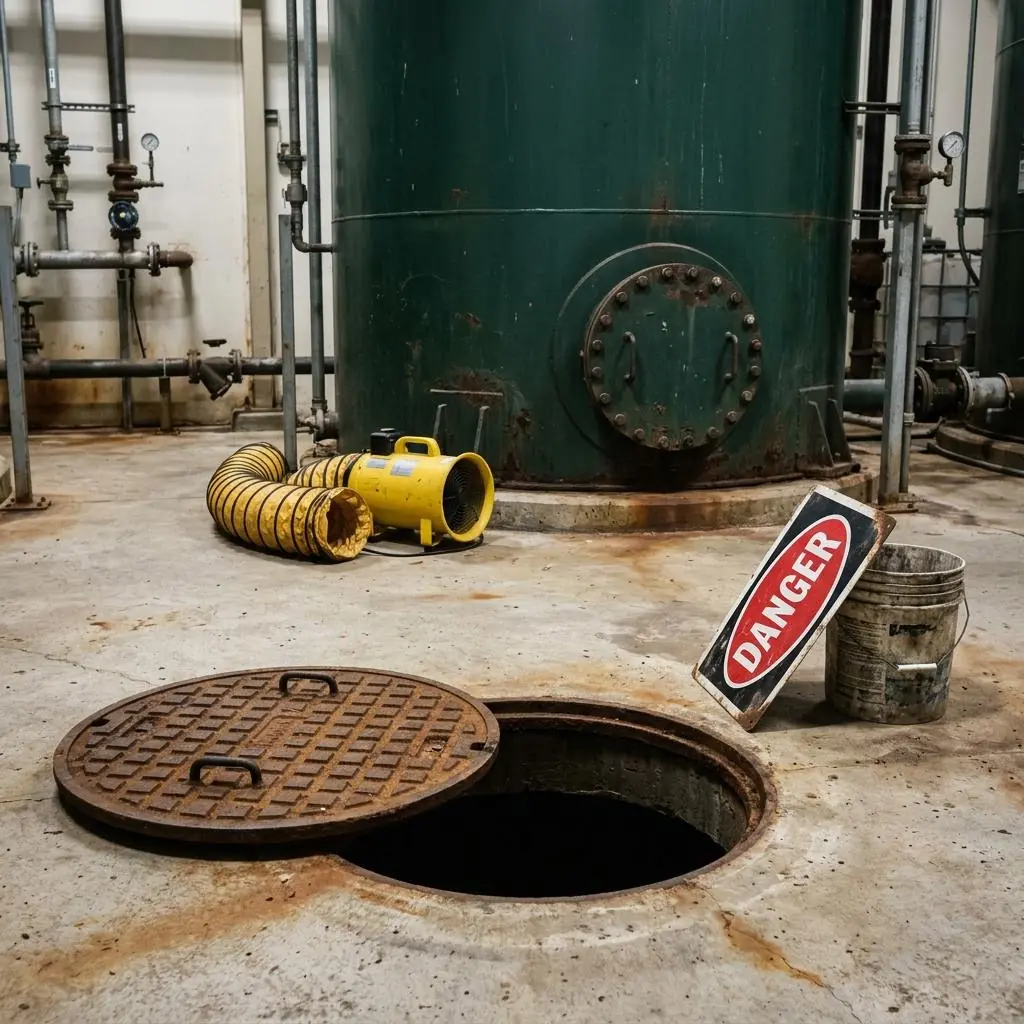
A sign is the first layer, not the last. If your employees will not enter permit spaces, OSHA requires effective measures to prevent entry in addition to the sign. And when a cover comes off, the opening needs a railing, temporary cover, or barrier right away. In the example photo, a manhole sits open with nothing around it, the danger sign leans against a bucket instead of being posted, and a ventilation blower lies unused. OSHA Scan flags those conditions with a possibly related standard and a fix. It doesn't classify spaces or replace your entry permit; it shows you what an open space looks like to the next person walking by.
OSHA's confined space rules separate three jobs. Signs inform: they tell exposed employees that a permit space exists, where it is, and what the danger is. Covers and locks prevent: when your employees aren't supposed to go in, effective measures keep them out. Barriers protect: when a cover comes off for entry, a railing, temporary cover, or barricade keeps people from falling in and keeps objects from falling on the entrant. A site that relies on a sign for all three jobs has a gap, and that gap usually shows when a cover has been left off.
The sign itself is simple to get right. Post it at each entrance, facing the direction people approach from. Use clear wording — OSHA's example is 'DANGER — PERMIT-REQUIRED CONFINED SPACE, DO NOT ENTER' — and add the specific hazard and a second language where it helps. Replace signs that fade or come loose, and re-evaluate when a space changes. A routine photo scan of tank rooms, pits, and vault areas helps you catch loose signs and open covers before someone walks up to them.
Run through these steps before crews start — each one covers a visible gap the AI can help you catch.
Evaluate the workplace and list each permit-required confined space, with its hazards and entrances.
Use wording like 'DANGER — PERMIT-REQUIRED CONFINED SPACE, DO NOT ENTER', mounted where people approaching will see it.
If your employees won't enter, bolt, lock, or otherwise secure the entrance so a sign isn't the only thing in the way.
When a cover comes off, set up a railing, temporary cover, or barricade right away, and keep loose items away from the edge.
Look for faded or loose signs and covers left off, and re-evaluate spaces when their use changes. A dated photo scan documents each check.
A scan can't classify a space or test its air, but it can see the conditions around an entrance that put people at risk.
Manholes, hatches, and pits with the cover off and no railing, temporary cover, or barricade around them.
Danger signs lying loose, facing the wrong way, faded, or missing at entrances that look like permit spaces.
Ventilation blowers, ducts, and tripods sitting unused while an entrance is open — a cue to confirm testing and ventilation before entry.
Each flagged item comes with a possibly related OSHA standard and a corrective action, ranked by risk, so the open hole gets guarded first.
Scan a photo like the one above and this is the report you get — score, findings, OSHA references, and fixes. It is an illustrative example, clearly marked — not live scan data.
Compliance score
72
Lower means more potential hazards found
Score uses visible confirmed findings only. Not a safety certification.
3 confirmed · 0 need review · 0 positive
1Manhole left open with the cover slid aside and no railing, cover, or barrier around the opening
Possibly related to guarding open entrances (29 CFR 1910.146(c)(5)(ii)(B) and (d)(3)(v)) and floor holes (29 CFR 1910.28(b)(3))
Observed condition: Anyone walking past can step into the opening, and tools or debris can fall onto anyone inside. OSHA's confined space rule calls for the opening to be guarded by a railing, temporary cover, or other barrier as soon as the cover comes off.
Corrective action: Put the cover back if no one is entering. If entry is under way, set up a guardrail or barricade around the opening, post an attendant, and keep loose items away from the edge.
High confidence
2Danger sign leaning against a bucket on the floor instead of posted at the entrance
Possibly related to informing employees about permit spaces with danger signs (29 CFR 1910.146(c)(2))
Observed condition: A sign on the floor is easy to miss, easy to knock over, and this one doesn't say what the danger is. OSHA expects exposed employees to be told where each permit space is and the danger it poses — a posted sign is one way to do that.
Corrective action: Mount a sign at the entrance where people approaching will see it, with wording like 'DANGER — PERMIT-REQUIRED CONFINED SPACE, DO NOT ENTER'. Mark the tank manway the same way if it is also a permit space.
High confidence
3Ventilation blower and duct lying unused beside the tank while the manhole is open
Possibly related to testing conditions before permit space entry (29 CFR 1910.146(d)(5))
Observed condition: An open cover suggests entry is planned or under way. A blower switched off and coiled on the floor is a reason to confirm the air was tested and ventilation is running before anyone goes in.
Corrective action: Before entry, test the atmosphere with a calibrated meter — oxygen first, then flammable gases and vapors, then toxic gases and vapors — then run the blower into the space and keep monitoring as your permit requires.
Medium confidenceNot fully clear from the photo — verify on site.
Upload a photo like the one above and get a compliance score and hazard count. No account needed to scan, though you may be asked for the free phone Access Pass — create a free account to unlock the full report.
Use the real site or facility name. If you save the scan after signup, it becomes the report name.
Three angles, one deeper scan
Only the wide shot is required — every extra angle gives the AI more places to look.
Required: Set the scene — one wide shot lets the AI sweep the whole area at once
Stand at the entry point and capture corner to corner: floors, ladders, scaffolds, and everyone at work
Drop a job-site photo or walkthrough video
Click to upload, drag & drop, or snap a photo on site. Photos scan free with no signup and no card — you may be asked for the free phone Access Pass. Video walkthroughs (up to 3 min) run on a free account.
Small habits, sharper scans
Set the scene
Start with context
Fill the frame
2–3 ft for close-ups; keep ladders, cords and workers fully in view.
Capture clearly
Make the frame usable
Light it right
Keep the sun or lights behind you — glare and shadows hide hazards.
Tap to focus
Tap the hazard on screen and hold still one second — blur can't be flagged.
Choose the useful view
Give the AI room to understand
Go landscape
Turn your phone sideways — a wider frame catches more of the scene.
Only upload photos you have permission to use, and avoid images showing personal, customer, or confidential information. Demo photos and results are held privately for up to 48 hours so you can save them to a free account; unclaimed photos are deleted automatically. Results are an AI-assisted preliminary review, not an official OSHA determination.
New: Video walkthrough scans
Record up to 3 minutes of your site — the AI extracts frames and categorizes findings with exact timestamps. Free account required.
Get the best results
Wide shot first
Stand at the entrance and photograph the entire work area so AI sees the full context
Hazard areas
Photograph elevated surfaces, equipment, electrical panels, and anywhere workers are active
Close-ups last
Move in close on anything damaged, missing, or that looks risky — the AI catches more detail
From finding your permit spaces to keeping people out of them. The first four are free — create a free account to unlock the rest and scan your own site for open hatches and missing signs.
Find every permit space
Evaluate the workplace to identify permit-required confined spaces (1910.146(c)(1)) — tanks, vaults, pits, silos, manholes, and similar spaces with a hazardous atmosphere, engulfment, entrapment, or other serious hazard. In construction, a competent person does this before work begins (1926.1203(a)).
Tell exposed employees
Inform exposed employees of each permit space's existence, location, and danger by posting danger signs or by another equally effective means (1910.146(c)(2), 1926.1203(b)(1)).
Use clear wording
OSHA's note gives an example: 'DANGER — PERMIT-REQUIRED CONFINED SPACE, DO NOT ENTER', or similar language. Add the specific hazard if it helps, and a second language if your workers need one.
Post the sign at the entrance
Mount it where anyone approaching the opening will see it — on the hatch, cover, manway, or a post beside it, not leaning on the floor.
Free printable templatePDF · US Letter
Use this form to check every permit-required confined space on your list: its sign, its cover or guard, and how entry is controlled. Check again after any change to the space or the work.
On the form
A free account is required to download it.
Non-English documents are automated translations, not official OSHA translations. Citations, limits and names are kept as written.
OSHA Scan template — not an official government form and not legal advice.
Record each space and answer questions based on the confined space definitions in 29 CFR 1910.146 and 1926.1203. You record the permit-required decision yourself; the app never makes it for you. For a permit-required space, make a prefilled DANGER sign in English, Spanish, or both, and open the permit template. The app doesn't issue entry permits. A free account includes the on-screen register, sign downloads, and one site report download.
Start your confined space register freeOSHA Scan reads a single photo. That makes it fast and easy for anyone on site — but it also means it has real limits. Here's an honest look at both.
Snap a photo of the job site, and the AI categorizes findings against OSHA standards.
Each finding includes consistent corrective actions and structured JHA outputs. Check items off as your crew resolves them.
Every inspection gets a deterministic 0-100 compliance score derived from hazard severity, so you can track sites at a glance.
A prioritization aid based on recorded findings—not a certification or a complete measure of site safety.
Generate detailed inspection reports and export data to Excel for record-keeping and stakeholders.
A qualified person must review AI-flagged items before making safety decisions. Do not replace required comprehensive safety walkthroughs with AI reports. Features, limits, and downloads depend on your account’s plan and permissions.
Illustrative AI-assisted workflows. Review the findings; they are not a compliance certification.
A scan is a fast first look, not the final word. Before treating this kind of area as safe, a competent person should still confirm:
OSHA requires you to inform exposed employees of the existence, location, and danger of each permit space — by posting danger signs or by any other equally effective means (29 CFR 1910.146(c)(2); in construction, 29 CFR 1926.1203(b)(1)). Signs are the most common way to do it, but the rule allows other equally effective methods.
OSHA's note to the rule says a sign reading 'DANGER — PERMIT-REQUIRED CONFINED SPACE, DO NOT ENTER' or using similar language would satisfy the sign requirement. Many employers add the specific hazard, such as a toxic atmosphere or engulfment, and a second language if their workers need one.
Not by itself. If your employees won't enter permit spaces, OSHA requires effective measures to prevent entry, in addition to informing them (29 CFR 1910.146(c)(3)). Bolted or locked covers and barriers around open entrances are common examples. A sign tells people the danger is there; it doesn't stop someone who doesn't read it.
OSHA's sign requirement applies to permit-required confined spaces. A non-permit confined space doesn't contain the serious hazards that make a space permit-required, so the rule doesn't call for a danger sign there. If its use or configuration changes in a way that could increase the hazards, it must be re-evaluated (29 CFR 1910.146(c)(6)). Many employers label all confined spaces so workers can tell which is which.
No. Classifying a space takes an evaluation of its hazards, which a photo can't do. OSHA Scan reviews a photo for visible conditions — an open manhole with no barrier, a danger sign lying on the floor, a blower that isn't running — and gives each a possibly related standard and a corrective action. It's an AI-assisted second set of eyes and is not affiliated with OSHA.
Reviewed by OSHA Scan Editorial
This content is produced by the OSHA Scan Editorial team and reviewed with AI assistance. It is general safety information, not legal or compliance advice. OSHA Scan is an independent tool and is not affiliated with, endorsed by, or certified by OSHA or the U.S. Department of Labor.
More ways to see what an AI OSHA scan can do for your site.
The overview hub — how the scanner works and every job, site, and hazard it covers.
The full sign rules: classes, colors, wording, and when signs come down.
What each signal word means and how to choose between them.
Letter size, lighting, and the doors that need a 'Not an Exit' sign.
Permits, testing, attendants, and rescue — the steps before anyone goes in.
A ready-made 'Confined Space — Permit Required' template you can edit and print.
OSHA's confined space topic page, with the general industry and construction rules and guidance.
Official resource — osha.govSee a complete labelled example of everything a scan returns.
Start with one lifetime use per eligible scan type — no credit card. Build JHA-ready reports and catch changing conditions sooner.
Start your free trial