
A Lockout/Tagout Failure Can Energize a Machine in an Instant
Verify zero energy before a hand ever goes inside
Failure to control hazardous energy is one of OSHA's most-cited standards and a leading cause of amputations, crush injuries, and electrocutions during servicing and maintenance. A machine that looks 'off' can still hold electrical, hydraulic, pneumatic, or stored mechanical energy. OSHA Scan analyzes job-site photos to flag energy-isolating devices that are unlocked, untagged, or bypassed before anyone reaches into the danger zone.
Free · No account needed to scan · You may be asked for the free phone Access Pass
May relate to 29 CFR 1910.147
Workers service equipment under LOTO rules
Deaths a year tied to energy-control gaps
Injuries annually from uncontrolled energy
All you need to run a scan
What this scenario looks like
A lockout/tagout failure is any situation where a machine or circuit is serviced without all energy sources isolated, locked, tagged, and verified at zero. It shows up as a disconnect switch left in the 'on' position, a breaker with no lock installed, a tag hanging without a physical lock, or a valve that was never bled of stored pressure before work began.
In practice, these gaps appear when a technician makes a 'quick adjustment' without applying a personal lock, when multiple crews work on one machine but only one lock is set, or when a startup happens because no one confirmed the isolation point before re-energizing. Group tasks and shift changes are especially dangerous because a returning worker may assume the machine is still safe when a lock was quietly removed.
The threat is invisible: a disconnect that appears open can still feed a control circuit, and a stopped conveyor can hold gravitational or spring energy. There is no warning sound before an unexpected startup, which is exactly why photo-based verification of every isolation point matters before hands enter the machine.
A labelled example scan for this scenario
Here is what an OSHA Scan report looks like for lockout/tagout failure. It is an illustrative example built from this scenario's hazards — clearly marked, not live scan data.
Compliance score
64
Lower means more potential hazards found
Score uses visible confirmed findings only. Not a safety certification.
1 need review; score is provisional.
2 confirmed · 1 need review · 0 positive
1Lockout/Tagout Failure
Confirmed violationCriticalPossibly related to The control of hazardous energy (lockout/tagout) (29 CFR 1910.147)
Observed condition: A lockout/tagout failure is any situation where a machine or circuit is serviced without all energy sources isolated, locked, tagged, and verified at zero.
Corrective action: Install lockable energy-isolating devices on every power, hydraulic, and pneumatic source
High confidence
2Lockout/Tagout Failure: Selection and use of work practices
Needs reviewHighPossibly related to Selection and use of work practices (29 CFR 1910.333)
Observed condition: Requires deenergizing and locking out electric circuits and equipment before employees work on or near exposed parts that could be energized.
Corrective action: Provide bleed valves and stored-energy dissipation points on each machine
Medium confidenceNot fully clear from the photo — verify on site.
3Lockout/Tagout Failure: General requirements for all machines
Confirmed violationMediumPossibly related to General requirements for all machines (29 CFR 1910.212)
Observed condition: Requires machine guarding to protect operators and others from hazards such as points of operation and rotating parts during operation and servicing.
Corrective action: Standardize disconnects so a single, obvious point isolates all energy
High confidence
See the workflow click into place
Illustrative AI-assisted workflows. Review the findings; they are not a compliance certification.
Why this scenario matters
Immediate consequences
Unexpected energization during servicing causes amputations, crushed limbs, electrocution, and fatal caught-in incidents. A machine that cycles while a worker is inside offers no chance to react.
Legal & financial impact
The control of hazardous energy standard, 29 CFR 1910.147, is among OSHA's top-cited rules. A serious violation exceeds $16,000, and willful or repeat findings can surpass $165,000 per instance plus litigation.
Operational impact
A LOTO incident shuts down the line, triggers an OSHA investigation, and forces a full procedure rewrite. Downtime, retraining, and higher insurance premiums ripple across production for months.
Industry-specific concerns
Manufacturing, food processing, warehousing, and construction maintenance crews all service powered equipment. Shared machines and contract labor make consistent, verified lockout especially hard to enforce.
How OSHA Scan detects this hazard
OSHA Scan uses an AI vision model to spot energy-control gaps. Upload a photo of the equipment and it checks whether energy-isolating devices are locked, whether tags are present and legible, and whether multiple locks are applied for group work, then flags any exposed isolation point with a severity rating and the OSHA standard it may relate to.
Analyze your first photo freeScan a photo for lockout/tagout failure now
Upload a real job-site photo and OSHA Scan detects visible hazards — no account needed to run your first scan, though you may be asked for the free phone Access Pass.
- Unlocked disconnects, missing tags, and single-lock group work flagged per finding
- The hazardous-energy standard each exposed isolation point may relate to
- A scored, dated LOTO review you can export to PDF or Excel
Use the real site or facility name. If you save the scan after signup, it becomes the report name.
Three angles, one deeper scan
Only the wide shot is required — every extra angle gives the AI more places to look.
Required: Set the scene — one wide shot lets the AI sweep the whole area at once
Stand at the entry point and capture corner to corner: floors, ladders, scaffolds, and everyone at work
Drop a job-site photo or walkthrough video
Click to upload, drag & drop, or snap a photo on site. Photos scan free with no signup and no card — you may be asked for the free phone Access Pass. Video walkthroughs (up to 3 min) run on a free account.
Accuracy boosters
Small habits, sharper scans
Set the scene
Start with context
Fill the frame
2–3 ft for close-ups; keep ladders, cords and workers fully in view.
Capture clearly
Make the frame usable
Light it right
Keep the sun or lights behind you — glare and shadows hide hazards.
Tap to focus
Tap the hazard on screen and hold still one second — blur can't be flagged.
Choose the useful view
Give the AI room to understand
Go landscape
Turn your phone sideways — a wider frame catches more of the scene.
Only upload photos you have permission to use, and avoid images showing personal, customer, or confidential information. Demo photos and results are held privately for up to 48 hours so you can save them to a free account; unclaimed photos are deleted automatically. Results are an AI-assisted preliminary review, not an official OSHA determination.
New: Video walkthrough scans
Record up to 3 minutes of your site — the AI extracts frames and categorizes findings with exact timestamps. Free account required.
Get the best results
Wide shot first
Stand at the entrance and photograph the entire work area so AI sees the full context
Hazard areas
Photograph elevated surfaces, equipment, electrical panels, and anywhere workers are active
Close-ups last
Move in close on anything damaged, missing, or that looks risky — the AI catches more detail
A jam cleared without a personal lock
The situation
A packaging operator noticed a carton jam on a wrapping machine and reached in to clear it. Because the fix would 'only take a second,' the operator hit the stop button but did not lock out the main disconnect or verify zero energy.
What went wrong
A second worker at the control panel, unaware anyone was inside, restarted the line to test a sensor. The machine cycled and crushed the first operator's hand and forearm, causing permanent amputation of two fingers.
How OSHA Scan would have prevented it
A photo of the machine run through OSHA Scan before the reach-in would have flagged the disconnect as still energized with no personal lock applied, cited 29 CFR 1910.147, and prompted the operator to isolate, lock, tag, and verify zero energy before touching the jam.
Lessons learned
The stop button is not lockout. Every servicing task, no matter how short, requires a personal lock on each energy source and a verified zero-energy state before hands enter the machine.
Prevention best practices
Layered controls, from most to least effective.
Engineering controls
Design isolation points so hazardous energy can be fully and visibly controlled.
- Install lockable energy-isolating devices on every power, hydraulic, and pneumatic source
- Provide bleed valves and stored-energy dissipation points on each machine
- Standardize disconnects so a single, obvious point isolates all energy
- Add interlocked guarding that prevents operation while access panels are open
Administrative controls
Build machine-specific procedures and verification habits that leave no room for assumption.
- Write and post equipment-specific lockout procedures at each machine
- Require a documented energy-verification (try-out) step before every service task
- Use group lockout boxes so each worker applies a personal lock
- Conduct annual authorized-worker LOTO audits and correct gaps
- Enforce a controlled shift-change handoff for locks that stay in place
Personal protective equipment
Equip each authorized worker to isolate energy under their own lock and key.
- Individually keyed padlocks assigned to each authorized worker
- Durable, legible danger tags with the worker's name and date
- Lockout hasps for applying multiple locks to one device
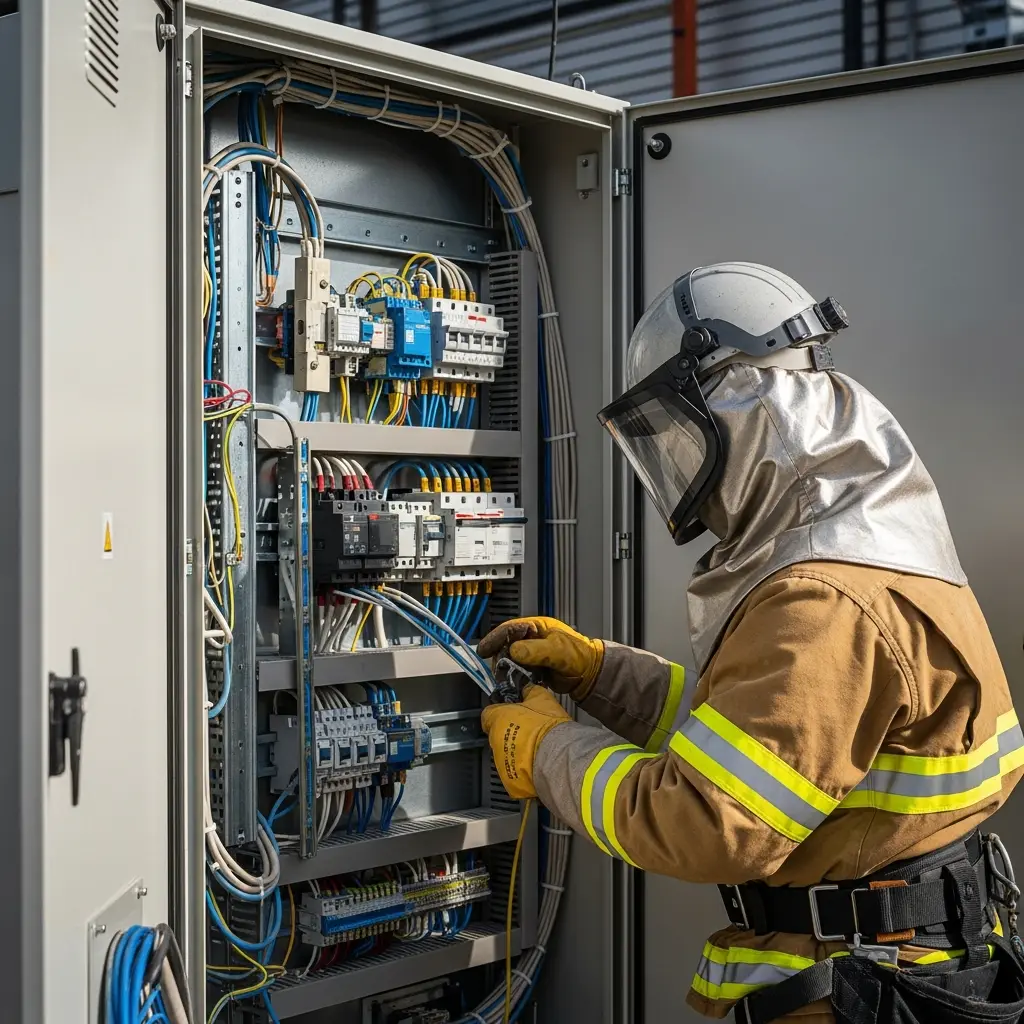
- Insulated gloves and arc-rated PPE for electrical isolation points
- Inspect all locks, tags, and hasps before each use and replace damaged gear
OSHA compliance & citations
The federal standards this hazard may relate to.
The control of hazardous energy (lockout/tagout)
Requires energy-control procedures, employee training, and periodic inspections to disable machines and prevent the release of hazardous energy during servicing and maintenance.
Up to $16,550 per serious violation; $165,514 for willful or repeat
Selection and use of work practices
Requires deenergizing and locking out electric circuits and equipment before employees work on or near exposed parts that could be energized.
Up to $16,550 per serious violation
General requirements for all machines
Requires machine guarding to protect operators and others from hazards such as points of operation and rotating parts during operation and servicing.
Up to $16,550 per serious violation
Incident response protocol
If an incident occurs, act fast and in order.
Immediate actions (first 5 minutes)
- 1Call 911 immediately if a worker is caught or injured
- 2Deenergize and lock out the equipment if it is safe to reach the disconnect
- 3Do not free a trapped worker until the machine is verified at zero energy
- 4Provide first aid if trained (bleeding control, CPR)
- 5Assign someone to direct emergency responders to the exact machine
Emergency response (5-30 minutes)
- 1Cooperate fully with arriving emergency responders
- 2Explain the machine, its energy sources, and how the incident occurred
- 3Account for all workers and stop related servicing tasks nearby
- 4Keep the equipment locked out to prevent a second incident
- 5Document the isolation points and scene with photos once responders allow
Post-incident
- 1Notify OSHA within 8 hours for a fatality, or 24 hours for an amputation or hospitalization
- 2Launch an incident investigation within 24 hours
- 3Preserve locks, tags, the machine state, and all documentation
- 4Interview witnesses and the authorized workers while details are fresh
- 5Revise the equipment-specific LOTO procedure and retrain all authorized workers
Team training module
Authorized workers will understand how uncontrolled energy causes injury, apply the correct equipment-specific lockout procedure, and verify a zero-energy state before servicing any machine.
Train authorized workers before assigning servicing duties, refresh annually and whenever equipment or procedures change, and reinforce with toolbox talks using real machine photos.
Training topics
- Types of hazardous energy: electrical, hydraulic, pneumatic, thermal, and stored mechanical
- How unexpected startup and energy release cause injury
- Reading and following equipment-specific lockout procedures
- Applying personal locks and legible danger tags
- Energy verification and try-out steps
- Group lockout and lockout boxes for multi-worker jobs
- Shift-change and lock-removal rules
- Roles of authorized, affected, and other employees
- Periodic inspection requirements
- OSHA requirements and penalties for LOTO failures
Compliance checklist
Run these checks to stay ahead of citations.
Daily pre-work inspection
- Equipment-specific lockout procedure available at the machine
- All energy sources identified (electrical, hydraulic, pneumatic, stored)
- Personal lock and legible tag applied to each isolating device
- Stored energy bled, blocked, or dissipated
- Zero-energy state verified with a try-out step
- Group lockout box in use for multi-worker tasks
- Only authorized workers performing the servicing
- Affected employees notified that lockout is in effect
Unlock the full Lockout/Tagout Failure checklist
10 more checklist points are waiting. Register with your email to reveal every item and download the complete OSHA compliance checklist as a printable PDF. Free, and it only takes a few seconds.
Non-English documents are automated translations, not official OSHA translations. Citations, limits and names are kept as written.
Already have an account? Sign in
Frequently asked questions
What is the difference between lockout and tagout?
Lockout uses a physical lock to hold an energy-isolating device in the safe position, while tagout uses a warning tag alone. OSHA prefers lockout because a tag is only a warning; tagout is permitted only when a device cannot accept a lock and equivalent protection is provided.
Does stopping or turning off a machine count as lockout?
No. Pressing stop or turning a control switch only pauses operation; the machine can be restarted. Lockout requires isolating each energy source at its disconnect, applying a physical lock, tagging it, and verifying zero energy before servicing.
Who is allowed to apply a lockout device?
Only authorized employees trained on the specific equipment and its energy-control procedure may apply locks and tags. Affected and other employees must be trained to recognize lockout and never remove or bypass someone else's lock.
How do you handle lockout when several workers service one machine?
Use group lockout: each authorized worker applies their own personal lock to a group lockout box or hasp. The machine cannot be re-energized until every worker removes their individual lock, so no one is left unprotected.
What are the OSHA penalties for a lockout/tagout failure?
A serious violation of 29 CFR 1910.147 can exceed $16,000, and willful or repeat violations can surpass $165,000 per instance. Incidents involving amputations or fatalities can also trigger criminal referral and significant civil litigation.
How often must lockout procedures be inspected?
OSHA requires a periodic inspection of energy-control procedures at least annually, performed by an authorized employee not using the procedure being reviewed, to verify workers follow it correctly and to correct any deviations.
What is a try-out or energy-verification step?
After applying locks, the authorized worker verifies isolation by attempting to start the equipment and confirming it will not operate, then returns controls to off. This step confirms all energy sources are truly isolated before servicing begins.
How accurate is OSHA Scan at detecting lockout/tagout failures?
OSHA Scan flags lockout/tagout gaps. It checks whether isolating devices are locked and tagged, whether group locks are applied, and returns the location and the OSHA citation it may relate to.
Verify zero energy before every service task
Analyze a photo
Upload a photo of your machine and isolation points to get instant feedback on missing locks, tags, and uncontrolled energy in your exact setup.
Get startedGet the LOTO checklist
Put our expert lockout/tagout verification checklist to work on your next servicing task to stay ahead of citations.
Get startedTalk to our team
See how OSHA Scan fits your maintenance program and get recommendations for controlling hazardous energy on your equipment.
Get startedJoin safety-first operations
See how other maintenance teams use OSHA Scan to prevent uncontrolled energy incidents before they happen.
Get startedAI photo hazard review
Snap a photo of the job site, and the AI categorizes findings against OSHA standards.
Consistent corrective actions & JHA
Each finding includes consistent corrective actions and structured JHA outputs. Check items off as your crew resolves them.
Emergency action plans
Access jurisdiction-specific guidelines and emergency action plan templates for your sites.
A qualified person must review AI-flagged items before making safety decisions. Do not replace required comprehensive safety walkthroughs with AI reports. Features, limits, and downloads depend on your account’s plan and permissions.
What the AI can and can't detect
OSHA Scan reads a single photo. That makes it fast and easy for anyone on site — but it also means it has real limits. Here's an honest look at both.
What it can catch from a photo
- Missing or incorrect PPE that is visible in the frame
- Unprotected edges, open holes, and visible fall hazards
- Housekeeping, trip, and blocked walkway or exit hazards
- Visible electrical, struck-by, and equipment-guarding hazards
What a photo can't tell it
- Hazards hidden from view or anything outside the photo
- Exact heights, distances, weights, or measurements
- Training records, procedures, or how equipment is actually used
- Full legal compliance or an official OSHA pass/fail determination
Reviewed by OSHA Scan Editorial
This content is produced by the OSHA Scan Editorial team and reviewed with AI assistance. It is general safety information, not legal or compliance advice. OSHA Scan is an independent tool and is not affiliated with, endorsed by, or certified by OSHA or the U.S. Department of Labor.
Ready to catch hazards before they become incidents?
Start with one lifetime use per eligible scan type — no credit card. Build JHA-ready reports and catch changing conditions sooner.
Start your free trial