
1
Set the scene
Start with context
Fill the frame
2–3 ft for close-ups; keep ladders, cords and workers fully in view.
Machine shop hazard detection means spotting the hazards of shops running lathes, mills, CNC machines, grinders, and saws: missing or bypassed guards, coolant and chips on the floor, parts and pallets in aisles, missing eye protection, loose clothing near rotating parts, compressed air, and oily rags. With OSHA Scan, a shop owner or supervisor photographs the shop floor, and AI hazard detection acts as a second set of eyes, listing the visible hazards, the OSHA standard each may relate to, and a suggested fix. It cannot test machine interlocks, measure noise or coolant mist exposure, or confirm lockout procedures; the safety inspection checklist below covers what a photo cannot show.
Photo scan: no account needed (you may be asked for the free phone Access Pass) · Template downloads: free account required
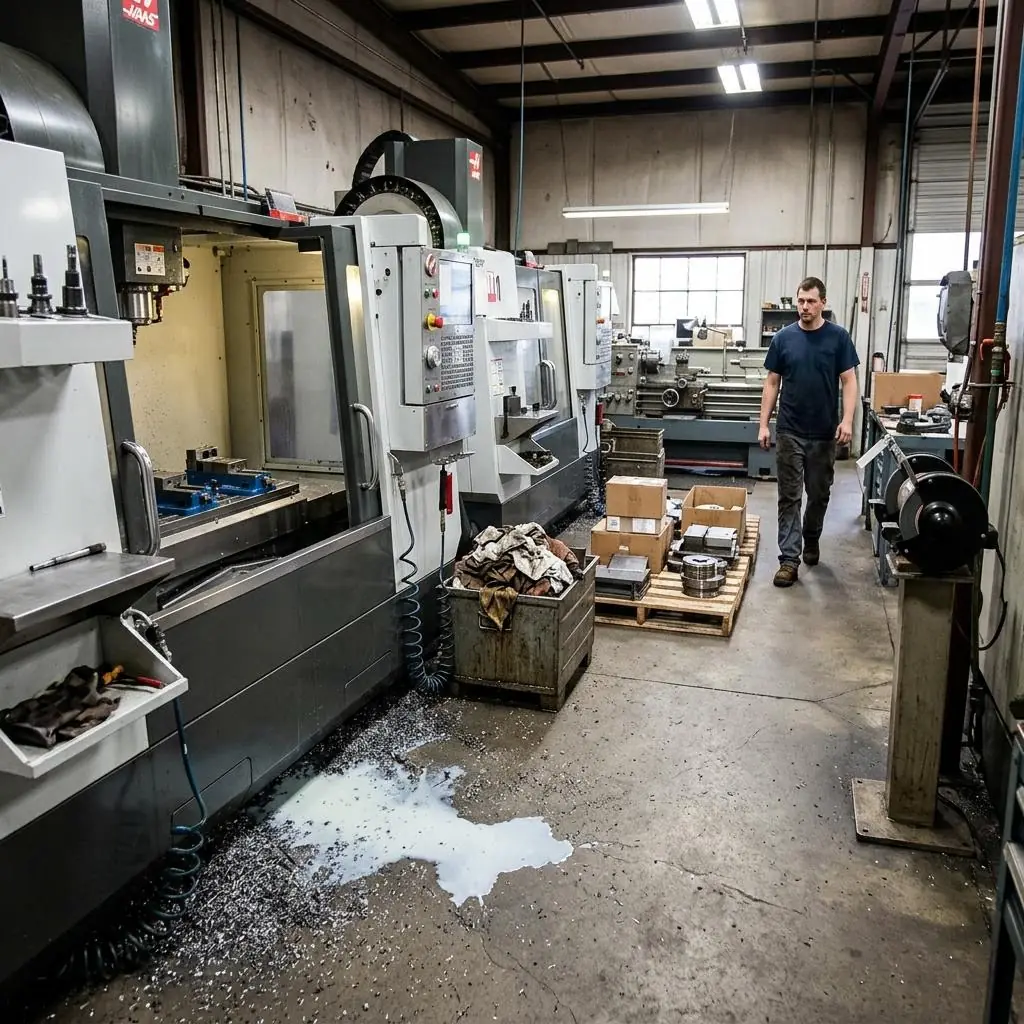
Machine shops run lathes, mills, CNC machining centers, grinders, saws, and drill presses, often for long shifts with parts moving between machines on pallets and carts. Coolant and chips build up around machines, air hoses and parts pile up, and operators work close to rotating spindles and chucks. Small housekeeping problems repeat every day, and that is where many slips, cuts, and eye injuries start.
OSHA Scan's hazard detection reads what is visible in a photo: coolant spills and chips on the floor where operators stand, pallets and parts left in aisles, people near running machines without safety glasses, air hoses hanging to the floor, open bins of oily rags, or guards and doors left open. For each finding it notes the OSHA standard it may relate to and a specific fix to confirm on site.
Machine shops fall under OSHA's general industry standards. General machine guarding (29 CFR 1910.212) covers point-of-operation and rotating-part hazards on lathes, mills, drills, and CNC machines, the abrasive wheel standard (1910.215) covers grinders, and lockout/tagout (1910.147) covers servicing and maintenance. Housekeeping rules matter just as much: floors kept clean and, as far as possible, dry (1910.22(a)(2)), aisles kept clear (1910.176(a)), and compressed air for cleaning limited to less than 30 psi with chip guarding and PPE (1910.242(b)).
Most daily problems in a machine shop are visible: coolant and chips on the floor, a pallet in the aisle, someone without safety glasses, hoses on the floor. A photo scan helps catch those between setups. What a photo cannot check is whether an interlock works, how much coolant mist or noise people are exposed to, or whether lockout procedures are followed.
Run through these steps before crews start — each one covers a visible gap the AI can help you catch.
Confirm chuck guards, shields, and CNC doors are in place and closed during cycles. Guarding may relate to 29 CFR 1910.212.
Clean spills, fix leaks, and remove chips with brushes or vacuums. Floor conditions may relate to 29 CFR 1910.22(a)(2).
Move pallets and parts out of marked aisles and hang air hoses off the floor. Aisle clearance may relate to 29 CFR 1910.176(a).
Check safety glasses for everyone on the floor, and make sure no loose clothing, jewelry, or gloves are near rotating parts. Eye protection may relate to 29 CFR 1910.133.
Photograph the machines, the floor around them, and the aisles and upload it to OSHA Scan for a second pass with AI hazard detection. The AI flags visible hazards, notes the OSHA standard each may relate to, and suggests a fix — treat the findings as a draft to verify on site. Free, no account needed (you may be asked for the free phone Access Pass).
The visible shop-floor problems a machine shop can fix between setups, detected from one image.
Coolant leaks and spills, oil on walkways, and chips building up around machines where operators stand.
Pallets, parts, and bins left in aisles, and stock stored where it can fall or block exits and electrical panels.
People near running machines without safety glasses, and loose clothing, jewelry, or gloves close to rotating parts.
Air hoses hanging to the floor, compressed air used for cleaning without chip guarding, and open bins of oily rags.
Scan a photo like the one above and this is the report you get — score, findings, OSHA references, and fixes. It is an illustrative example, clearly marked — not live scan data.
Compliance score
83
Lower means more potential hazards found
Score uses visible confirmed findings only. Not a safety certification.
2 confirmed · 0 need review · 0 positive
1Coolant spill and metal chips on the floor in front of the CNC machines
Possibly related to keeping workroom floors clean and dry (29 CFR 1910.22(a)(2))
Observed condition: Coolant makes the floor slick, and chips are sharp. An operator who slips in front of a machine can fall against it or reach into it to catch themselves.
Corrective action: Clean up the coolant and chips now, find and fix the source of the leak, and use absorbent mats or drip trays where coolant collects. Remove chips with a brush, rake, or vacuum, never bare hands.
High confidence
2Pallet of parts left in the aisle
Possibly related to keeping aisles and passageways clear (29 CFR 1910.176(a))
Observed condition: A pallet in the aisle forces people and carts to squeeze past machines, blocks pallet jack and forklift routes, and is a trip hazard for anyone carrying parts.
Corrective action: Move the pallet to a marked staging area out of the aisle, keep permanent aisles marked and clear, and set a spot near each machine for parts waiting to be run.
High confidence
Upload a photo like the one above and get a compliance score and hazard count. No account needed to scan, though you may be asked for the free phone Access Pass — create a free account to unlock the full report.
Use the real site or facility name. If you save the scan after signup, it becomes the report name.
Three angles, one deeper scan
Only the wide shot is required — every extra angle gives the AI more places to look.
Required: Set the scene — one wide shot lets the AI sweep the whole area at once
Stand at the entry point and capture corner to corner: floors, ladders, scaffolds, and everyone at work
Drop a job-site photo or walkthrough video
Click to upload, drag & drop, or snap a photo on site. Photos scan free with no signup and no card — you may be asked for the free phone Access Pass. Video walkthroughs (up to 3 min) run on a free account.
Small habits, sharper scans
Set the scene
Start with context
Fill the frame
2–3 ft for close-ups; keep ladders, cords and workers fully in view.
Capture clearly
Make the frame usable
Light it right
Keep the sun or lights behind you — glare and shadows hide hazards.
Tap to focus
Tap the hazard on screen and hold still one second — blur can't be flagged.
Choose the useful view
Give the AI room to understand
Go landscape
Turn your phone sideways — a wider frame catches more of the scene.
Only upload photos you have permission to use, and avoid images showing personal, customer, or confidential information. Demo photos and results are held privately for up to 48 hours so you can save them to a free account; unclaimed photos are deleted automatically. Results are an AI-assisted preliminary review, not an official OSHA determination.
New: Video walkthrough scans
Record up to 3 minutes of your site — the AI extracts frames and categorizes findings with exact timestamps. Free account required.
Get the best results
Wide shot first
Stand at the entrance and photograph the entire work area so AI sees the full context
Hazard areas
Photograph elevated surfaces, equipment, electrical panels, and anywhere workers are active
Close-ups last
Move in close on anything damaged, missing, or that looks risky — the AI catches more detail
Walk the shop floor with these points at the start of each shift. The first four are free — create a free account to unlock the full checklist and scan your own shop photos.
Free checklist — 12 points
Enter your email to unlock the full checklist
Read the checklist here after entering your email. A free account is required to download the PDF.
One email with the checklist, one follow-up. Unsubscribe anytime.
Free printable templatePDF · US Letter
Walk the shop floor with this form at the start of each shift and after any machine is serviced, moved, or set up for a new job.
On the form
A free account is required to download it.
Non-English documents are automated translations, not official OSHA translations. Citations, limits and names are kept as written.
OSHA Scan template — not an official government form and not legal advice.
OSHA Scan reads a single photo. That makes it fast and easy for anyone on site — but it also means it has real limits. Here's an honest look at both.
Snap a photo of the job site, and the AI categorizes findings against OSHA standards.
Each finding includes consistent corrective actions and structured JHA outputs. Check items off as your crew resolves them.
Every inspection gets a deterministic 0-100 compliance score derived from hazard severity, so you can track sites at a glance.
A prioritization aid based on recorded findings—not a certification or a complete measure of site safety.
Generate detailed inspection reports and export data to Excel for record-keeping and stakeholders.
A qualified person must review AI-flagged items before making safety decisions. Do not replace required comprehensive safety walkthroughs with AI reports. Features, limits, and downloads depend on your account’s plan and permissions.
Illustrative AI-assisted workflows. Review the findings; they are not a compliance certification.
A scan is a fast first look, not the final word. Before treating this kind of area as safe, a competent person should still confirm:
Between setups, photograph a machine and the floor and aisle around it, then upload the picture. The AI looks for visible hazards such as coolant and chips where the operator stands, a guard or door left open, and pallets blocking the aisle, and lists each with the OSHA standard it may relate to and a suggested fix. It cannot test an interlock, measure noise or coolant mist, or confirm a lockout procedure, so the supervisor still checks those at the machine.
Machine shops fall under OSHA's general industry standards. Common ones include machine guarding (29 CFR 1910.212), abrasive wheels (1910.215), lockout/tagout (1910.147), walking-working surfaces (1910.22), material storage and aisles (1910.176), compressed air for cleaning (1910.242(b)), eye and face protection (1910.133), noise (1910.95), and hazard communication for coolants and solvents (1910.1200).
Yes. OSHA's general machine guarding rule (29 CFR 1910.212) requires guarding to protect operators from hazards like rotating parts and flying chips. On CNC machines that is usually the enclosure, doors, and interlocks the maker built in, which should stay closed and working, never bypassed. A photo can show an open door, but it cannot test an interlock.
Gloves can be caught by rotating chucks, spindles, and bits and pull a hand in, so many shops do not allow gloves at running rotating machines. The PPE hazard assessment (29 CFR 1910.132(d)) should decide where gloves are needed — for handling sharp parts or chips — and where they create an entanglement hazard.
Only if the air is reduced to less than 30 psi and used with effective chip guarding and PPE (29 CFR 1910.242(b)). Brushes, chip hooks, and vacuums are safer ways to clear chips, and air should never be pointed at a person.
Yes. Any owner or supervisor can run it from a phone between setups. Findings come back in plain language with a suggested fix. Treat them as a draft for someone on site to confirm.
Reviewed by OSHA Scan Editorial
This content is produced by the OSHA Scan Editorial team and reviewed with AI assistance. It is general safety information, not legal or compliance advice. OSHA Scan is an independent tool and is not affiliated with, endorsed by, or certified by OSHA or the U.S. Department of Labor.
More ways to see what an AI OSHA scan can do for your site.
The overview hub — how the scanner works and every job, site, and hazard it covers.
Common guarding hazards and how shops control them.
Missing or open guards on machines in photos.
Energy control for servicing and jam clearing.
Welding, gas cylinders, cranes, and fab shop floors.
Coolant, chips, and clutter on walkways.
Noise from machines and compressed air.
The complete hub of every hazard type and industry the scanner covers.
See a complete labelled example of everything a scan returns.
Start with one lifetime use per eligible scan type — no credit card. Build JHA-ready reports and catch changing conditions sooner.
Start your free trial