
1
Set the scene
Start with context
Fill the frame
2–3 ft for close-ups; keep ladders, cords and workers fully in view.
Construction employers post the same federal posters as other private employers — OSHA's 'It's the Law' poster, the minimum wage (FLSA) and polygraph (EPPA) posters, and the USERRA notice — plus the EEOC poster, generally at 15 or more employees, and the FMLA poster at 50 or more. Because construction work is spread out, OSHA's rule (29 CFR 1903.2(b)) puts the OSHA poster at the location where employees report each day, such as the site trailer or gate. Contractors and subcontractors on covered federal or federally funded construction must also post the Davis-Bacon poster and the project's wage determination at the site, where workers can easily see them. For state posters, check with your state labor department. OSHA Scan doesn't audit posters. It scans job-site photos for blocked posting spots and nearby hazards. The free checklist below covers each step.
Photo scan: no account needed (you may be asked for the free phone Access Pass) · Template downloads: free account required
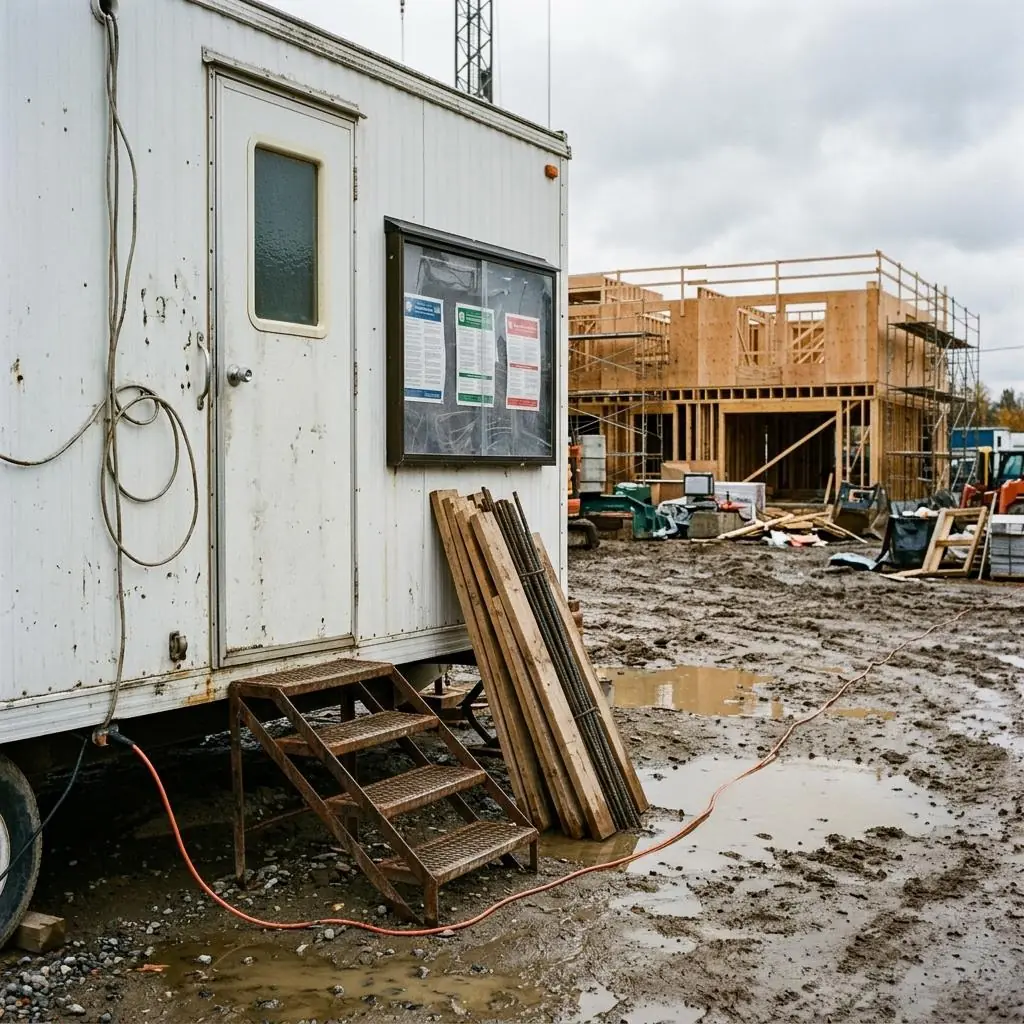
OSHA's posting rule treats construction as a physically dispersed activity. Under 29 CFR 1903.2(b), the OSHA poster goes at the location to which employees report each day — on most jobs, the site trailer, the gate, or the sign-in area. Workers who don't usually report to one place, like technicians moving between jobs, get the poster where they operate from. Each employer has its own posting duty, so subcontractors with crews on site should confirm their own workers can see a poster too. The poster still has to be conspicuous and kept from being altered, defaced, or covered (1903.2(a)(1)), and outdoors that means rain, sun, and mud, not just coats.
In the example photo, the posters are in a covered case on the site trailer — a reasonable spot if the crew reports there. The problems are around it: the metal steps up to the door have no handrail, an extension cord runs through standing water, and lumber and rebar lean unsecured against the trailer right below the case. OSHA Scan flags conditions like these with a possibly related standard and a fix. It doesn't read the posters or decide which ones you need — for federal posters, use the free poster checker; for state ones, check with your state labor department.
Every private construction employer starts with the same federal set: the OSHA poster (or the State Plan version), the FLSA minimum wage poster, the EPPA polygraph poster, and the USERRA notice. Size adds more: the EEOC 'Know Your Rights' poster, generally at 15 or more employees, and FMLA at 50 or more employees in 20 or more workweeks. The contract adds the rest. Construction covered by the Davis-Bacon and Related Acts — federal or federally funded projects — brings the Davis-Bacon poster and the project's wage determination, posted at the site of the work where workers can easily see them. State and local posters vary, so check with your state labor department.
The practical problem on a job site is that the posting spot moves and turns into storage. Trailers get relocated, gates change with each phase, and the wall under the posting case becomes the easiest place to lean lumber. Pick one spot every crew walks by on the way in, protect the posters from the weather, and keep the ground in front of them clear and safe to stand on. When the site changes, move the posters with it. A photo scan of that spot on each walk-through gives you a dated record of what was posted and what was in the way.
Run through these steps before crews start — each one covers a visible gap the AI can help you catch.
Choose the place your crew reports each day — usually the trailer, the gate, or the sign-in table.
Put up the OSHA poster (or your State Plan's version) and the FLSA and EPPA posters, and provide the USERRA notice.
Add EEOC and FMLA if your headcount calls for them, and the Davis-Bacon poster and wage determination on covered federal work.
Use a covered case or laminated copies, and keep materials, cords, and equipment away from it.
When the trailer or gate moves, move the posters. A dated photo scan records each check.
A scan can't read posters or tell you which ones apply, but it can see whether the spot where your crew reports is safe to reach and clear to read.
Posting cases blocked by stored lumber or equipment, cracked covers, and posters faded or torn by the weather.
Steps without handrails, unstable stairs, and muddy paths at the spot where the crew reports each day.
Extension cords running through water, mud, or traffic paths, where damage and shock are more likely.
Each flagged item comes with a possibly related OSHA standard and a corrective action, ranked by risk, so the worst hazard gets fixed first.
Scan a photo like the one above and this is the report you get — score, findings, OSHA references, and fixes. It is an illustrative example, clearly marked — not live scan data.
Compliance score
68
Lower means more potential hazards found
Score uses visible confirmed findings only. Not a safety certification.
3 confirmed · 0 need review · 0 positive
1Portable metal steps up to the trailer door with no handrail on either side
Possibly related to handrails and stairrails on stairways with four or more risers (29 CFR 1926.1052(c)(1))
Observed condition: Everyone who signs in, picks up plans, or checks the posting case uses these steps, often with full hands and muddy boots. OSHA's construction stairway rule calls for at least one handrail, and a stairrail along each unprotected side, once a stairway has four or more risers or rises more than 30 inches.
Corrective action: Replace the steps with a unit that has handrails on both sides, or add a handrail and stairrails that fit the existing steps. Set the steps on firm, level ground and scrape the mud off the treads.
High confidence
2Orange extension cord running across the yard through mud and standing water
Possibly related to protecting flexible cords from damage (29 CFR 1926.405(a)(2)(ii)(I)) and ground-fault protection on construction sites (29 CFR 1926.404(b)(1))
Observed condition: A cord lying in water and mud gets stepped on, driven over, and soaked, and any nick in the jacket becomes a shock path. On construction sites, OSHA requires GFCI protection or an assured equipment grounding conductor program, and cords have to be protected from damage.
Corrective action: Lift the cord out of the water — hang it on insulated hooks or route it along the trailer and fence — and plug it into a GFCI-protected outlet. Inspect it for cuts and take it out of service if the jacket is worn or damaged.
Medium confidenceNot fully clear from the photo — verify on site.
3Lumber and rebar leaning loose against the trailer, directly below the posting case
Possibly related to storing materials so they can't slide, fall, or collapse (29 CFR 1926.250(a)(1))
Observed condition: Loose boards and rebar leaning on a wall can slide or topple onto feet and legs — and this stack sits right where workers stand to read the posters and climb the steps.
Corrective action: Move the lumber and rebar to a storage area, laid flat on dunnage or racked, away from the steps and the posting case. Keep the ground in front of the case clear.
High confidence
Upload a photo like the one above and get a compliance score and hazard count. No account needed to scan, though you may be asked for the free phone Access Pass — create a free account to unlock the full report.
Use the real site or facility name. If you save the scan after signup, it becomes the report name.
Three angles, one deeper scan
Only the wide shot is required — every extra angle gives the AI more places to look.
Required: Set the scene — one wide shot lets the AI sweep the whole area at once
Stand at the entry point and capture corner to corner: floors, ladders, scaffolds, and everyone at work
Drop a job-site photo or walkthrough video
Click to upload, drag & drop, or snap a photo on site. Photos scan free with no signup and no card — you may be asked for the free phone Access Pass. Video walkthroughs (up to 3 min) run on a free account.
Small habits, sharper scans
Set the scene
Start with context
Fill the frame
2–3 ft for close-ups; keep ladders, cords and workers fully in view.
Capture clearly
Make the frame usable
Light it right
Keep the sun or lights behind you — glare and shadows hide hazards.
Tap to focus
Tap the hazard on screen and hold still one second — blur can't be flagged.
Choose the useful view
Give the AI room to understand
Go landscape
Turn your phone sideways — a wider frame catches more of the scene.
Only upload photos you have permission to use, and avoid images showing personal, customer, or confidential information. Demo photos and results are held privately for up to 48 hours so you can save them to a free account; unclaimed photos are deleted automatically. Results are an AI-assisted preliminary review, not an official OSHA determination.
New: Video walkthrough scans
Record up to 3 minutes of your site — the AI extracts frames and categorizes findings with exact timestamps. Free account required.
Get the best results
Wide shot first
Stand at the entrance and photograph the entire work area so AI sees the full context
Hazard areas
Photograph elevated surfaces, equipment, electrical panels, and anywhere workers are active
Close-ups last
Move in close on anything damaged, missing, or that looks risky — the AI catches more detail
From picking your posting spot to keeping posters readable through the weather. The first four are free — create a free account to unlock the rest and scan your own job sites for blocked posting spots and nearby hazards.
Pick the spot where the crew reports
Post the OSHA poster at the location where employees report each day — the site trailer, gate, or sign-in area (1903.2(b)). If crews report to your shop or yard each morning instead, that's where it goes.
Cover crews who move between jobs
Workers who don't usually report to a single site, such as service technicians, get the poster at the location they operate from (1903.2(b)).
Treat separate operations separately
If you run distinctly separate activities from one location — OSHA's own example is contract construction run from the same place as a lumber yard — each activity gets its own notice (1903.2(b)).
Post the federal posters every employer needs
OSHA's 'It's the Law' poster (or your State Plan's version), the minimum wage (FLSA) and polygraph (EPPA) posters, and the USERRA notice, which can be posted or handed out.
Free printable templatePDF · US Letter
Use this form when a job starts and whenever the site layout or the spot where the crew reports changes.
On the form
A free account is required to download it.
Non-English documents are automated translations, not official OSHA translations. Citations, limits and names are kept as written.
OSHA Scan template — not an official government form and not legal advice.
For each job site you add in OSHA Scan, choose Construction and answer a few questions to build its federal poster list, then download a print packet of the official government posters. Mark each poster as posted where crews report, with the date and a photo. When an agency publishes a newer version of a poster you marked as posted, that site shows "Re-post needed". A free account includes the poster list, print packet, photo proof, on-screen posting status and one status report download. Paid packages add a worker poster link with a QR code and re-post alert emails; for most posters an online copy is extra, not a replacement for the posted one. Statuses are your team's records, not a legal review, and state posters are not tracked.
Track posters freeOSHA Scan reads a single photo. That makes it fast and easy for anyone on site — but it also means it has real limits. Here's an honest look at both.
Snap a photo of the job site, and the AI categorizes findings against OSHA standards.
Each finding includes consistent corrective actions and structured JHA outputs. Check items off as your crew resolves them.
Every inspection gets a deterministic 0-100 compliance score derived from hazard severity, so you can track sites at a glance.
A prioritization aid based on recorded findings—not a certification or a complete measure of site safety.
Generate detailed inspection reports and export data to Excel for record-keeping and stakeholders.
A qualified person must review AI-flagged items before making safety decisions. Do not replace required comprehensive safety walkthroughs with AI reports. Features, limits, and downloads depend on your account’s plan and permissions.
Illustrative AI-assisted workflows. Review the findings; they are not a compliance certification.
A scan is a fast first look, not the final word. Before treating this kind of area as safe, a competent person should still confirm:
For physically dispersed work like construction, OSHA's rule puts the poster at the location where employees report each day (29 CFR 1903.2(b)). On most jobs, that's the site trailer, the gate, or the sign-in area. If your crews report to a shop or yard each morning instead, the poster goes there. Workers who don't usually report to one place get it at the location they operate from.
On construction covered by the Davis-Bacon and Related Acts, the contractor and its subcontractors must post the Davis-Bacon poster (WH-1321) and the applicable wage determination at the site of the work, at all times, in a prominent and accessible place where workers can easily see them (29 CFR 5.5(a)(1)). The Department of Labor also says contractors must put the poster requirement into their subcontracts.
Each employer has its own posting duty under 29 CFR 1903.2(a)(1), so subcontractors should make sure their own employees can see the OSHA poster where they report each day. On Davis-Bacon work, 29 CFR 5.5(a)(1) names the contractor and its subcontractors directly. The other federal posters, like minimum wage, apply to each employer based on its own coverage.
OSHA's rule doesn't call for a specific case, but it does require employers to take steps so the poster isn't altered, defaced, or covered (29 CFR 1903.2(a)(1)). A covered, weatherproof posting case or laminated copies at the trailer or gate keep rain and sun from washing posters out. Check the case after storms and replace posters that fade or tear.
Not the posters themselves. OSHA Scan reviews a photo of your posting spot for visible problems — material leaning against the trailer, steps with no handrail, cords in standing water — and gives each a possibly related standard and a fix. To see which federal posters may apply, use OSHA Scan's free poster checker; for state posters, check with your state labor department. OSHA Scan is an AI-assisted second set of eyes and is not affiliated with OSHA.
Reviewed by OSHA Scan Editorial
This content is produced by the OSHA Scan Editorial team and reviewed with AI assistance. It is general safety information, not legal or compliance advice. OSHA Scan is an independent tool and is not affiliated with, endorsed by, or certified by OSHA or the U.S. Department of Labor.
More ways to see what an AI OSHA scan can do for your site.
The overview hub — how the scanner works and every job, site, and hazard it covers.
The OSHA posting rule every employer follows, from print size to State Plan versions.
Federal posters for restaurants, including the minimum wage poster's tip credit section.
MSPA and H-2A notices for farms with migrant, seasonal, or H-2A workers.
A photo-based walk of the hazards on an active job site.
Answer a few questions to see the federal posters that may apply, including Davis-Bacon on covered federal construction.
DOL's free federal workplace posters, with who must post each one, including the Davis-Bacon poster.
Official resource — dol.govSee a complete labelled example of everything a scan returns.
Start with one lifetime use per eligible scan type — no credit card. Build JHA-ready reports and catch changing conditions sooner.
Start your free trial