CHALLENGE SOLVED
🐢

Slow Iteration Cycles

Instant iterations, not weeks

Traditional evacuation map revisions take days or weeks per cycle. Fire Exit Evacuation Map Generator allows instant regeneration with changes.

Time SavedDays per iteration
Money SavedRevision fees
Challenge Analysis

Accelerating Map Revision Speed

Root cause analysis and proven solutions

Root Cause Analysis

Symptom: Days to get revisions
Root Cause: Consultant or designer queue
Risk: Extended time with incorrect maps
Solution: Instant revision capability
Symptom: Multiple rounds needed
Root Cause: Miscommunication of changes
Risk: Prolonged non-compliance
Solution: Self-service changes
Symptom: Small changes take days
Root Cause: Minimum engagement fees
Risk: Minor errors persist
Solution: Instant updates for any change

Transformation Proof

Before: 5 days for minor text correction
After: 2 minutes for any change
99.7% faster | 5 days to 2 minutes
Before: 3 revision rounds over 2 weeks
After: Real-time adjustments
Same session | 95% cycle reduction

Solve Slow Iteration Cycles Now

Transform from at-risk to compliant in minutes. Your solution is one click away.

Eliminate this challenge today

😓 The Pain Points

Days for each revision
Back-and-forth with vendors
Lost time waiting
Frustrating delays

✨ How Fire Exit Evacuation Map Generator Helps

Instant regeneration
Immediate changes
No waiting
Try different approaches

From Napkin Sketch to Solution: Overcome Slow Iteration Cycles

Our AI helps you overcome slow iteration cycles by generating professional evacuation maps instantly

Works with photos, scans, PDFs, CAD files, or even hand-drawn napkin sketches

  • 100% OSHA Compliant
  • Instant Results (~30 sec)
  • Print-Ready (11x8.5" or 17x11")

How We Help You Overcome Slow Iteration Cycles

Do I need design skills to create an evacuation map?

No design skills are required. Our AI understands hand-drawn floor plans, smartphone photos, scanned blueprints, and PDF documents. Simply upload any representation of your facility layout and receive a professional-grade emergency evacuation map instantly.

Are the generated maps OSHA compliant?

Yes, every generated map meets OSHA 29 CFR 1910.38 Emergency Action Plan requirements including clearly marked exit routes, fire extinguisher locations within 75-foot travel distance, assembly points, YOU ARE HERE markers, and accessibility accommodations per ADA guidelines.

Can I update my evacuation map after renovations?

Yes, unlimited revisions are included. If you renovate your office or add a new emergency exit, simply re-upload your updated floor plan and generate a new compliant map instantly. All free maps include unlimited regeneration so you always have current evacuation documentation.

What types of buildings can use this evacuation map generator?

Our generator works for any building type including warehouses, manufacturing plants, healthcare facilities, schools, retail stores, and office buildings. The AI adapts to any facility size and layout, generating appropriate exit routes, fire safety equipment placement, and assembly point locations.

Key Statistics: Slow Iteration Cycles

Understanding the numbers behind slow iteration cycles helps prioritize your safety planning.

Days per iterationTime SavingsCompared to traditional methods
Revision feesCost SavingsPer evacuation map created
1 in 59Inspection ProbabilityEmployers face random OSHA inspections
$15,625Average Violation FinePer serious OSHA violation

Implementation Guide: Slow Iteration Cycles

Follow this step-by-step process to address slow iteration cycles effectively.

1

Identify the Challenge

Recognize how slow iteration cycles is affecting your compliance efforts.

⏱️ 15 minutes
2

Calculate Current Costs

Document time and money spent dealing with slow iteration cycles.

⏱️ 20 minutes
3

Try AI Solution

Upload your floor plan to Fire Exit Evacuation Map Generator for instant map generation.

⏱️ 2 minutes
4

Compare Results

Evaluate the AI-generated map against traditional consultant deliverables.

⏱️ 15 minutes
5

Implement Across Locations

Generate maps for all your facilities using the same fast process.

⏱️ 5 min/location
6

Calculate Savings

Document Days per iteration of time saved and Revision fees cost reduction.

⏱️ 10 minutes

Traditional vs. Fire Exit Evacuation Map Generator

See how AI-powered evacuation maps outperform traditional methods for slow iteration cycles.

AspectTraditional MethodsFire Exit Evacuation Map Generator
Time to CompleteDays per iteration waiting2 minutes
Total CostRevision feesFree preview
Days for each revisionProblem persistsInstant regeneration
Back-and-forth with vendorsProblem persistsImmediate changes
AvailabilityBusiness hours only24/7 instant access
Multi-Location SupportMultiply time and costSame speed per location

Slow Iteration Cycles Compliance Checklist

Use this checklist to ensure you've covered all aspects of slow iteration cycles.

Instant regeneration
Immediate changes
No waiting
Try different approaches
Save Days per iteration on each map project
Reduce costs by Revision fees per map

Cost-Benefit Analysis

Compare the true costs of different approaches to slow iteration cycles.

ItemTraditional ApproachWith Fire Exit Evacuation Map Generator
Initial Map CreationRevision feesFree preview
Time InvestmentDays per iteration of delays2 minutes
Revisions$100-300 eachUnlimited free
Annual Updates$300-500Instant regeneration
Multi-Site (10 locations)$5,000-20,000Same 2-min process each

Expert Tips for Slow Iteration Cycles

💡

Update evacuation maps within 30 days of any layout changes per OSHA requirements.

29 CFR 1910.38
💡

Post maps at eye level near exits and in high-traffic areas for maximum visibility.

NFPA Life Safety Code
💡

Conduct evacuation drills at least annually and document results for compliance records.

OSHA Best Practices

Real-World Application

📋

Case Example: Slow Iteration Cycles

Scenario

A facility manager faced slow iteration cycles when trying to update outdated evacuation maps.

Challenge

Days for each revision

Solution

Used Fire Exit Evacuation Map Generator to instant regeneration.

Outcome

Saved Days per iteration and Revision fees, achieving full compliance in a single session.

Step-by-Step Solution

Remediation Playbook

Clear action plan to overcome this challenge

1

Discovery & Audit: Addressing Slow Iteration Cycles

30 minutes

Actions

  • Inventory existing documentation
  • Identify compliance gaps
  • Photograph current conditions
  • List all floor plans needed
  • Streamlined processes accelerate compliance

Deliverables

  • Compliance gap report
  • Floor plan inventory
  • Priority list

Common Mistakes to Avoid

  • Overlooking basement/storage areas
  • Missing temporary structures
  • Ignoring seasonal layouts
2

Rapid Generation: Addressing Slow Iteration Cycles

5 minutes per map

Actions

  • Upload existing floor plans
  • AI generates compliant maps
  • Review OSHA elements
  • Customize for facility specifics
  • Streamlined processes accelerate compliance

Deliverables

  • Draft evacuation maps
  • Element checklist
  • Customization notes

Common Mistakes to Avoid

  • Using outdated floor plans
  • Skipping AI review step
  • Not including all required elements
3

Stakeholder Review: Addressing Slow Iteration Cycles

1-2 hours

Actions

  • Circulate to safety committee
  • Fire department preview (optional)
  • Incorporate feedback
  • Finalize revisions
  • Streamlined processes accelerate compliance

Deliverables

  • Approved final maps
  • Review documentation
  • Sign-off records

Common Mistakes to Avoid

  • Single-person approval only
  • Ignoring operations team input
  • Not involving AHJ
4

Deployment & Training: Addressing Slow Iteration Cycles

Half day

Actions

  • Print and laminate
  • Post at required locations
  • Conduct orientation briefing
  • Update training records
  • Streamlined processes accelerate compliance

Deliverables

  • Posted maps
  • Training attendance
  • Photo documentation

Common Mistakes to Avoid

  • Posting at wrong height
  • Insufficient copies
  • No training documentation

Troubleshooting Guide

Symptom:Translation requests delaying project
Diagnosis:Multilingual workforce without language plan
Solution:AI tools support multiple languages automatically
Prevention:Identify language needs during initial assessment. Process improvements deliver sustainable results.
Symptom:Contractors don't have orientation maps
Diagnosis:Visitor/contractor provisions overlooked
Solution:Create lobby versions and contractor orientation packages
Prevention:Include external personnel in planning scope. Process improvements deliver sustainable results.
Symptom:Night shift unaware of changes
Diagnosis:Training gaps across shifts
Solution:Mandatory briefing for all shifts, sign-off requirement
Prevention:Include shift coverage in deployment plan. Process improvements deliver sustainable results.
⚠️ OSHA COMPLIANCE ALERT

OSHA Compliance Alert: Slow Iteration Cycles

Over 52,548 OSHA violations issued nationally. Average penalty: $15,625 per serious violation.

🔍31,822Annual Inspections
⚠️52,548Violations
💰$189.4MTotal Penalties
💀5,486Fatalities
🚨

OSHA Penalty Structure - Know Your Risk

Other-than-SeriousUp to $16,131Per violation
Serious ViolationUp to $16,131Per violation
Willful / RepeatUp to $161,323Per violation
Failure to Abate$16,131/dayAfter citation deadline

Avoid costly penalties with compliant evacuation maps

⚠️

Top OSHA Violations in nationwide

Is your facility compliant?

🗺️

Missing Evacuation Maps = OSHA Violation

29 CFR 1910.38 requires emergency action plans with posted evacuation routes. Generate compliant maps in minutes.

Don't Wait for an OSHA Inspection

Get Your your area Evacuation Map Today

Professional, OSHA-compliant maps generated in minutes. Avoid penalties up to $161,323 per violation.

View Pricing
✓ OSHA Compliant✓ Print Ready✓ AI-Powered✓ Used by 47,000+ Businesses

Solve Slow Iteration Cycles Right Now

Upload your floor plan and get a professional OSHA-compliant evacuation map in under 2 minutes

📊 5 of 5 Free Maps Left

Create Your Slow Iteration Cycles Evacuation Map

📷
Clear ImageUse a clean, high-quality scan or photo
↔️
Correct OrientationImage should be right-side up, not rotated or sideways
🔍
No ZoomCapture the entire floor plan, avoid zooming in on sections
💡
Good LightingThe clearer and less blurry, the better results
📁

Drag & drop your floor plan here

or

PNG, JPG, PDF - Hand-drawn sketches work too!

🔒Your files are private: never shared, stored temporarily, deleted automatically.

Compliance Options

Generate bilingual map with English + Spanish labels

ℹ️Adds Spanish translations (Español) to all text on the map
🔥 NEW

Customize Your Map

Add special requests for your safety map - tell our AI exactly what you need!

  • 🎯Add specific details like "Mark fire extinguisher near kitchen"
  • 📍Request specific zones: "Highlight assembly point in parking lot"
  • 🏥Add safety equipment: "Include AED location near reception"
0/2000

Quick Add:

See What You'll Get

Real examples of AI-generated OSHA-compliant evacuation maps

Corporate Office - California - OSHA-compliant evacuation floor plan with marked exits and fire safety equipment
🔍 View Full Size

Corporate Office - California

TechnologyCalifornia
Distribution Center - Texas - OSHA-compliant evacuation floor plan with marked exits and fire safety equipment
🔍 View Full Size

Distribution Center - Texas

WarehousingTexas
Medical Center - New York - OSHA-compliant evacuation floor plan with marked exits and fire safety equipment
🔍 View Full Size

Medical Center - New York

HealthcareNew York
Restaurant - Florida - OSHA-compliant evacuation floor plan with marked exits and fire safety equipment
🔍 View Full Size

Restaurant - Florida

RestaurantFlorida

Ready to create your own professional evacuation map?

Register for 5 free maps with unlimited revisions
🔓 Free Account Bonus

Unlock 5 Free Evacuation Maps

Create your free account in seconds and get instant access to professional, OSHA-compliant evacuation maps.

What You Get When You Register:

  • 5 Free Full-Quality Downloads - Professional maps ready for printing
  • No Watermarks - Clean, presentation-ready evacuation maps
  • Personal Dashboard - Manage all your maps in one place
  • Save & Revisit Anytime - Access your maps from any device
  • OSHA Compliant - Meets 29 CFR 1910.38 requirements
15,000+Maps Generated
4.9/5User Rating
100%Compliant
Sample Output
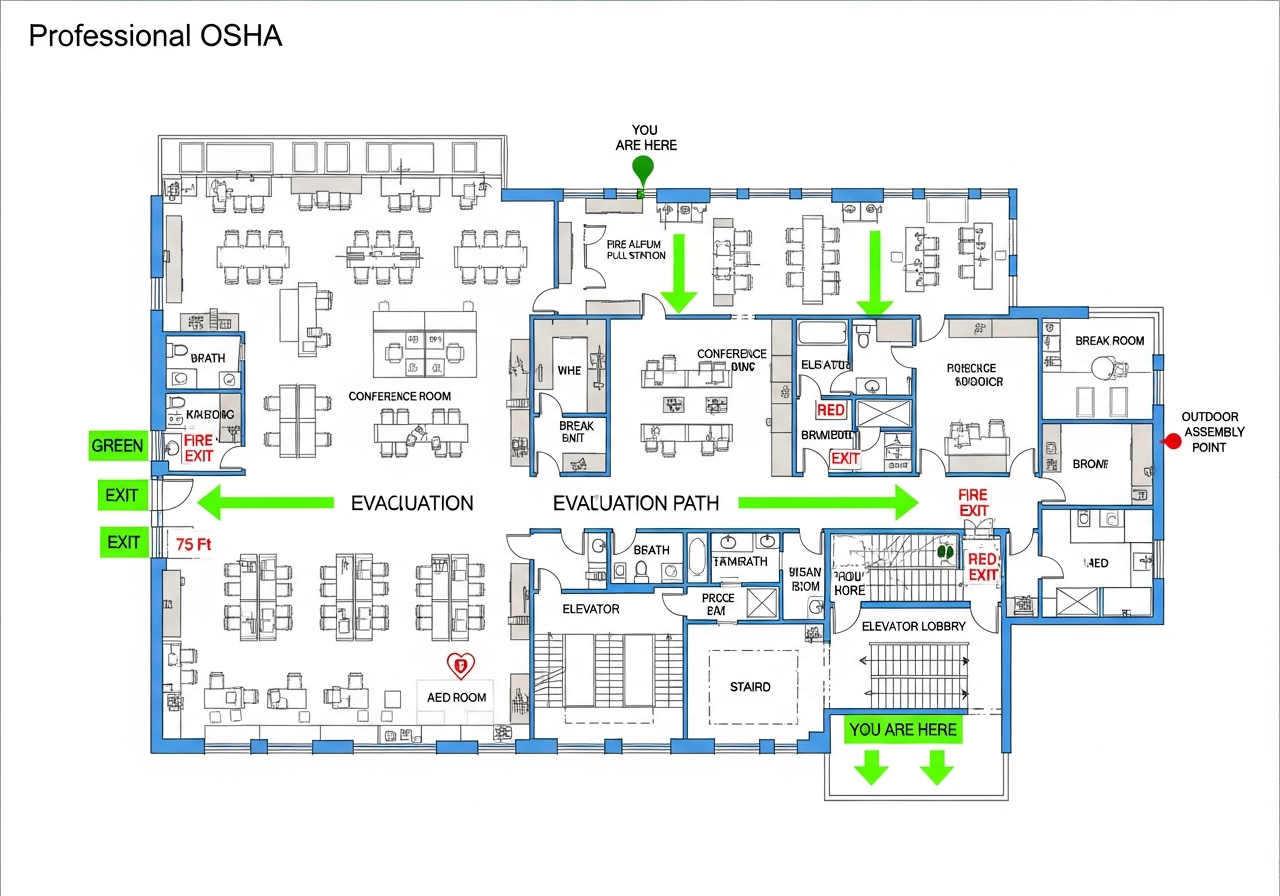
Sample Slow Iteration Cycles OSHA-compliant evacuation floor plan showing emergency exits, fire extinguisher locations, and assembly points
🧯 Fire Extinguishers🚪 Exit Routes📍 You Are Here

No credit card required • Takes 30 seconds • Instant access

Ready to Overcome Slow Iteration Cycles?

Join thousands of businesses who eliminated this challenge with Fire Exit Evacuation Map Generator.